




LaserJet P1505N
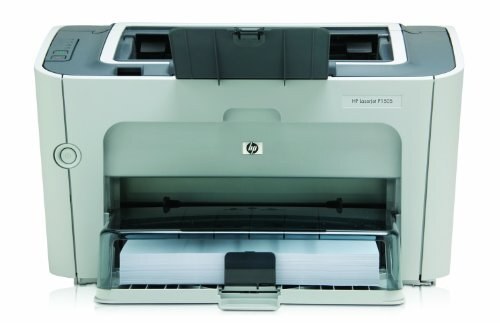
Some printers earn their keep by being shared, and the LaserJet P1505N is one of them: a monochrome, single-function LaserJet from the late 2000s whose built-in networking made it the small-office machine that everybody prints to. It feeds on a single black cartridge, the CB436A, better known as the HP 36A. Desks that empty a standard cartridge quickly can step up to the high-yield CB436X, sold as the HP 36X, which packs extra toner into the same bay.
A shared printer lives a different life from a personal one. Jobs arrive from several desks, in several moods: a two-page letter, a forty-page report, a label run at closing time. The P1505N survives that mix because there is so little to go wrong — one cartridge to stock, one supply to check, and output that stays plain, dark and readable. When a printer like this one is still on an office network years later, it is usually because nobody ever found a reason to unplug it.
Toner Cartridges for LaserJet P1505N
| Cartridge | Color | Page Yield |
|---|---|---|
| CB436A | Black | See product page |
| CB436A (P1505N listing) | Black | See product page |
| CB436X | Black, high yield | See product page |
| CB436A MICR | Black (MICR) | See product page |
| CB436A | Black, 2 pack | See product page |
| CB436A | Black, 3 pack | See product page |
| CB436A | Black, 5 pack | See product page |
| CB436A Premium | Black, 5 pack | See product page |
| CB436A | Black, 10 pack | See product page |
Which cartridge should you buy?
Start with how many people print to this machine. A P1505N serving one or two light users does fine on the standard 36A, replaced as needed. Once the printer is shared across a small team, the high-yield 36X is usually the smarter default: it holds more toner per cartridge, so the "who changed it last?" conversation happens less often and the cost per page drops. Offices that print in bursts — month-end statements, onboarding packets — often keep a multi-pack on the shelf instead, because a shared printer never runs dry at a convenient moment. The premium-quality 5-pack suits buyers who want the compatible saving with the closest match to original output, and every compatible cartridge on this page is covered by a 1-year warranty and 1-year returns.
Chip, toner and everyday use
The first time a compatible cartridge goes in, the P1505N may flag that it has detected a cartridge not made by HP. That notice is the printer reporting what it found, not a fault: acknowledge it and printing carries on. On a networked machine the message appears at the printer itself, so the person who swaps the cartridge should be the one to clear it. Because a shared printer can be emptied by somebody else's big job, keep one sealed spare within reach rather than in a storeroom across the building. When pages start to fade, lift the cartridge out and rock it gently from side to side; the redistributed toner often buys enough clean pages to finish the day while a replacement is ordered.
Frequently Asked Questions
Which toner cartridge does the LaserJet P1505N take?
It takes the CB436A standard cartridge (the HP 36A) or the CB436X high-yield version (the HP 36X). Match the code printed on the cartridge you remove; a code match is the surest way to avoid ordering a look-alike cartridge from a different HP family.
Why does my P1505N mention a non-HP cartridge?
That message appears whenever the printer detects a cartridge it did not manufacture. Compatible cartridges print normally once the notice is acknowledged. If the machine ever refuses to print, follow the on-screen instructions first, and contact your cartridge supplier if the message will not clear.
What is the MICR version of the 36A for?
The MICR build uses magnetic toner formulated for printing checks, so the encoded line at the bottom of each check can be read by bank equipment. It fits the P1505N exactly like the regular cartridge; choose it only if your shared printer also handles check runs, and keep it separate from everyday document printing.
How should spare toner be stored in a shared office?
Leave spares sealed in their original packaging, stored flat in a cool, dry place away from direct sunlight and radiators. Heat and humidity age toner even inside the box, and an opened cartridge left on a shelf picks up dust. Open a new cartridge only at the moment it goes into the printer.
More printers that use the same cartridges
The same 36A family also feeds these models: HP CB436A, LaserJet M1120, LaserJet M1120 MFP, LaserJet M1120N, LaserJet M1120N MFP, LaserJet M1522, LaserJet M1522 MFP, LaserJet M1522N, LaserJet M1522NF, LaserJet M1522NFMFP, LaserJet P1505, Laserjet M1120.