




Color LaserJet M475DW
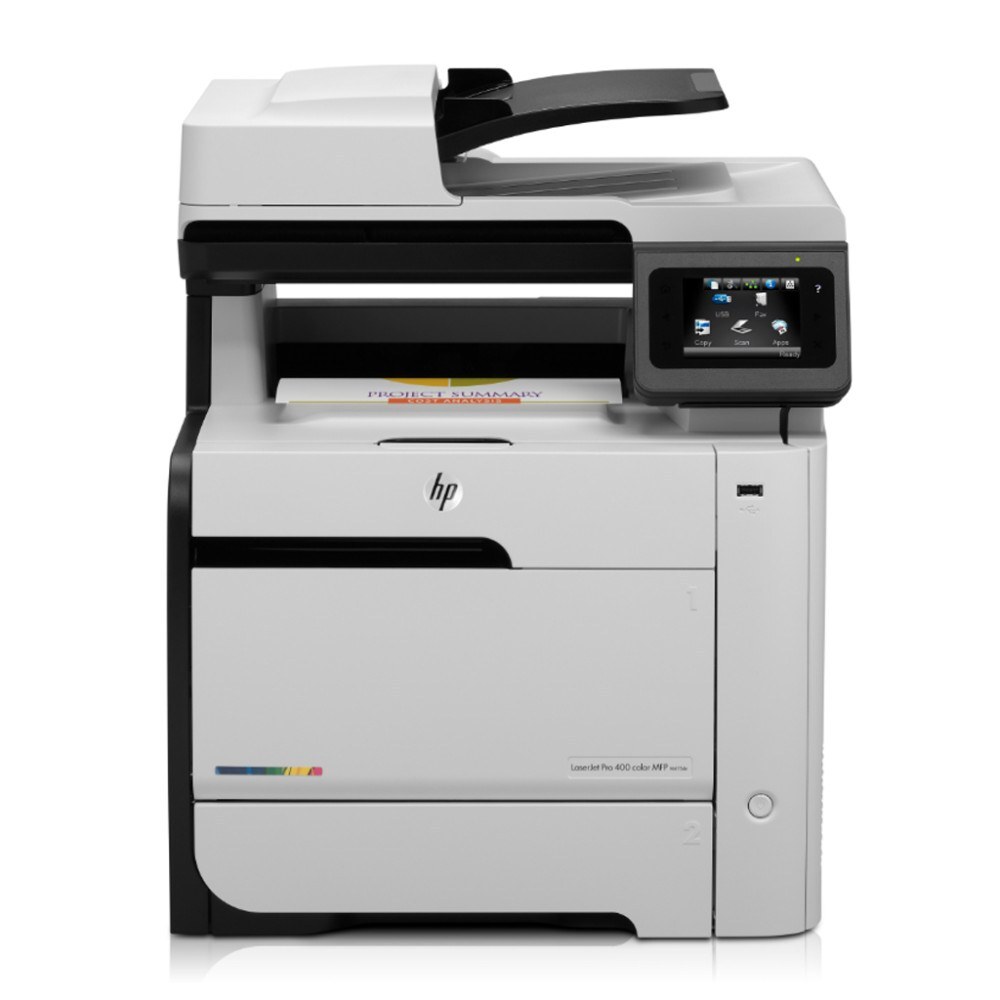
The Color LaserJet M475DW is the wireless duplex configuration of the 2012-era line: two-sided printing for small businesses with no Ethernet run required, so the machine can sit wherever the work is. Cable-free placement does not change what feeds it — the CE410A black from the 305A family, the CE410X high-yield black from the 305X line for heavier two-sided workloads, and the CE411A cyan, CE412A yellow and CE413A magenta color cartridges.
Printers that can live anywhere tend to live everywhere: a corner of the sales desk this quarter, the back office next. Each move is a reminder that the cartridge routine has to be simple enough to survive handoffs between people. The DW's owners benefit from a small ritual — check levels when the machine is moved or a new person takes over the desk, and keep the spare black with the printer rather than in a central closet it may no longer sit near.
Toner Cartridges for Color LaserJet M475DW
| Cartridge | Color | Page Yield |
|---|---|---|
| CE410X | Black, high yield | See product page |
| CE410A | Black | See product page |
| CE411A | Cyan | See product page |
| CE412A | Yellow | See product page |
| CE413A | Magenta | See product page |
Further listings of these cartridges stocked on this page:
- 305X & 305As 4 Color Set (CE410X/ CE411A/ CE412A/ CE413A)
- 305A 4 Color Set (CE410A/ CE411A/ CE412A/ CE413A)
- 305A Premium Quality 4 Color Set (CE410A/ CE411A/ CE412A/ CE413A)
- M475dw 4 Color Set
- 305A (CE413A) Magenta
- 305A (CE411A) Cyan
- 305A (CE410A CE411A CE412A CE413A) 4 Color Set
- 305A (CE410A) Black
- 305A (CE412A) Yellow
- 305A (CE410A) 2 Black
- 305A (CE411A CE412A CE413A) 3 Color Set
- 305A (CE411A CE412A CE413A) 3 Color Set
- 305A (CE410A) 5 Black
- 305A (CE410A CE411A CE412A CE413A) 8 Color Set
- PRO 400 COLOR MFP M475DW (CE410A CE411A CE412A CE413A) 4 Color Set
- 305A (CE410A) Black
- 305A (CE411A) Cyan
- 305A (CE412A) Yellow
- 305A (CE413A) Magenta
- 305A (CE411A CE412A CE413A) 3 Color Set
- 305A (CE410A CE411A CE412A CE413A) 5 Color Set
- 305A (CE410A) Black
- 305A (CE410A CE411A CE412A CE413A) 4 Color Set
- 305A (CE412A) Yellow
Which cartridge should you buy?
Think about the two-sided habit first. A DW machine invites duplex printing, and duplex jobs keep the black cartridge working through long documents; the high-yield black matches that pattern with a lower cost per page and longer gaps between changes. If the printer mostly handles short single-sided jobs, the standard black is perfectly adequate and costs less per cartridge. Colors are best bought individually — the printer reports each color's level separately, and there is no discount in retiring a half-full cyan just because the magenta emptied. A four-color set earns its shelf space when you are setting the machine up fresh in a new spot. Compatible cartridges here include a 1-year warranty and 1-year returns.
Chip, toner and everyday use
The chip in each cartridge is how the printer knows the code and watches the level, and it works the same whether the job arrives by Wi-Fi or cable. After any cartridge change, let the machine calibrate before sending a long duplex run, so the first pages come out even. Yield numbers always trace back to a five percent coverage estimate; dense two-sided documents will use toner faster than that estimate suggests. When a color fades, rocking that cartridge gently from side to side can even out the remaining toner for a few more pages.
Frequently Asked Questions
Does the wireless setup change which cartridges fit this printer?
Not at all. Connectivity and consumables are separate systems — the cartridge list for this model is the table above, and every cartridge is recognized by its chip when installed.
The printer asks for a color cartridge, but I only print black documents. Why?
This family needs a complete set installed to keep printing, even for black-only work. Replacing the empty color restores printing; selecting grayscale or black-only in the driver slows how fast the colors are used.
Which black fits a two-sided workload better?
The high-yield black. Duplex printing concentrates page volume into long runs, and the larger cartridge lowers both the cost per page and the number of interruptions.
Where should spares live for a printer that moves around the office?
With the machine itself — sealed, flat and out of direct sunlight. A spare stored across the building tends to be forgotten exactly when the low-toner warning appears.
More printers that use the same cartridges
Every model below runs on the same cartridges as this one:
- Color LaserJet M351
- Color LaserJet M351A
- Color LaserJet M375 MFP
- Color LaserJet M375NW MFP
- Color LaserJet M451
- Color LaserJet M451DN
- Color LaserJet M451DW
- Color LaserJet M451NW
- Color LaserJet M475
- Color LaserJet M475DN
- HP 305A
- LaserJet Pro 300 Color M375NW
- LaserJet Pro 300 Color MFP M375
- LaserJet Pro 300 Color MFP M375NW
- LaserJet Pro 300 Color Printer M351
- LaserJet Pro 300 Color Printer M351A
- LaserJet Pro 400 Color M451
- LaserJet Pro 400 Color M451DN
- LaserJet Pro 400 Color M451DW
- LaserJet Pro 400 Color M451NW
- LaserJet Pro 400 Color M475
- LaserJet Pro 400 Color M475DW
- LaserJet Pro 400 Color MFP M475
- LaserJet Pro 400 Color MFP M475DN
- LaserJet Pro 400 Color Printer M451
- LaserJet Pro 400 Color Printer M451DN
- LaserJet Pro 400 Color Printer M451DW
- LaserJet Pro 400 color MFP M475DW
- LaserJet Pro 400 color Printer M451NW