






 See Compatible Printers
 Read more about our ink!
Hewlett Packard
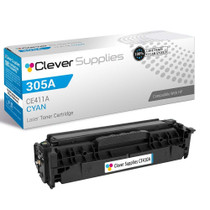
Compatible HP M451DN (CE411A) Toner Cartridge Cyan
- Page Yield:
- Color: 2600
- Availability:
- In Stock
- Shipping:
- Calculated at Checkout

Amazon Price:

- Page Yield:
- Color: 2600
- Availability:
- In Stock
- Shipping:
- Calculated at Checkout
- Compatible Printers
- LaserJet 300 Color MFP M375nw
- LaserJet 400 Color M451dn
- LaserJet 400 Color M451dw
- LaserJet 400 Color MFP M451nw
- LaserJet 400 Color MFP M475dn
- LaserJet 400 Color MFP M475dw
- LaserJet Pro 300 Color MFP M375nw
- LaserJet Pro 400 Color M451dn
- LaserJet Pro 400 Color M451dw
- LaserJet Pro 400 Color MFP M451nw
- LaserJet Pro 400 Color MFP M475dn
- LaserJet Pro 400 Color MFP M475dwi>
- Color LaserJet M351
- Color LaserJet M351A
- Color LaserJet M375 MFP
- Color LaserJet M375NW MFP
- Color LaserJet M451
- Color LaserJet M451DN
- Color LaserJet M451DW
- Color LaserJet M451NW
- Color LaserJet M475
- Color LaserJet M475DN
- Color LaserJet M475DW
- HP 305A
- LaserJet Pro 300 Color M375NW
- LaserJet Pro 300 Color MFP M375
- LaserJet Pro 300 Color Printer M351
- LaserJet Pro 300 Color Printer M351A
- LaserJet Pro 400 Color M451
- LaserJet Pro 400 Color M451NW
- LaserJet Pro 400 Color M475
- LaserJet Pro 400 Color M475DW
- LaserJet Pro 400 Color MFP M475
- LaserJet Pro 400 Color Printer M451
- LaserJet Pro 400 Color Printer M451DN
- LaserJet Pro 400 Color Printer M451DW
- LaserJet Pro 400 color Printer M451NW
- Specifications
- SKU:
- CLS-HP-M451DN-C-2
- Printer Brand:
- Hewlett Packard
- OEM Number:
- CE411A
- Ink Color:
- Cyan
- Page Yield:
- Color: 2600
- Printer Type:
- Laser Cartridge
- Condition:
- New Compatible
- Description
- Reviews



The HP 305A LaserJet Series comprises a range of high-performance printers designed to meet the demands of professional color printing. From the Pro 300 Color M375NW to the Pro 400 Color M451 series, each model offers exceptional quality and reliability. The Pro 400 Color M451DN, M451DW, and M451NW are renowned for their speed and precision, while the Pro 400 Color M475 and M475DW excel in multifunctionality. Compatible with these printers are the HP 305A toner cartridges, including the CE410A Black, CE411A Cyan, CE413A Magenta, and CE412A Yellow. These cartridges ensure vibrant colors and crisp text for all your printing needs. Whether you're producing documents, presentations, or marketing materials, the HP 305A cartridges deliver consistent results. For multifunction printers like the Pro 300 Color MFP M375 and M375NW, as well as the Pro 400 Color MFP M475, these cartridges maintain efficiency across printing, scanning, copying, and faxing tasks. The M375NW MFP and M475DN offer added convenience with their duplex printing capabilities, saving both time and resources. In the realm of color laser printing, the M375 MFP stands out for its professional-grade output and versatile functionality. With the HP 305A toner cartridge series, users can achieve sharp, vivid images and text, enhancing the impact of their printed materials. Whether it's business reports, brochures, or photographs, these printers and cartridges deliver impressive results. Overall, the HP 305A LaserJet Series, coupled with the HP 305A toner cartridges, caters to the diverse needs of businesses and individuals alike. With their reliability, speed, and quality output, these printers and cartridges ensure optimal performance for all your printing tasks.
Frequently Asked Questions
Which cartridge does the M451dn ask for when cyan runs out?
The CE411A — the cyan member of the 305A family that the whole M451 line shares. If you want certainty before ordering, pull the cartridge from the C slot of your M451dn and read the number off its label; it will match the number on this listing.
Can I check the cyan level on an M451dn without walking to the printer?
Yes — that is one of the conveniences of the dn model. Type the printer's network address into a browser and its embedded web server shows a supplies page with a separate gauge for cyan. In a shared office that means whoever looks after supplies can spot a fading color days before it becomes someone's ruined print run.
How does duplex printing affect how long the cyan lasts?
It does not change the cartridge's rating — still 2,600 pages at the standard 5 percent coverage — but two-sided work does mean both faces of every sheet draw toner, so a duplex-heavy office simply lives the rating faster. At $34.02 the cartridge is priced for that reality of workgroup printing.
Several of us share this printer. Who notices cyan fading first?
Usually whoever prints the color-critical work — the person running presentation decks or client charts sees blues drift before the colleague printing invoices does. The status page removes the argument: it names the low slot, and on this machine that verdict takes ten seconds to get.
Is there anything to configure after fitting the new cartridge?
No settings to touch. The M451dn recognizes the cartridge, resets its cyan gauge and carries on. If colors look slightly off on the first pages, one run of the calibration routine from the system setup menu brings the fresh cartridge into line with the other three.
What does the office get if the cartridge misbehaves?
Protection is built into the purchase — a 1-year warranty and 1-year free returns — and our support desk is staffed Monday–Friday, 9 AM–5 PM CST for the troubleshooting conversation that usually resolves things first.
What does a page of cyan cost from this cartridge?
At $34.02 for a cartridge rated at 2,600 pages, the CE411A works out to roughly 1.3 cents of cyan per standard page. Duplex and photo work spend it faster per sheet, text with a blue heading spends it slower, but for budgeting a workgroup's color output that figure is a sound average to plan around.
Should a workgroup keep a spare CE411A on site, or order when warned?
On site, if the M451dn carries deadline work. The printer's own gauge gives days of warning, but delivery takes days too, and the two do not always overlap kindly. One sealed CE411A in the supply cabinet costs little shelf space, waits indefinitely in its sealed bag, and converts a cyan failure from a stalled workgroup into a short pause.
How can the office judge the new cartridge fairly on its first day?
Keep one reference print — a chart or page the office knows well — filed from when output was last known-good. Print the same file on the fresh CE411A and compare the two side by side under the same light. Matching blues settle the question immediately; a visible drift points at seating or calibration rather than guesswork about whether the new cartridge is performing.
Is the box worth keeping after the cartridge goes in?
Keep the flap, if not the box. It carries the CE411A code in print, and pinned inside the supply cabinet it becomes the office's reorder card: whoever notices the cyan gauge low can order the exact cartridge without opening the printer or disturbing a colleague's job to read a label. The empty cartridge itself can travel back out in the same packaging for recycling.
About This Cyan Cartridge for the M451dn
This CE411A cyan cartridge is made for the LaserJet Pro 400 Color M451dn and the rest of the 305A generation: a single color unit rated at 2,600 pages, sold on its own at $34.02. In a networked workgroup printer the cyan slot quietly underpins every chart, hyperlink-blue heading and logo the office produces, so a cartridge that simply does its rated life without drama is the whole requirement.
We dispatch from the nearest of IL, PA, GA and CA, and the full delivery picture lives on the shipping & returns page. Everything else stocked for this printer sits in the HP catalogue.
Related Items


Hewlett Packard
Compatible HP PRO 400 COLOR M451DN (CE411A) Toner Cartridge Cyan


Hewlett Packard
Compatible HP M451DW (CE411A) Toner Cartridge Cyan


Hewlett Packard
Compatible HP 305A (CE411A) Toner Cartridge Cyan


Hewlett Packard
Compatible HP 305A (CE411A) Toner Cartridge Cyan