






 See Compatible Printers
 Read more about our ink!
Hewlett Packard
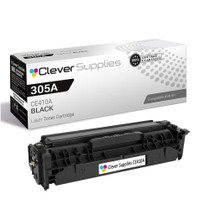
Compatible HP 305A (CE410A) Toner Cartridge Black
- Page Yield:
- Black: 2200
- Availability:
- In Stock
- Shipping:
- Calculated at Checkout

Amazon Price:

- Page Yield:
- Black: 2200
- Availability:
- In Stock
- Shipping:
- Calculated at Checkout
- Compatible Printers
- LaserJet 300 Color MFP M375nw
- LaserJet 400 Color M451dn
- LaserJet 400 Color M451dw
- LaserJet 400 Color MFP M451nw
- LaserJet 400 Color MFP M475dn
- LaserJet 400 Color MFP M475dw
- LaserJet Pro 300 Color MFP M375nw
- LaserJet Pro 400 Color M451dn
- LaserJet Pro 400 Color M451dw
- LaserJet Pro 400 Color MFP M451nw
- LaserJet Pro 400 Color MFP M475dn
- LaserJet Pro 400 Color MFP M475dwi>
- Color LaserJet M351
- Color LaserJet M351A
- Color LaserJet M375 MFP
- Color LaserJet M375NW MFP
- Color LaserJet M451
- Color LaserJet M451DN
- Color LaserJet M451DW
- Color LaserJet M451NW
- Color LaserJet M475
- Color LaserJet M475DN
- Color LaserJet M475DW
- HP 305A
- LaserJet Pro 300 Color M375NW
- LaserJet Pro 300 Color MFP M375
- LaserJet Pro 300 Color Printer M351
- LaserJet Pro 300 Color Printer M351A
- LaserJet Pro 400 Color M451
- LaserJet Pro 400 Color M451NW
- LaserJet Pro 400 Color M475
- LaserJet Pro 400 Color M475DW
- LaserJet Pro 400 Color MFP M475
- LaserJet Pro 400 Color Printer M451
- LaserJet Pro 400 Color Printer M451DN
- LaserJet Pro 400 Color Printer M451DW
- LaserJet Pro 400 color Printer M451NW
- Specifications
- SKU:
- CLS-HEWCE410A-COM-2
- Printer Brand:
- Hewlett Packard
- OEM Number:
- CE410A
- Ink Color:
- Black
- Page Yield:
- Black: 2200
- Printer Type:
- Laser Cartridge
- Condition:
- New Compatible
- Description
- Reviews



The HP 305A LaserJet Series comprises a range of high-performance printers designed to meet the demands of professional color printing. From the Pro 300 Color M375NW to the Pro 400 Color M451 series, each model offers exceptional quality and reliability. The Pro 400 Color M451DN, M451DW, and M451NW are renowned for their speed and precision, while the Pro 400 Color M475 and M475DW excel in multifunctionality. Compatible with these printers are the HP 305A toner cartridges, including the CE410A Black, CE411A Cyan, CE413A Magenta, and CE412A Yellow. These cartridges ensure vibrant colors and crisp text for all your printing needs. Whether you're producing documents, presentations, or marketing materials, the HP 305A cartridges deliver consistent results. For multifunction printers like the Pro 300 Color MFP M375 and M375NW, as well as the Pro 400 Color MFP M475, these cartridges maintain efficiency across printing, scanning, copying, and faxing tasks. The M375NW MFP and M475DN offer added convenience with their duplex printing capabilities, saving both time and resources. In the realm of color laser printing, the M375 MFP stands out for its professional-grade output and versatile functionality. With the HP 305A toner cartridge series, users can achieve sharp, vivid images and text, enhancing the impact of their printed materials. Whether it's business reports, brochures, or photographs, these printers and cartridges deliver impressive results. Overall, the HP 305A LaserJet Series, coupled with the HP 305A toner cartridges, caters to the diverse needs of businesses and individuals alike. With their reliability, speed, and quality output, these printers and cartridges ensure optimal performance for all your printing tasks.
Frequently Asked Questions
Why does the black cartridge on a color printer run out first?
Because most office pages are text. Letters, invoices, contracts and reports draw almost entirely on the black cartridge, while the colors wait for graphics. On a 305A machine the CE410A black — rated at 2,200 pages — is nearly always the first slot to empty.
Do I have to change the colors when I change the black?
No. Each cartridge lives in its own slot and reports its own level. Swap the black when the black is done and leave the colors in place until their turn comes; the printer keeps track of each one separately.
Which printers use this CE410A black?
HP's 305A generation: the Pro 300 color MFPs and the Pro 400 color printers and MFPs — the LaserJet Pro 300 Color MFP M375nw among them. If the cartridge you pulled out says CE410A, this is its replacement.
What am I paying $34.20 for here?
One compatible CE410A black cartridge, rated at 2,200 pages, ready to install. It is the straightforward single-cartridge reorder for a machine whose black has just given out.
My prints have started to fade in bands. Is that the black cartridge?
Usually, yes. Fading that grows worse down the page is the classic sign of a black cartridge at the end of its toner. A gentle rock of the cartridge can coax out a few more pages, but the lasting fix is a fresh cartridge.
What protection backs this cartridge?
A 1-year warranty and 1-year free returns. We ship from warehouses in IL, PA, GA and CA, and if you need help our support team is on hand Monday–Friday, 9 AM–5 PM CST.
How can I tell the black is near the end before the fading starts?
Watch the trend rather than a single reading. Print a supplies status page every few weeks and note the CE410A level; a gauge that has been sliding steadily tells you the reorder week long before print quality dips. Ordering while the bar still shows a little life turns the change into a planned minute at the printer instead of an interruption in the middle of a document run.
What does one CE410A cost me per page, roughly?
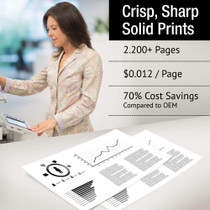
The arithmetic is simple: $34.20 across a 2,200-page rating works out at about one and a half cents per page for the black slot. Dense pages with heavy graphics spend toner faster and nudge the real figure up; plain correspondence tracks the rating closely and can land under it. Either way, the black's share of a mixed page is the predictable part of a color printer's running cost.
Where should a spare black cartridge wait in a small office?
Flat in its sealed bag, in the cupboard nearest the printer, out of direct light and away from any heat source. A spare CE410A kept that way is ready months after delivery, and keeping it beside the machine rather than in a distant storeroom is what makes the swap a two-minute job when the warning appears. Mark the box with its arrival date so older stock is always fitted first.
What do I do with the empty black cartridge?
Before it leaves your hand, read the code off its label — CE410A — and note it wherever you keep reorder information; that label is the surest confirmation of what to buy next. Then seal the empty in the bag the new cartridge arrived in, so stray toner stays inside, and recycle it through your normal office or electronics recycling route rather than the general trash.
About This 305A Black Cartridge
The color machines in the 305A family do their everyday work in black. This CE410A cartridge is the single black unit for that row — 2,200 pages of rated capacity at $34.20 — intended for the simple, regular reorder that keeps an office printer fed.
Find the rest of the family in the HP section of the store, and the delivery picture on the shipping & returns page.
Related Items
Hewlett Packard
Compatible HP 305A (CE410A) Toner Cartridge Black


Hewlett Packard
Compatible HP 305A (CE410A) Toner Cartridge Black

Hewlett Packard
Compatible HP 305A (CE410A) Toner Cartridge Black


Hewlett Packard
Compatible HP 305A (CE410A) Toner Cartridge 5 Black