





 See Compatible Printers
 Read more about our ink!
Dell
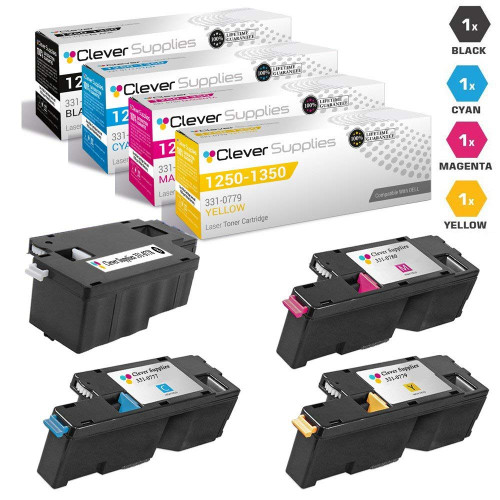
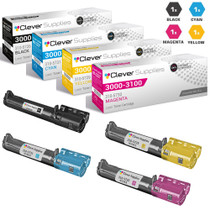
Compatible Dell 1250cnw High Yield Toner Cartridges 4 Color Set
- Page Yield:
- Black: 2,000, Colors: 1,400 Each
- Availability:
- In Stock
- Shipping:
- Calculated at Checkout

Amazon Price:

- Page Yield:
- Black: 2,000, Colors: 1,400 Each
- Availability:
- In Stock
- Shipping:
- Calculated at Checkout
- Compatible Printers
- Color Laser 1250c
- Color Laser 1350cnw
- Color Laser 1355cn
- Color Laser 1355cnw
- Color Laser 1755nf
- Color Laser 1755nfw
- Color Laser C1760nw
- Color Laser C1765nf
- Color Laser C1765nfwi>
- Color Laser 1250
- Color Laser 1250CNW
- Color Laser 1350
- Color Laser 1355
- Color Laser C1760
- Color Laser C1765
- Color Laser C1765NFW
- Dell (331-0778, 331-0777, 331-0780, 331-0779)
- Dell (810WH, C5GC3, XMX5D, WM2JC)
- Dell (XKP2P, YX24V, MHT79, J95NM)
- Multifunction 1355CN
- Multifunction 1355CNW
- Specifications
- SKU:
- Dell-1250cnw
- Printer Brand:
- Dell
- OEM Number:
- 331-0778, 331-0777, 331-0780, 331-0779
- Ink Color:
- Black, Cyan, Magenta, Yellow
- Page Yield:
- Black: 2,000, Colors: 1,400 Each
- Printer Type:
- Laser Cartridge Set
- Condition:
- New Compatible
- Description
- Yields up to Black: 2000 Colors: 1400 Each
- Compatible Dell 1250cnw High Yield Toner Cartridges 4 Color Set consistently produces high-resolution printouts with enhanced graphics and sharp text
- Unlike bargain brand toners Dell 1250cnw High Yield Toner Cartridges 4 Color Set is specifically engineered to work in Dell printers for optimum quality and performance
- Packaging: Each
- Compatible with: Dell 1250 1250c 1350 1350cnw 1355 1355cn 1355cnw and C1765 etc. laser printer
- Print technology: Laser
- Replaces the Following Manufacturer Numbers: 331-0722 3K9XM DV16F DX7YG 331-0778 4R4G5 331-0723 58P6Y PDVTW XPXY8 331-0777 FYFKF 331-0724 5GDTC H89YG JYX82 331-0780 CMR3C 331-0725 5M1VR DG1TR VKYJT 331-0779 89KJM
- Reviews

/> 

Compatible Dell 1250cnw High Yield Toner Cartridges 4 Color Set produces high-resolution printouts sharper images and text.
Dell 1250cnw High Yield Toner Cartridges 4 Color Set yields up to Black: 2000 Colors: 1400 Each. Cartridge is specifically designed to work in Dell printers for optimum quality and performance.
Features:
Frequently Asked Questions
Five of us share this 1250cnw — why does the color seem to vanish faster than it did at a single desk?
Because a networked printer collects everyone's color habits at once. One person's presentation deck, another's web pages printed in full color, a third's charts — each job sips from the same cyan 331-0777, magenta 331-0780 and yellow 331-0779, and at 1,400 pages each their ratings are consumed by the whole team's combined output. The black 331-0778, rated at 2,000 pages, faces the same shared demand but starts with a bigger tank. Nothing is wrong with the printer; a shared machine simply spends its color budget at team speed, and it is why shared printers are the ones most often caught empty.
What is actually in the box?
Four high-yield compatible cartridges, one for each slot of the 1250cnw: black 331-0778 rated at 2,000 pages, cyan 331-0777, magenta 331-0780 and yellow 331-0779 rated at 1,400 pages each, all measured at the standard 5% page coverage. These same four part numbers serve the whole compact platform — Color Laser 1250c, 1350cnw, 1355cn, 1355cnw, 1755nf, 1755nfw, C1760nw and C1765nf — so a set bought for the 1250cnw also covers a sibling machine down the hall. The full set is $46.23, about $11.56 per cartridge.
Can I swap in just one cartridge from the set and shelve the rest?
Yes. The four cartridges are independent — if only the magenta has faded, install the 331-0780 and put the other three back in the cupboard. Toner is a sealed dry powder, so an unopened cartridge does not spoil while it waits; stored cool and dry, the remainder of the set is a ready spare for whichever slot calls next. On a shared printer that flexibility matters, because the next low cartridge is a question of when, not if, and a shelf spare turns a two-day wait into a two-minute swap.
Black is rated 2,000 pages and the colors 1,400 — what does that split mean for a team?
It means the colors will usually need attention first even though the black prints more pages. Every document the team prints uses black, but most also use some color — a logo, a chart, a highlighted table — and each color's smaller 1,400-page rating is shared across all of it. Plan accordingly: when the first color starts to fade, the others are often not far behind, which is the practical argument for keeping a complete set in reserve rather than a single cartridge. One order, one delivery, no meeting interrupted by a printer waiting on toner.
How do we avoid the shared-printer problem of nobody noticing toner is low?
Nominate the set, not a person. Keep one full set — black 331-0778, cyan 331-0777, magenta 331-0780, yellow 331-0779 — in the cupboard next to the printer, and make the house rule simple: whoever installs the last spare tells whoever orders supplies. Because these are compatible cartridges at $46.23 a set, holding a spare set in reserve is a small amount of money parked against a very common office disruption. The printer's own low-toner warning then becomes a prompt to reorder at leisure instead of an emergency.
What warranty and returns cover toner for a shared office machine?
Each cartridge carries a 1-year warranty against defects, and the purchase is backed by 1-year free returns if a cartridge does not perform — full terms on our shipping and returns page. These are compatible cartridges, not Dell-manufactured ones; the cover is what makes them a safe choice for a machine the whole team depends on. Orders ship from our warehouses in Illinois, Pennsylvania, Georgia or California, and support is on hand Monday to Friday, 9 AM to 5 PM CST.
Where is the best place to keep this set in a shared office?
In one labeled box in the cupboard beside the 1250cnw itself. A shared printer fails at the least convenient moment, and the fix is only quick if whoever is standing there can find the right cartridge without a search party. The label that matters is the part numbers — black 331-0778, cyan 331-0777, magenta 331-0780, yellow 331-0779 — so write them on the outside of the storage box as well as on the cartridges inside.
Why does printing web pages seem to eat the color cartridges so fast?
Because a web page printed in color is a full-color page — banners, photos, backgrounds and all — even when the article you wanted was plain text. Every one of those pages draws on the cyan 331-0777, magenta 331-0780 and yellow 331-0779 at far above the 5% coverage their 1,400-page ratings assume. On a shared machine, a handful of people printing pages that way each day adds up to the team-speed drain owners notice on these printers.
One color has started fading on the shared printer. Should I check the others while I am in there?
Yes — it takes a minute and saves a second interruption. The three colors share the same 1,400-page rating and, on a networked machine, much the same workload, so when one begins to fade the other two are often not far behind. Print the test page, look at all four color blocks together, and you will know whether this is a one-cartridge swap or the moment to fit the waiting set and reorder.
What should the team do with empty cartridges so they do not pile up?
Keep one collection box next to the printer and make it the rule: an empty goes in the box, in the bag its replacement came in, as soon as it comes out. Hold each empty until its replacement has a day of clean printing behind it, then let the box fill and take the batch to a cartridge recycling point together. One box and one habit keeps five people's toner tidy.
About This Dell 1250cnw Set
This is a complete four-cartridge compatible toner set for the Dell Color Laser 1250cnw: black 331-0778 rated at 2,000 pages and cyan 331-0777, magenta 331-0780 and yellow 331-0779 rated at 1,400 pages each, $46.23 for the set. It ships from one of our four US warehouses in Illinois, Pennsylvania, Georgia or California, and every cartridge is covered by our 1-year warranty with 1-year free returns behind the purchase. See the rest of the compatible range for this printer family on our Dell toner page.
Related Items
Dell
Compatible Dell 1250cnw Premium Quality High Yield Toner Cartridges 4 Color Set
/>

Dell
Compatible Dell 2135 Toner Cartridge High Yield 4 Color Set
/>
Dell
Compatible Dell 2130 Toner Cartridge High Yield 4 Color Set
/>
Dell
Compatible Dell 3100 Toner Cartridge High Yield 4 Color Set
/>