





 See Compatible Printers
 Read more about our ink!
Samsung
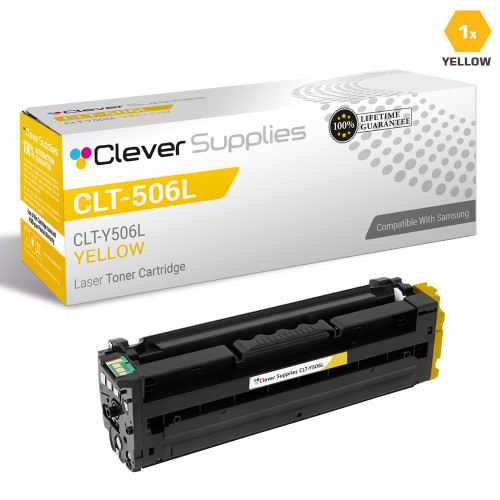
Compatible Samsung CLP-680ND Toner Cartridge Yellow (CLT-Y506L)

Amazon Price:

- Page Yield:
- Color:3500
- Availability:
- In Stock
- Shipping:
- Calculated at Checkout
- Compatible Printers
- Specifications
- SKU:
- CS-Samsung-CLP-680ND-Yellow
- Printer Brand:
- Samsung
- OEM Number:
- CLT-Y506L
- Ink Color:
- Yellow
- Page Yield:
- Color:3500
- Printer Type:
- Laser Cartridge
- Description
- Reviews

/> 

Clever Supplies brand products are made in the USA! Why pay more for cheaper product with a high defective rate? You will end up having to send it back to the manufacturer. Your time is valuable. Get a quality product that you KNOW will work. Purchase the Clever Supplies Compatible for Samsung CLP-680ND (CLT-Y506L) Yellow Toner Cartridge and experience the difference! All Clever Supplies brand products are backed by '100% Quality Satisfaction' 1 year warranty against defects in materials and workmanship for all toner products. Free tech support for any problems for all Clever Supplies brand products. The use of Clever Supplies brand replacement laser toner cartridges and supplies does not void printer warranty. Premium Quality Replacement Toner Cartridge is made by ISO9001 Certified Factory to Meet or Exceed OEM Standards. These units are manufactured 100% brand new with all new parts including OPC drums, wiper blades, a smart chip and other internal parts, they are an economical alternative to expensive OEM CLT-Y506L Compatible Toner Cartridges. The Compatible Toner Cartridges will produce the same amount of page yield as an OEM cartridge would. This is a Compatible for Samsung CLP-680ND Toner Cartridges Yellow guaranteed to perform with Samsung Laser Printers. It replaces the original Samsung CLP-680NDYellow. The use of compatible replacement Cartridges and supplies does not void Printer Warranty. Our Compatible for CLT-Y506L Laser Toner Cartridges and supplies. For use in the following printers: CLP-680ND, CLX-6260FD, CLX-6260FW
Frequently Asked Questions
Our CLP-680ND prints color charts and warm-toned graphics all week — why does the yellow level fall faster than the other colors?
Because of what your pages are made of. Bar charts, heat maps, highlighted tables and warm-toned graphics are built largely from yellow: every green column is yellow mixed with cyan, every orange and amber element is yellow mixed with magenta, and skin tones and wood tones in images lean on it heavily. A document set like yours can spend yellow at twice the rate of the other colors without anything being wrong. The cartridge is not leaking — your artwork is simply yellow-hungry.
What happens to our charts if we keep printing as the yellow runs low?
The printer compensates instead of stopping, and charts are where the compensation is easiest to spot. Greens slide toward blue, oranges flatten into pink, and a heat map's carefully graded scale can start lying to the reader because two steps that should look different render almost the same. For internal drafts that hardly matters; for anything a client or a meeting will judge, a fading yellow cartridge quietly undermines the accuracy the chart was built for.
Is the 3,500-page rating realistic for the way this office prints?
The rating assumes about five percent page coverage, and a page carrying charts and graphics can easily run three to five times that. So on your workload the honest expectation is a working life well under 3,500 pages — how far under depends on how much of each sheet your graphics actually cover. What does not change is the arithmetic at rated coverage: $53.85 spread over 3,500 pages is roughly 1.54 cents a page, and your effective cost rises in proportion to your coverage, which is the right way to budget for a graphics-heavy machine.
Can we change just the yellow, or should the whole set go in together?
Just the yellow. The four cartridges in the CLP-680ND are independent supplies, and there is no benefit to retiring a cyan, magenta or black cartridge that still has life in it. The 506L family — black CLT-K506L, cyan CLT-C506L, magenta CLT-M506L and this yellow — was designed so each color is bought and replaced on its own rhythm. In a graphics-heavy office that rhythm simply brings yellow to the front of the queue more often.
How do we check the yellow level before a big print job?
Print the supplies status page from the printer's menu, or open the printer's status monitor on a connected PC — both report each color separately. Do it before the long run rather than during it: a cartridge that reads low-but-printing can finish a stack of letters yet die twenty pages into the chart deck. If the status shows yellow under roughly a fifth and the job matters, swap first and keep the part-used cartridge as an emergency spare for text work.
What protection do we get with a compatible cartridge like this?
A one-year warranty covers the cartridge, and the first year also carries free returns, so a cartridge that disappoints can go back without return postage eating the saving. Details are set out on the shipping and returns page. If you want a second opinion before ordering, our support team answers Monday through Friday, 9 AM to 5 PM CST.
How do we prove the new yellow has fixed our charts before the important run starts?
Keep one chart page from before the swap — ideally a sheet whose faults you can point to — and reprint the same page with the fresh CLT-Y506L fitted. Lay the two side by side: the graded steps in a heat map should separate again, and greens that had collapsed toward blue should read as distinct values. That before-and-after pair is the evidence the run is safe to start.
How should we budget the yellow cost of a big chart campaign?
Start from the rated figure — about 1.54 cents of yellow per page at standard coverage — then scale it by how much of each sheet your graphics actually cover. A campaign page at three times standard coverage costs roughly three times the rated yellow share. The cartridge price never changes, so the honest budget line is your page count multiplied by your real coverage, not by the test number.
Is it better to swap the yellow between jobs than in the middle of one?
For chart work, yes. A deck printed half with a fading yellow and half with a fresh one carries a visible step in the middle: the same chart appears in two different color balances within one document. Swapping between jobs keeps every document internally consistent. The part-used cartridge is not wasted, either — it can serve internal drafts, where that color step bothers nobody.
What should happen to the empty cartridge from a graphics-heavy machine?
Seal it in the replacement's packaging the moment it comes out. A cartridge that has fed full-color work can still shake loose a little residual toner, so keep the bag closed, store it with the other empties if you collect them, and send it to a recycling point rather than the general waste bin once the new cartridge has settled in.
About This CLT-Y506L for the CLP-680ND
Some printers sip yellow; a graphics-driven CLP-680ND drinks it. This compatible CLT-Y506L is the high-yield answer for that machine — 3,500 rated pages of yellow at $53.85, sized so the color that runs out first is also the one that lasts longest between orders. It belongs to the same Samsung toner cartridges family we supply for the CLP-680 and CLX-6260 lines, and it is rated for the CLP-680ND and CLX-6260FD. Stock is held in Illinois, Pennsylvania, Georgia and California, and your order ships from the warehouse nearest you.
Related Items

Samsung
Compatible Samsung CLP-680ND Toner Cartridge 4 Color Set (CLT-K506L, CLT-C506L, CLT-M506L, CLT-Y506L)
/>

Samsung
Compatible Samsung CLP-680ND Toner Cartridge Magenta (CLT-M506L)
/>
Samsung
Compatible Samsung CLP-680ND Toner Cartridge Cyan (CLT-C506L)
/>

Samsung
Compatible Samsung CLP-680ND Toner Cartridge Black (CLT-K506L)
/>