




PIXMA iP6000D
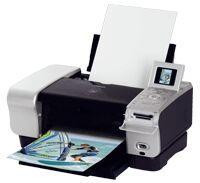
On the Canon PIXMA iP6000D, consumption is written by the images themselves. A printer stocked from the nine-tank shelf below — the BCI-3E Black pigment tank (about 420 pages) for text and the dye colors BCI-6 Black, BCI-6 Cyan, BCI-6 Magenta, BCI-6 Yellow, BCI-6 Photo Cyan, BCI-6 Photo Magenta, BCI-6 Red and BCI-6 Green (about 280 pages each) — never empties evenly. Owners keep this model running because it does its job without drama, and because ink is the only real running cost there is.
So plan spares by the image, not by the set. A month of landscapes leans on cyan, photo cyan and green; a month of family portraits leans on the magentas; a month of paperwork touches almost nothing but the pigment black. The compatible version of each tank keeps the same rated output per cartridge while cutting the cost of feeding those sessions — the right spare is simply the color your last batch of prints kept asking for.
Ink Cartridges for PIXMA iP6000D
| Cartridge | Color | Page Yield |
|---|---|---|
| BCI-6 Black | Black (dye) | 280 pages (approx.) |
| BCI-6 Cyan | Cyan | 280 pages (approx.) |
| BCI-6 Magenta | Magenta | 280 pages (approx.) |
| BCI-6 Yellow | Yellow | 280 pages (approx.) |
| BCI-6 Photo Cyan | Photo Cyan | 280 pages (approx.) |
| BCI-6 Photo Magenta | Photo Magenta | 280 pages (approx.) |
| BCI-6 Red | Red | 280 pages (approx.) |
| BCI-6 Green | Green | 280 pages (approx.) |
| BCI-3E Black | Black (pigment) | 420 pages (approx.) |
Sets and multipacks sold for this printer:
| Sets and multipacks | Type | Page Yield |
|---|---|---|
| BCI-3E Set of 10 | Multipack | See product page |
| BCI-3E / BCI-6 Set of 11 | Multipack | See product page |
| BCI-3E / BCI-6 Set of 5 | Multipack | See product page |
| BCI-6 Set of 14 | Multipack | See product page |
| BCI-6 Set of 6 | Multipack | See product page |
| BCI-6 Set of 18 | Multipack | See product page |
| BCI-6 Set of 8 | Multipack | See product page |
Which cartridge should you buy?
Singles first, matched to the work in front of you: if the last photo session drained one color, that single tank is the purchase. Move to a set when a large batch is planned and you want the whole shelf covered before it starts — the BCI-6 Set of 6 covers the core colors once, and the BCI-6 Set of 14 doubles the black, core and photo colors for a heavy season. Document-heavy owners should weight the other side of the shelf: BCI-3E Black singles, or the BCI-3E Set of 10 in bulk.
Chip, ink and everyday use
On the iP6000D the tank is the sensor, with nothing digital in between: levels are read optically, so the color that runs low is simply the one your printing used up. Replace that tank when the printer flags it, keep the machine dust-free, and print something every few weeks so the heads stay wet. Sealed spares keep at room temperature, and every compatible cartridge on this page is covered by a 1-year warranty with 1-year returns.
Frequently Asked Questions
How do I know which color to reorder for the iP6000D?
Look at what you have been printing, then confirm with the level reading. The printer reads each tank optically and flags the low one; your recent images explain why — skies point to the cyans, skin tones to the magentas, foliage to green and cyan together.
What do the red and green tanks add?
Range. Red stretches the shelf toward vivid reds and oranges, and green toward richer natural greens, which is why landscape and nature printers work through the BCI-6 Green faster than anyone expects. If your subjects rarely push those colors, both tanks will be the last to empty.
Does a set make sense before a big photo batch?
Yes, if several tanks are already part-used: a batch stops for whichever color gives out first, so covering the shelf beforehand — the BCI-6 Set of 14 is shaped for it — is cheaper than a mid-run interruption. If only one tank is low, a single is the smarter buy.
Is there a chip to reset when I change tanks?
None. Nothing about using these cartridges is digital: the level is read from the tank itself, so a swap is just a swap, with no reset tool and no warning to clear.
More printers that use the same cartridges
The iP6000D's shelf is shared with the Canon models below — a spare bought for any of them fits this printer too: S400, S450, S500, S520, S530D, S600, S630, S750, S800, S820D, S830D, S900, S9000, BJC-3000, BJC-6000, BJC-6100, BJC-8200, MultiPass F50, MultiPass F60, MultiPass F80, MultiPass MP700, MultiPass MP730, Multipass C755, Multipass F30, PIXMA MP750, PIXMA MP760, PIXMA MP780, PIXMA iP3000, PIXMA iP4000, PIXMA iP4000R, PIXMA iP5000, PIXMA iP8500, i550, i560, i850, i860, i865, i900D, i950, i960, i9900.