




PCD320
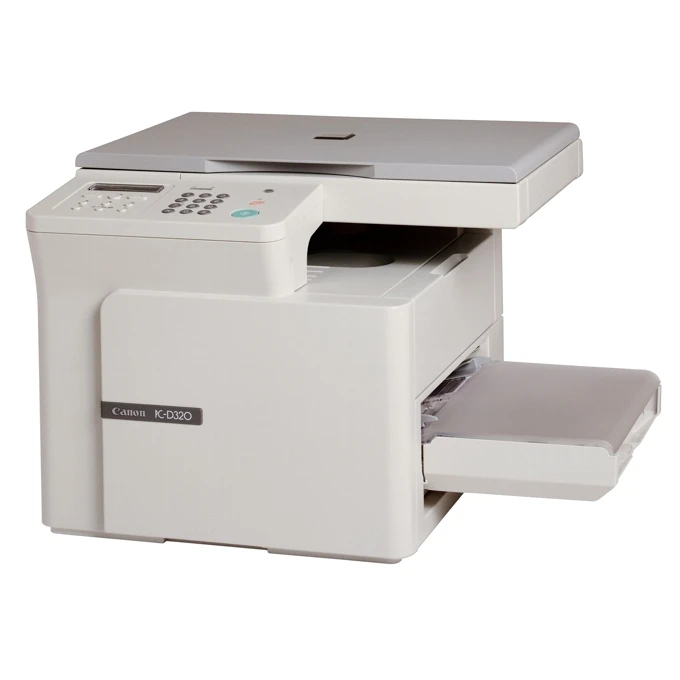
PCD320 is this store's code for Canon's PC-D320, a personal desktop machine that does two jobs at one desk: it prints at 15 pages per minute over a USB connection, and its flatbed copies at around 14 copies per minute. Compact and deliberately single-user — no network port, no sharing — it takes the Canon S35 toner cartridge, rated for 3,500 pages.
That dual role shaped a generation of home-office desks: the PC-D320 printed the invoices and then photocopied the signed copies without a trip down the hall. Machines like this survive on simplicity. One cartridge feeds both the printer and the copier side, the cartridge carries its drum inside it, and a swap is a one-minute job. For a device that might print a contract in the morning and copy a passport at noon, the S35's 3,500-page rating stretches a long way.
Toner Cartridges for PCD320
| Cartridge | Color | Page Yield |
|---|---|---|
| Canon S35 | Black | 3,500 pages |
| Canon S35 — 2 Pack | Black | 3,500 pages per cartridge |
| Canon S35 — 3 Pack | Black | 3,500 pages per cartridge |
| Canon S35 — 5 Pack | Black | 3,500 pages per cartridge |
| Canon S35 Premium Quality — 5 Pack | Black | 3,500 pages per cartridge |
| Canon S35 — 10 Pack | Black | 3,500 pages per cartridge |
Which cartridge should you buy?
The S35 range has no high-yield variant, so the choice is purely about how many cartridges to hold. A single Canon S35 suits the typical PCD320 desk — at personal volumes, 3,500 pages is a generous runway, and there is no larger fill to upgrade to. The 2 pack is the comfort option: one cartridge working, one waiting, no reorder errand when output fades. Reserve the 5 and 10 packs for homes and offices running several S35 machines from the family below; per-cartridge cost falls as the pack grows, and the premium-quality 5 pack offers the alternative build at the same rating.
Chip, toner and everyday use
Fitting the S35 is a front-access job: open the cover, take the old cartridge out by its handle, rock the new one gently side to side to level the toner, and slide it in until it seats. Because this machine both prints and copies from the one cartridge, a fading cartridge shows up in both jobs at once — pale prints and pale copies together are the classic sign. Page ratings assume about 5% coverage, and photocopied originals with photographs or shaded forms run heavier than typed pages, so a copy-heavy desk will land under the headline figure.
Frequently Asked Questions
Is the PCD320 the same machine as the Canon PC-D320?
Yes — PCD320 is simply the store's listing code for Canon's PC-D320. The hardware, the speeds and the Canon S35 cartridge are identical whichever name you search by.
Does the same cartridge serve both printing and copying?
It does. The PC-D320 has a single cartridge slot, and the S35 feeds every page the machine produces, whether the job arrived from the computer or from the flatbed.
Which other printers take this cartridge?
The S35 is the cartridge of Canon's small D-series generation — the ImageClass D320 and its relatives in the list below share it, so owners of more than one of these machines can stock a single cartridge type.
Is there a separate drum to replace on the PC-D320?
No. The drum is built into the S35 cartridge, so replacing the cartridge renews the drum surface too. There is nothing else on the consumables list.
More printers that use the same cartridges
The complete S35 family — fax, D-series and LBP models that take the same cartridge as the PCD320: FaxPhone L170, FaxPhone L400, ICD-340, ImageClass D300, ImageClass D320, ImageClass D323, ImageClass D340, ImageClass D380, ImageClass D383, ImageClass ICD340, ImageClass L170, ImageClass L400, ImageClass PC-D320, ImageClass PC-D340, L400, LBP-1210, LaserClass 310, LaserClass 510, PCD340.