




ICD-340
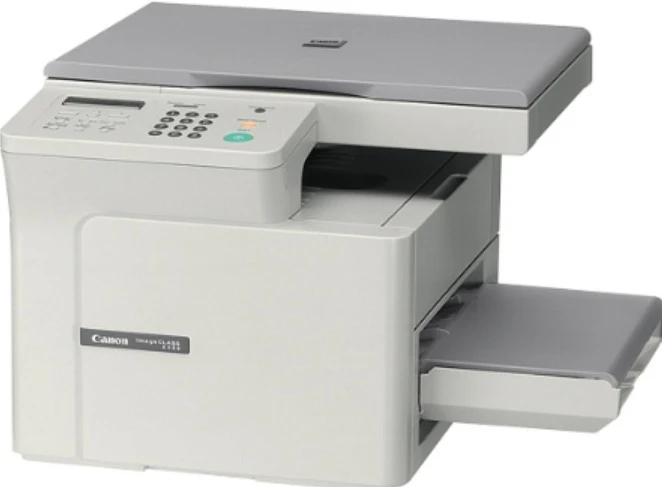
Two names, one machine. The ICD-340 is the imageCLASS D340 sold under a second listing name: a 15-page-per-minute desktop copier-printer from Canon's early-2000s lineup that copies and prints over USB from a compact footprint meant for a desk corner, not a print room. Whichever name is on your paperwork, the supply is the same — the Canon S35 toner cartridge, rated at 3,500 pages, sold here as a single and in packs up to 10.
The double naming confuses owners more than the machine itself ever does. Detailed factory specifications for this exact listing are scarce, so configuration details beyond the headline figures should be treated as approximate — but the important facts are firm. It is a monochrome desktop unit for one desk: copies at the glass, prints over USB, and asks for nothing but its S35 cartridge to keep working. If you arrived here searching under the ICD name and your colleague orders under D340, you are both maintaining the same printer.
Toner Cartridges for ICD-340
| Cartridge | Color | Page Yield |
|---|---|---|
| Canon S35 Toner Cartridge | Black | 3,500 pages |
| Canon S35 — 2 Pack | Black | 3,500 pages per cartridge |
| Canon S35 — 3 Pack | Black | 3,500 pages per cartridge |
| Canon S35 — 5 Pack | Black | 3,500 pages per cartridge |
| Canon S35 Premium Quality — 5 Pack | Black | 3,500 pages per cartridge |
| Canon S35 — 10 Pack | Black | 3,500 pages per cartridge |
Which cartridge should you buy?
All six listings are the same S35 cartridge at the same 3,500-page rating, so the choice is pack size against your pace. A single suits a lightly used desk machine. A 2 or 3 pack is the comfortable middle for a unit that copies and prints daily — one fitted, one sealed in reserve. The 5 and 10 packs, including the premium-quality 5 pack, make sense where several S35 machines share one supply shelf, which is common with this family: the cartridge fits a long list of Canon models, so a shared stock rarely goes to waste even if one machine retires.
Chip, toner and everyday use
The S35 is an all-in-one cartridge — toner and drum in a single unit — so fitting a fresh one renews the print path in one step and there is no separate drum to schedule. When output fades, slide the cartridge out and rock it gently from side to side; the toner settles back into an even layer and typically carries the machine a while longer. Let a newly fitted cartridge seat fully before printing, keep spares sealed and flat away from sunlight, and read the 3,500-page rating as the 5%-coverage measure it is — dense copies and dark originals will always land below it.
Frequently Asked Questions
Is the ICD-340 really the same machine as the D340?
Yes — the ICD-340 listing is the imageCLASS D340 under another name. Same 15-ppm desktop copier-printer, same USB printing, same S35 cartridge.
What toner does the ICD-340 use?
The Canon S35 black toner cartridge, shown in the table above as a single and in multipacks.
How many pages does an S35 cartridge print?
About 3,500 pages at the standard 5% coverage measure. Heavy, dark originals copied all day will use toner faster and lower the real total.
Can the ICD-340 print from a computer?
Yes — alongside copying at the glass, it prints over a USB connection, which is how the machine earns the copier-printer label. Compatible S35 cartridges here carry a 1-year warranty and 1-year returns.
More printers that use the same cartridges
The S35 family is broad. Its imageCLASS branch covers ImageClass D300, ImageClass D320, ImageClass D323, ImageClass D340, ImageClass D380, ImageClass D383, ImageClass ICD340, ImageClass L170, ImageClass L400, ImageClass PC-D320, ImageClass PC-D340, the fax side adds FaxPhone L170, FaxPhone L400, and the list is completed by L400, LBP-1210, LaserClass 310, LaserClass 510, PCD320, PCD340.