




L400
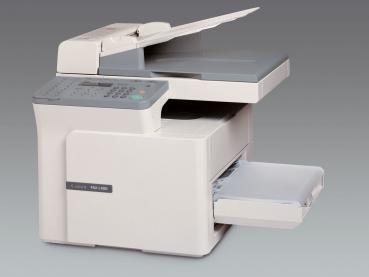
The FAX-L400 puts its fax first and its printer second: a Super G3 modem and a 14-page-per-minute engine, a 50-page automatic document feeder for unattended sending, and a flatbed for copying bound originals. PC printing arrives over USB only — there is no Ethernet and no automatic duplexing, by design. It runs on one black cartridge, the Canon FX8, rated for 3,500 pages.
That puts the L400 a step above the older fax generation elsewhere in the L series: a faster engine and a longer-lived cartridge, in a machine unapologetically built as a fax station. Offices that still live on fax — signed forms, orders, medical and legal pages — get quick sending from the feeder and quick receiving onto plain paper, with the flatbed handling the books and bound documents a feeder cannot.
Toner Cartridges for L400
| Cartridge | Color | Page Yield |
|---|---|---|
| Canon FX8 Toner Cartridge | Black | 3,500 pages |
| Canon FX8 Toner Cartridges, 3 Pack | Black | 3,500 pages per cartridge |
| Canon FX8 Toner Cartridges, 5 Pack | Black | 3,500 pages per cartridge |
Which cartridge should you buy?
Start with the yield: at 3,500 rated pages, a single FX8 already covers a long stretch of fax traffic, and for a single L400 in ordinary office service the single cartridge is the straightforward buy. The packs are for fax rooms and shared stations. A machine fed by a 50-page feeder can be handed a stack of originals by anyone in the office, and its cartridge drains on other people's schedules; the 3 pack keeps that station supplied at a lower per-cartridge cost, and the 5 pack suits a business running the L400 as its central fax. There is no color and no second supply item to plan around — one black cartridge does everything.
Chip, toner and everyday use
When an L400 prints badly from a computer but copies cleanly, suspect the USB connection or driver before the cartridge — printing here is USB-only, so there is no network path to fall back on. When everything fades together, the cartridge is the likely cause: remove it, rock it gently to redistribute the toner, and you will often get clean pages again while a replacement ships. Keep bound originals on the flatbed rather than forcing them toward the feeder, and store spare cartridges sealed and flat.
Frequently Asked Questions
What toner does the Canon L400 use?
The Canon FX8 black toner cartridge, rated for 3,500 pages. It is the machine's only supply item.
Can the L400 print over a network?
No. PC printing works over USB only; the design includes no Ethernet connection.
Does the L400 print double-sided automatically?
No — there is no automatic duplexing. Double-sided output means turning the pages over and printing the second sides manually.
Why does a fax machine need a flatbed?
For bound originals. The 50-page feeder handles loose sheets for unattended faxing, while the flatbed copies pages from books and stapled documents that cannot pass through a feeder.
More printers that use the same cartridges
The FX8 cartridge is shared with a smaller, later group of Canon machines, all listed here: ImageClass D323, ImageClass D340, ImageClass D380, ImageClass D383, ImageClass ICD340, ImageClass L170, ImageClass L400, ImageClass PC-D320, ImageClass PC-D340. Also using the FX8: LBP-1210, LaserClass 310, LaserClass 510, PCD320, PCD340, FaxPhone L170, FaxPhone L400, ICD-340, ImageClass D300, ImageClass D320.