




LBP-1210
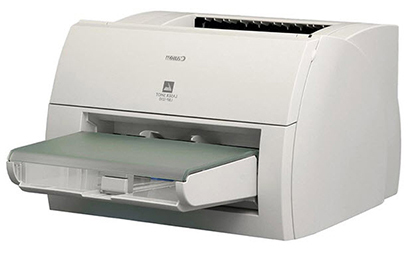
Fourteen A4 pages per minute, manual duplexing, and a parallel port sitting beside the USB socket: the Canon LBP-1210 is unmistakably a printer from another era. As a print-only desktop laser it does exactly one thing — put toner on paper — drawing from a 250-sheet cassette, with no networking of any kind. Its single supply is the Canon S35 toner cartridge, which yields about 3,500 pages. If you are keeping one of these stubborn survivors alive, that cartridge code is the one to order.
The LBP-1210's appeal today is its refusal to be anything else. It does not scan, it does not copy, it does not ask to join a network or update itself; it warms up and prints. Owners who keep one usually pair it with a modern machine and route the plain, heavy text work here — archival documents, labels, long reports — where a cartridge rated around 3,500 pages stretches a long way. Manual duplexing is part of the ritual: print the first sides, flip the stack, print the backs.
Toner Cartridges for LBP-1210
| Cartridge | Color | Page Yield |
|---|---|---|
| Canon S35 Toner Cartridge (Compatible) | Black | 3,500 pages |
| Canon S35 Toner Cartridges (Compatible) — 2 Pack | Black | 3,500 pages per cartridge |
| Canon S35 Toner Cartridges (Compatible) — 3 Pack | Black | 3,500 pages per cartridge |
| Canon S35 Toner Cartridges (Compatible) — 5 Pack | Black | 3,500 pages per cartridge |
| Canon S35 Premium Quality Toner Cartridges (Compatible) — 5 Pack | Black | 3,500 pages per cartridge |
| Canon S35 Toner Cartridges (Compatible) — 10 Pack | Black | 3,500 pages per cartridge |
Which cartridge should you buy?
There is a single S35 cartridge and a single yield, so the only decision is how many spares make sense for an aging machine. One cartridge plus a single on the shelf is the sensible pattern for most owners — parts-era printers deserve stock, but not a warehouse. The 2 pack and 3 pack cover that neatly. If the LBP-1210 shares shelf space with Canon personal copiers from the same S35 family, a 5 pack — standard or Premium — pools the stock, and the 10 pack is there for genuinely heavy archive printing runs. All carry a 1-year warranty and 1-year returns.
Chip, toner and everyday use
No chip stands guard over this cartridge slot. Open the top, lift the spent S35 out, rock the replacement gently from side to side so its toner bed settles evenly, pull the sealing tape and lower it into place. The roughly 3,500-page figure assumes about 5% coverage; dense archival printing uses toner faster, light correspondence slower. For manual duplex jobs, let first sides rest a moment and fan the stack before the second pass — warm pages curl, and a fanned stack feeds straighter. Keep the spare sealed, flat and away from heat.
Frequently Asked Questions
What toner does the Canon LBP-1210 use?
The Canon S35 cartridge, yielding about 3,500 pages. It is the only consumable this printer takes.
Is duplex printing automatic on the LBP-1210?
No — duplexing is manual. Print the first side of the stack, turn the pages over, and run them through again for the backs.
Can the LBP-1210 join a home or office network?
It has no networking at all. It connects to one computer by USB or by its parallel port, a reminder of the era it was built in.
Does this printer scan or copy?
Neither — it is print-only by design. Its S35 cartridge family, listed below, also covers Canon personal copiers that do copy, which is where the cartridge's wider model list comes from.
More printers that use the same cartridges
The S35 also feeds Canon's personal copier and fax bench of the same era; the complete family is linked here: ImageClass D320, ImageClass D323, ImageClass D340, ImageClass D380, ImageClass D383, ImageClass ICD340, ImageClass L170, ImageClass L400, ImageClass PC-D320, ImageClass PC-D340, L400, LaserClass 310, LaserClass 510, PCD320, PCD340, FaxPhone L170, FaxPhone L400, ICD-340, ImageClass D300.