




LASERCLASS 810
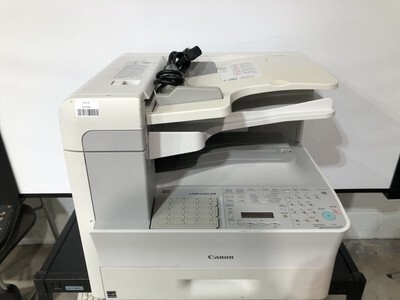
The Canon LASERCLASS 810 is a fax-first laser MFP trimmed for smaller footprints: 23 pages per minute, duplex printing and scanning, 64MB of memory and a USB connection, with network printing available as an add-on rather than built in. It runs on a single cartridge — the Canon 106, rated at up to 5,000 pages — and offers a jumbo build of the same 106 for desks that burn through the standard fill too quickly.
This is a machine for offices where the fax line still rings all day but the equipment shelf has shrunk. It sits close to the people who use it, tethered to one workstation over USB, and handles two-sided work automatically on both the print and scan sides. Clinics, law offices and dispatch desks that live on signed forms and confirmations are its natural home.
Toner Cartridges for the LASERCLASS 810
| Cartridge | Color | Page Yield |
|---|---|---|
| Canon 106 Black | Black | 5,000 pages |
| Canon 106 Black 2 Pack | Black | 5,000 pages per cartridge |
| Canon 106 Black 3 Pack | Black | 5,000 pages per cartridge |
| Canon 106 Black 5 Pack | Black | 5,000 pages per cartridge |
| Canon 106 Black 10 Pack | Black | 5,000 pages per cartridge |
| Canon 106 Jumbo Black | Black | See product page |
| Canon 106 Jumbo Black 4 Pack | Black | See product page |
| Canon 106 Premium Quality Black 5 Pack | Black | 5,000 pages per cartridge |
Which cartridge should you buy?
The standard Canon 106 is the default buy: 5,000 pages is a long run for a single-desk fax center. Step up to the jumbo 106 when the standard cartridge starts turning over monthly — the swap interval stretches, and the cartridge itself is the same fit. Desks that never want to think about toner can stock the 5-pack or 10-pack of standard cartridges, while the Premium Quality 5-pack covers the same ground in the premium build. One spare in the drawer is the minimum for a machine whose whole job is receiving paper.
Chip, toner and everyday use
The 106 is an all-in-one cartridge, so the drum surface travels with the toner — a fresh cartridge refreshes both at once. Rock it gently end to end before fitting so the toner sits level, and expect the rated 5,000 pages only at around 5% coverage; fax pages full of signatures and fine print count as ordinary text, but dense forms shorten the run. If output fades near the end of a cartridge, a gentle rock buys a few more days while the spare ships.
Frequently Asked Questions
What toner does the LASERCLASS 810 take?
The Canon 106 — one black cartridge for everything the machine prints, copies or receives by fax. The standard build is rated at up to 5,000 pages.
Does the jumbo Canon 106 fit the 810?
Yes. The jumbo is the same 106 cartridge with a larger fill, made for desks where the standard 5,000-page cartridge turns over too fast. Fit and installation are identical.
Is network printing required to use this toner?
No. The 810 connects over USB out of the box, and networking is an optional add-on for the printer itself — the cartridge choice is the same either way.
How do I change the cartridge?
Open the front cover, pull the old cartridge straight out, rock the new 106 gently, and slide it in until it seats. The machine is ready as soon as the cover closes.
More printers that use the same cartridges
Canon built a whole generation of fax MFPs around the 106; the cartridge also serves: ImageClass MF6500, ImageClass MF6530, ImageClass MF6531, ImageClass MF6540, ImageClass MF6540RF, ImageClass MF6550, ImageClass MF6560, ImageClass MF6560CX, ImageClass MF6580, ImageClass MF6580CX, ImageClass MF6590, ImageClass MF6590rf, ImageClass MF6595, ImageClass MF6595CX, LASERCLASS 830, LaserBase MF6530, LaserBase MF6530PL, LaserBase MF6540, LaserBase MF6540pl, LaserBase MF6550, LaserBase MF6550PL, LaserBase MF6560, LaserBase MF6560PL, LaserBase MF6580, LaserBase MF6580PL, LaserClass 830I.