




ImageClass MF6590
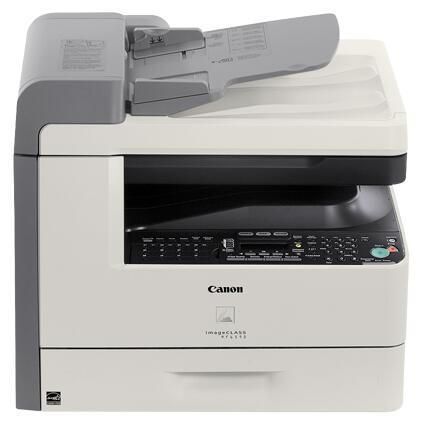
Top of the MF6500 ladder in its day: the imageCLASS MF6590 pushes 24 pages per minute and adds what the base models lack — standard network printing. A 50-sheet duplexing document feeder and a 500-sheet cassette make it a genuine small-workgroup machine, with Super G3 fax built in. It uses the Canon 106 cartridge, rated for up to 5,000 pages, and workgroups can stretch intervals further with the jumbo build of the same cartridge.
Capacity is the theme of this model: a cassette that swallows a full ream, a feeder that flips two-sided originals by itself, and a network port that puts the machine at the center of a workgroup. Everything about it is sized so the printer stops being the bottleneck — fewer paper refills, fewer walk-up-and-wait moments, and a toner cartridge generous enough that supply runs are a monthly event rather than a weekly one.
Toner Cartridges for ImageClass MF6590
| Cartridge | Color | Page Yield |
|---|---|---|
| Canon 106 toner cartridge (single) | Black | 5,000 pages |
| Canon 106 Jumbo — 4 Pack | Black | See product page |
| Canon 106 — 3 Pack | Black | 5,000 pages per cartridge |
| Canon 106 Jumbo toner cartridge (single) | Black | See product page |
| Canon 106 — 5 Pack | Black | 5,000 pages per cartridge |
| Canon 106 — 10 Pack | Black | 5,000 pages per cartridge |
| Canon 106 — 2 Pack | Black | 5,000 pages per cartridge |
| Canon 106 Premium Quality — 5 Pack | Black | 5,000 pages per cartridge |
Which cartridge should you buy?
Workgroups should start with the jumbo Canon 106: it is built for exactly this machine's workload, holding more toner per cartridge so swaps come less often — its product page gives the full specification. The standard Canon 106, rated for up to 5,000 pages, remains the economical default and comes in 2, 3, 5 and 10 packs plus a premium quality 5 pack for steadily lower per-cartridge cost; the jumbo is sold singly and in a 4 pack. Whichever build you standardize on, keep the rule simple — one spare on the shelf per machine, reorder the day it goes in.
Chip, toner and everyday use
Big cassettes and big runs hide toner consumption until the warning light arrives, so workgroup discipline matters: whoever fits a cartridge also checks the shelf and triggers the reorder. Fit it properly — rock the cartridge gently to level the toner, then seat it until it clicks so the printer recognizes it at once. The standard cartridge's 5,000-page rating assumes roughly 5% coverage; duplexed reports and fax traffic through the feeder run heavier. Store multipacks flat and sealed in the supply cupboard, and rotate stock so the oldest box is used first.
Frequently Asked Questions
What does the duplexing document feeder do?
The 50-sheet feeder scans and copies two-sided originals automatically, flipping each sheet itself. On a workgroup machine that handles contracts and reports all day, it removes the slowest manual step in copy and scan work.
How much paper does the MF6590 hold?
Its cassette takes 500 sheets — a full ream — which suits a shared machine far better than the smaller trays of the desk-bound models below it in the range. Fewer refills mean fewer jobs stalled on an empty tray.
Which cartridge does the MF6590 take?
The Canon 106 black cartridge, in standard build rated for up to 5,000 pages or in jumbo build for longer runs. It is the only consumable the machine needs.
Is the MF6590 a network printer out of the box?
Yes. Standard network printing is one of its defining upgrades over the base models, alongside Super G3 fax — it is built to be shared by a workgroup from day one.
More printers that use the same cartridges
Toner buying for the MF6590 doubles as toner buying for the whole clan — every model below, from its MF6500 siblings to the LaserBase and LASERCLASS machines, runs on the same Canon 106 cartridge: ImageClass MF6595, ImageClass MF6595CX, ImageClass MF6590rf, ImageClass MF6580, ImageClass MF6580CX, LaserBase MF6580, LaserBase MF6580PL, ImageClass MF6560, ImageClass MF6560CX, LaserBase MF6560, LaserBase MF6560PL, ImageClass MF6550, LaserBase MF6550, LaserBase MF6550PL, ImageClass MF6540, ImageClass MF6540RF, LaserBase MF6540, LaserBase MF6540pl, ImageClass MF6531, ImageClass MF6530, LaserBase MF6530, LaserBase MF6530PL, ImageClass MF6500, LASERCLASS 830, LaserClass 830I, LASERCLASS 810.