




ImageClass MF6595
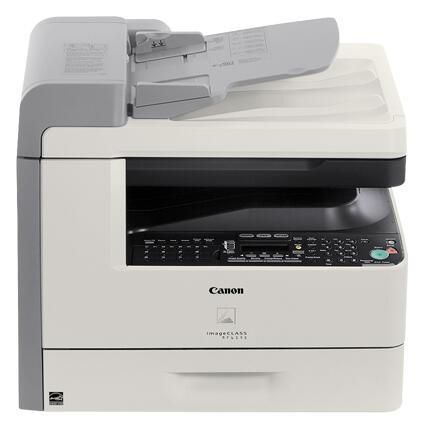
If the MF6590 is the flagship, the imageCLASS MF6595 is the flagship with the volume turned up: 24 pages per minute, Ethernet and USB connections, duplex scanning through the document feeder, 128MB of memory, and a 33.6 Kbps Super G3 fax. Print, scan, copy, fax — everything a busy small office needs in one box. Toner is the Canon 106 cartridge, rated for up to 5,000 pages, with a jumbo edition of the same cartridge covering offices that fax and print all day.
The MF6595 was specced for the offices that outgrow ordinary multifunction machines: the ones where the fax line never really sleeps, scan jobs run to dozens of two-sided pages, and the printer queue is a shared resource rather than a personal one. Extra memory and duplex scanning are not brochure decorations at that workload — they are what keep big jobs moving without choking the machine for everyone else.
Toner Cartridges for ImageClass MF6595
| Cartridge | Color | Page Yield |
|---|---|---|
| Canon 106 toner cartridge (single) | Black | 5,000 pages |
| Canon 106 — 2 Pack | Black | 5,000 pages per cartridge |
| Canon 106 Premium Quality — 5 Pack | Black | 5,000 pages per cartridge |
| Canon 106 Jumbo toner cartridge (single) | Black | See product page |
| Canon 106 Jumbo — 4 Pack | Black | See product page |
| Canon 106 — 3 Pack | Black | 5,000 pages per cartridge |
| Canon 106 — 10 Pack | Black | 5,000 pages per cartridge |
| Canon 106 — 5 Pack | Black | 5,000 pages per cartridge |
Which cartridge should you buy?
Heavy offices should compare two routes. Route one: the standard Canon 106 at up to 5,000 rated pages, bought in quantity — the 5 pack, premium quality 5 pack and 10 pack steadily reduce per-cartridge cost. Route two: the jumbo Canon 106, sold singly or in a 4 pack, which raises the toner load per cartridge so a hard-working machine is opened less often; its product page carries the detailed figures. Either way, treat toner as a standing order with a named owner — at this machine's pace, an empty cartridge is a team-wide outage.
Chip, toner and everyday use
Volume changes the maintenance rhythm. Cartridges cycle fast enough that seating technique matters: rock each new cartridge side to side, fit it until it clicks, and confirm the machine returns to ready before walking away — an unrecognized cartridge on a shared flagship blocks the whole office queue. The 5,000-page standard rating assumes about 5% coverage, and this model's typical diet of fax pages, duplexed reports and scanned forms runs denser, so forecast generously. Keep spares sealed, flat and away from heat, and rotate the multipack stock oldest-first.
Frequently Asked Questions
How does the MF6595 differ from the MF6590?
The ImageClass MF6590 is the workgroup flagship; the MF6595 turns the volume up with 128MB of memory, duplex scanning through the feeder and both Ethernet and USB connectivity, aimed at offices that fax and print all day.
What toner does the MF6595 use?
The Canon 106 black cartridge — standard build rated for up to 5,000 pages, or the jumbo build for longer intervals between changes. No other supply is required.
Can it scan two-sided documents automatically?
Yes. Duplex scanning via the document feeder is one of this model's headline features, so two-sided originals are digitized in one pass instead of being flipped by hand sheet by sheet.
Is 128MB of memory meaningful for a printer like this?
On a machine juggling network print jobs and a busy Super G3 fax line, yes — it gives the MF6595 room to hold and process larger jobs smoothly while other work continues, which is precisely the flagship-with-volume role Canon built it for.
More printers that use the same cartridges
Stock one cartridge, cover a fleet: the models below — the rest of the MF6500 series, the LaserBase equivalents and the LASERCLASS machines — all take the same Canon 106 as the MF6595: LaserBase MF6530, LaserBase MF6530PL, LaserBase MF6540, LaserBase MF6540pl, LaserBase MF6550, LaserBase MF6550PL, LaserBase MF6560, LaserBase MF6560PL, LaserBase MF6580, LaserBase MF6580PL, ImageClass MF6595CX, ImageClass MF6590rf, ImageClass MF6590, ImageClass MF6580CX, ImageClass MF6580, ImageClass MF6560CX, ImageClass MF6560, ImageClass MF6550, ImageClass MF6540RF, ImageClass MF6540, ImageClass MF6531, ImageClass MF6530, ImageClass MF6500, LASERCLASS 810, LASERCLASS 830, LaserClass 830I.