




ImageClass MF6595CX
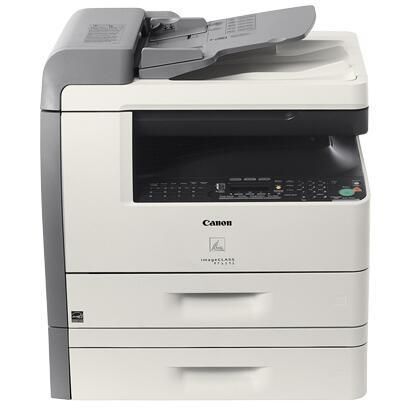
The Canon imageCLASS MF6595CX is a configuration story rather than a separate machine: it is the bundled version of the MF6595 flagship, a 24-ppm monochrome multifunction printer with network printing, Super G3 fax, duplex scanning through the DADF and 128MB of memory. The bundle changes what ships in the box, not what prints. Every page this machine produces runs through a single cartridge, the Canon 106, rated at about 5,000 pages, and that one cartridge is the whole toner story for the MF6595CX.
That shared hardware is good news at reorder time. Offices that bought the CX bundle sometimes hunt for a CX-specific cartridge, and there is not one: the badge on the front panel describes a sales configuration, while the toner door opens on the same bay as the standard flagship. If your asset register lists the machine under either name, the reorder is identical, and a purchasing note that simply names this cartridge covers every MF6595-family device on the floor.
Toner Cartridges for ImageClass MF6595CX
| Cartridge | Color | Page Yield |
|---|---|---|
| Canon 106 | Black | About 5,000 pages |
| Canon 106 Jumbo | Black | See product page |
| Canon 106 2 Pack | Black | See product page |
| Canon 106 3 Pack | Black | See product page |
| Canon 106 5 Pack | Black | See product page |
| Canon 106 Premium 5 Pack | Black | See product page |
| Canon 106 10 Pack | Black | See product page |
| Canon 106 Jumbo 4 Pack | Black | See product page |
Which cartridge should you buy?
Start from volume. The standard cartridge is rated at about 5,000 pages, which on a shared office machine can still disappear quickly, so the real choice is how often someone has to open the toner door. The Canon 106 Jumbo stretches that interval with a larger fill — its rating is listed on its product page — and suits machines that print all day. Multi-packs attack the same problem from the stockroom side: the 2 pack and 3 pack keep a spare on the shelf, the 5 pack and 10 pack spread one order across several machines, and the jumbo 4 pack pairs the big fill with backup stock. Pick the standard single for a lightly used machine, the jumbo for a busy one, and a pack when an empty cartridge would idle a workgroup.
Chip, toner and everyday use
A single-cartridge machine makes toner care simple, and the rating behind it is an estimate: about 5,000 pages assumes roughly 5% coverage, so dense contracts and long reports land short of it while light memo traffic may run past. When output first turns faint, lift the cartridge out and rock it gently from side to side a few times; toner settles toward one end in storage and in use, and redistributing it often restores even density for the remaining life of the fill. Reinstall until it seats with a click, and keep a sealed spare stored flat, away from heat, where the person who changes toner will actually find it.
Frequently Asked Questions
What toner does the imageCLASS MF6595CX use?
It uses the Canon 106 — the same cartridge as the standard MF6595. There is no CX-specific toner; the suffix describes the sales bundle, not a different cartridge bay.
How many pages does a Canon 106 print in this machine?
The standard cartridge is rated at about 5,000 pages at 5% coverage. Real output depends on what you print: page-dense documents spend more toner per sheet than short emails and memos, so heavy machines should plan their reorder point generously.
What is the jumbo version?
The Canon 106 Jumbo is the same cartridge design with a larger fill, made for machines whose standard cartridge does not last long enough between changes. Its page rating is shown on its product page, and it is also sold as a jumbo 4 pack for stockrooms.
How do I change the cartridge?
Open the front cover, pull the old cartridge straight out, rock the new one gently from side to side to loosen the toner, then slide it in until it clicks. The swap takes a couple of minutes and needs no tools.
More printers that use the same cartridges
One cartridge covers a wide family — the same Canon 106 feeds the rest of the MF6500 generation, its LaserBase twins and the LASERCLASS fax machines: across the imageCLASS line, ImageClass MF6500, ImageClass MF6530, ImageClass MF6531, ImageClass MF6540, ImageClass MF6540RF, ImageClass MF6550, ImageClass MF6560, ImageClass MF6560CX, ImageClass MF6580, ImageClass MF6580CX, ImageClass MF6590, ImageClass MF6590rf, ImageClass MF6595; the LaserBase equivalents, LaserBase MF6530, LaserBase MF6530PL, LaserBase MF6540, LaserBase MF6540pl, LaserBase MF6550, LaserBase MF6550PL, LaserBase MF6560, LaserBase MF6560PL, LaserBase MF6580, LaserBase MF6580PL; and the LASERCLASS machines, LASERCLASS 810, LASERCLASS 830, LaserClass 830I