




LaserBase MF6580PL
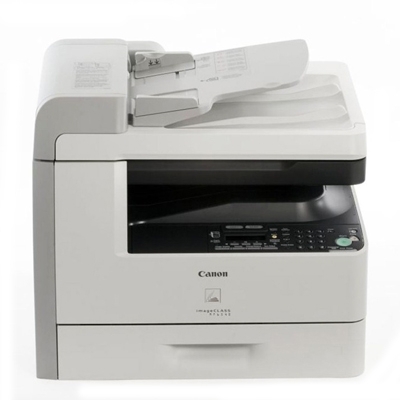
The LaserBase MF6580PL was the everything-included model of Canon's European PL line: Ethernet network printing, PCL support and Super G3 fax on one monochrome laser multifunction printing at 23 pages per minute, with print, scan, copy and fax and automatic duplexing across all of it. An office that wanted one machine to anchor a small network bought this one. Its appetite is modest, though — everything it prints comes from the Canon 106 black toner cartridge, rated for up to 5,000 pages.
Flagship machines earn their keep by being shared, and shared machines consume toner on the group's schedule rather than any one user's. The MF6580PL also sits at the crossing of two worlds — walk-up copying and faxing on the panel, PCL print streams arriving over the network — and both worlds draw on the same cartridge. A single, common cartridge across a flagship like this is a quiet virtue: no color sets, no separate drum orders, just one code to keep in stock. Compatible cartridges on this page include a 1-year warranty and 1-year returns.
Toner Cartridges for LaserBase MF6580PL
| Cartridge | Color | Page Yield |
|---|---|---|
| Canon 106 Jumbo | Black | See product page |
| Canon 106 | Black | 5,000 pages |
| Canon 106 Premium Quality — 5 Pack | Black | 5,000 pages per cartridge |
| Canon 106 — 2 Pack | Black | 5,000 pages per cartridge |
| Canon 106 Jumbo — 4 Pack | Black | See product page |
| Canon 106 — 5 Pack | Black | 5,000 pages per cartridge |
| Canon 106 — 3 Pack | Black | 5,000 pages per cartridge |
| Canon 106 — 10 Pack | Black | 5,000 pages per cartridge |
Which cartridge should you buy?
Let the machine's role decide. A flagship that anchors a network usually justifies the Canon 106 Jumbo: the longer interval between changes suits a printer nobody in particular babysits, and its rated yield is on its product page. If your MF6580PL mostly handles moderate, everyday volume, the standard Canon 106 remains the economical default at 5,000 pages per fill. Stocking spares matters as much as the fill size — the 2 pack guarantees one cartridge is always waiting, and the larger packs, including the premium-quality 5 pack, suit offices standardizing on this Canon 106 family across several machines.
Chip, toner and everyday use
Two habits keep a networked flagship printing cleanly. First, treat cartridge changes as a thirty-second craft, not a yank-and-shove: open the front cover, withdraw the spent unit by its handle, rock the replacement gently end to end so the toner bed levels, strip its seals, and seat it fully. Second, respect storage — cartridges waiting in a warm, bright room age before they are ever installed, so keep the spare sealed in its bag in a cool cabinet. The 5,000-page figure is measured at about 5% coverage; heavy fax and form traffic will land below it, which is normal.
Frequently Asked Questions
What separates the MF6580PL from the MF6580?
Printer language. The LaserBase MF6580 covers the standard driver world, while the PL adds PCL support for systems and applications that print in PCL. Speed, fax, networking and the Canon 106 cartridge are shared.
Can one cartridge stock cover both the fax and network printing sides?
Yes — there is only one cartridge in this machine. Faxes it receives, copies made at the panel and PCL jobs arriving over Ethernet all print from the same Canon 106.
Is a separate drum part of the running costs?
No separate drum exists for this model. The drum is part of the all-in-one cartridge, so each replacement cartridge renews it, and the ordering list stays at a single line.
How do I know the compatible cartridge will be accepted?
These compatible Canon 106 cartridges carry the chip the machine reads and are built for this cartridge slot. They are backed by a 1-year warranty, with 1-year returns if a cartridge does not perform.
More printers that use the same cartridges
The flagship shares its cartridge with the whole band below — LaserBase, imageCLASS and LASERCLASS badges alike: LaserBase MF6530PL, LaserBase MF6540, LaserBase MF6540pl, LaserBase MF6550, LaserBase MF6550PL, LaserBase MF6560, LaserBase MF6560PL, LaserBase MF6580, LaserClass 830I, ImageClass MF6500, ImageClass MF6530, ImageClass MF6531, ImageClass MF6540, ImageClass MF6540RF, ImageClass MF6550, ImageClass MF6560, ImageClass MF6560CX, ImageClass MF6580, ImageClass MF6580CX, ImageClass MF6590, ImageClass MF6590rf, ImageClass MF6595, ImageClass MF6595CX, LASERCLASS 810, LASERCLASS 830, LaserBase MF6530.