




LaserBase MF6580
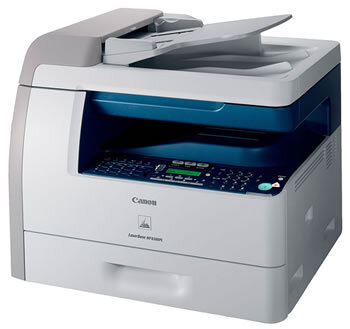
Networking is the headline on the LaserBase MF6580: this is Canon's European version of the imageCLASS MF6580, a shared monochrome laser multifunction running at 23 pages per minute with Ethernet and USB connections, print, scan, copy and fax, and automatic duplexing as standard. A department's worth of users can send work to it, and everything they print comes out of one supply — the Canon 106 black toner cartridge, rated for up to 5,000 pages.
A shared machine changes the toner equation. Nobody owns the moment it runs dry: the cartridge is drained by a dozen people's habits, the low-toner warning is somebody else's problem, and the person who finally hits empty is never the person who saw the warning. The practical answer is a shelf policy rather than a heroic cartridge — keep at least one spare in the room, and let the multipacks below do the restocking arithmetic. Compatible Canon 106 cartridges here carry a 1-year warranty and 1-year returns.
Toner Cartridges for LaserBase MF6580
| Cartridge | Color | Page Yield |
|---|---|---|
| Canon 106 — 2 Pack | Black | 5,000 pages per cartridge |
| Canon 106 | Black | 5,000 pages |
| Canon 106 — 5 Pack | Black | 5,000 pages per cartridge |
| Canon 106 Jumbo | Black | See product page |
| Canon 106 — 10 Pack | Black | 5,000 pages per cartridge |
| Canon 106 — 3 Pack | Black | 5,000 pages per cartridge |
| Canon 106 Jumbo — 4 Pack | Black | See product page |
| Canon 106 Premium Quality — 5 Pack | Black | 5,000 pages per cartridge |
Which cartridge should you buy?
For a networked MF6580, buy for the group, not the individual. The standard Canon 106 at 5,000 pages is the baseline unit; the question is how many of them should live on the shelf. A small workgroup usually lands on the 2 or 3 pack — one in the machine, one or two in reserve. Busier floors should compare the Canon 106 Jumbo, which spaces changes further apart, against the 5 and 10 packs of the standard fill; the jumbo's rated yield is listed on its product page. Either way, the cost per page improves as the pack size grows, and every option on this page fits the same slot.
Chip, toner and everyday use
On a shared machine, most "cartridge problems" are seating problems: a unit pushed in by a hurried colleague stops a few millimeters short and the printer complains. Show the team the full routine once — front cover open, old cartridge out by its handle, new one rocked gently to distribute the toner, then slid in until it seats with a click — and call-outs drop away. Toner yield figures assume roughly 5% coverage, so a department printing dense forms will cycle cartridges faster than the rating suggests; that is arithmetic, not a fault.
Frequently Asked Questions
Does the MF6580 share its cartridge with the smaller MF6560 models?
Yes. The whole band of Canon multifunctions in the family list below runs on the Canon 106, so one stock of cartridges can serve a mixed fleet of LaserBase, imageCLASS and LASERCLASS machines.
Does duplex printing save toner as well as paper?
Duplexing halves paper use; toner use follows the amount of text and image printed, not the number of sheets. Expect the cartridge to last the same number of printed pages either way — those pages simply land on fewer sheets.
What happens when the cartridge runs out mid-job on a network machine?
The job pauses and the machine reports its toner status. Swap in a fresh Canon 106 and printing resumes; keeping a spare beside a shared printer is the difference between a two-minute pause and a stalled office.
Is the jumbo cartridge a different fit?
No. The Canon 106 Jumbo is the same cartridge shape with a larger fill, made for this same slot. Its yield is stated on its product page.
More printers that use the same cartridges
Every model in this list drinks from the same Canon 106 shelf, whichever badge it wears: ImageClass MF6580CX, ImageClass MF6590, ImageClass MF6590rf, ImageClass MF6595, ImageClass MF6595CX, LASERCLASS 810, LASERCLASS 830, LaserBase MF6530, LaserBase MF6530PL, LaserBase MF6540, LaserBase MF6540pl, LaserBase MF6550, LaserBase MF6550PL, LaserBase MF6560, LaserBase MF6560PL, LaserBase MF6580PL, LaserClass 830I, ImageClass MF6500, ImageClass MF6530, ImageClass MF6531, ImageClass MF6540, ImageClass MF6540RF, ImageClass MF6550, ImageClass MF6560, ImageClass MF6560CX, ImageClass MF6580.