




ImageRunner 3230
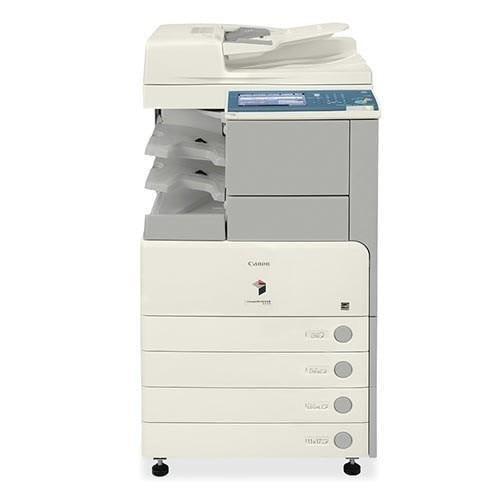
The Canon imageRUNNER 3230 slots into the 32xx generation at 30 pages per minute — a mid-ladder black-and-white MFP for steady departmental volume. It uses the GPR-15 cartridge, rated for approximately 21,000 pages, and the same toner also goes by GPR15BK in the catalogue.
The 3230 shares its networked copier-based platform with the ImageRunner 3225 and ImageRunner 3235, with standard Ethernet and automatic duplexing, so it arrives ready for a shared floor. Thirty pages per minute is the middle of this range — fast enough for a department, without the bulk of the top of the line.
Toner Cartridges for ImageRunner 3230
| Cartridge | Color | Page Yield |
|---|---|---|
| GPR15BK — 3-pack | Black | 21,000 pages per cartridge |
| GPR15BK — 2-pack | Black | 21,000 pages per cartridge |
| GPR-15 — Single cartridge | Black | 21,000 pages |
| GPR15BK — Single cartridge | Black | 21,000 pages |
| GPR15BK — 5-pack | Black | 21,000 pages per cartridge |
| GPR15BK — 10-pack | Black | 21,000 pages per cartridge |
| GPR-15 — 5-pack | Black | 21,000 pages per cartridge |
| GPR-15 — Premium Quality 5-pack | Black | 21,000 pages per cartridge |
Which cartridge should you buy?
For a departmental machine, the 2-pack is the right default: one cartridge working, one waiting. The 3-pack adds a little more buffer, and the 5-pack and 10-pack suit sites where several GPR-15 machines draw from the same cupboard. The Premium Quality 5-pack holds the same black toner as the standard 5-pack — the difference is positioning, not compatibility.
Chip, toner and everyday use
Compatible GPR-15 cartridges carry the chip the 3230 expects, so toner levels report normally and the machine does not stop for a cartridge it cannot read. Installation is the usual short job: open the front cover, remove the spent cartridge, unpack the new one, rock it gently from side to side so the toner spreads evenly, and slide it in until it clicks. Keep spares flat, cool, and out of direct sunlight, and do not leave a cartridge sitting in a hot car or a damp store room. If the print starts to look pale all over, a gentle rock often squeezes out a few more days while the spare is fetched. Every compatible cartridge is covered by a 1-year warranty and 1-year returns.
Frequently Asked Questions
What toner does the imageRUNNER 3230 use?
The 3230 uses the Canon GPR-15 black toner cartridge, rated for approximately 21,000 pages at 5% coverage.
Which other models share this cartridge?
The whole GPR-15 family, including the ImageRunner 3225 and ImageRunner 3235 on the same platform. The full list is at the bottom of this page, and one spare cartridge fits any of them.
How many pages does a cartridge print?
About 21,000 pages at 5% coverage. A departmental machine reaches that sooner than a desk copier, so the 2-pack is the usual buy.
How do I install a GPR-15 cartridge?
Open the front cover, take the old cartridge out, unpack the new one, rock it gently to spread the toner, and slide it in until it clicks into place.
More printers that use the same cartridges
The 32xx models lead the list below; every machine here takes the same GPR-15 cartridge: ImageRunner 3225, ImageRunner 3225F, ImageRunner 3235, ImageRunner 3235F, ImageRunner 3235I, ImageRunner 3245, ImageRunner 3245F, ImageRunner 3245I, ImageRunner 2230, ImageRunner 2230G, ImageRunner 2270, ImageRunner 2770, ImageRunner 2830, ImageRunner 2870, ImageRunner 3025, ImageRunner 3025N, ImageRunner 3030, ImageRunner 3035, ImageRunner 3035N, ImageRunner 3045, ImageRunner 3045N, ImageRunner 3530, ImageRunner 3570, ImageRunner 4570