




MFC-L5900DW
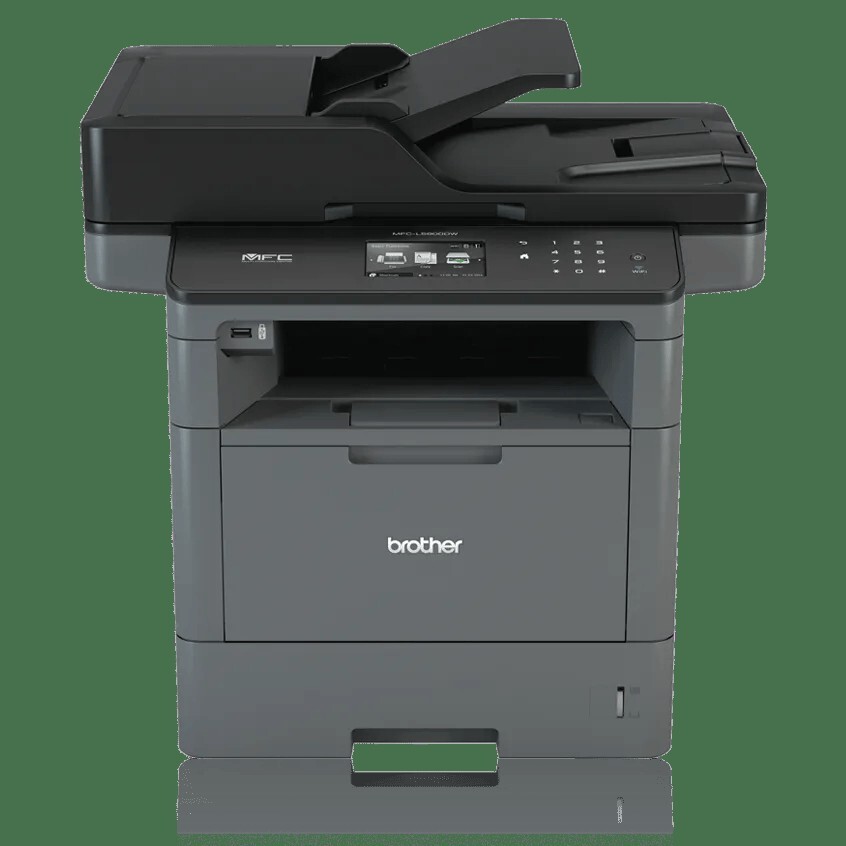
Two supplies keep the Brother MFC-L5900DW printing: toner that carries the image, and a drum that outlives several cartridges. The DR820 drum unit — also listed as DR-820 — is rated for about 30,000 pages on single-page jobs, rising toward 50,000 pages on three-page jobs. Toner comes in two sizes: the TN820 standard cartridge at about 3,000 pages, or the TN850 high-yield cartridge at about 8,000 pages. Compatible and genuine Brother versions of all three supplies are stocked below.
On a shared office machine, the best supply policy is the one nobody has to think about. The MFC-L5900DW will typically serve several people with different habits — one prints a contract a day, another runs the month-end statements — so the practical move is to standardize: pick the tier that matches the machine's average month, keep one spare of it and one spare drum, and let the counters do the rest. Variety feels flexible; a standard is what actually prevents the empty-printer morning.
Toner Cartridges for MFC-L5900DW
| Cartridge | Color | Page Yield |
|---|---|---|
| TN820 · genuine toner · 1-pack | Black | 3,000 pages |
| TN820 · compatible toner · 10-pack | Black | 3,000 pages |
| TN820 · compatible toner · 5-pack | Black | 3,000 pages |
| TN820 · compatible toner · 3-pack | Black | 3,000 pages |
| TN820 · compatible toner · 2-pack | Black | 3,000 pages |
| TN820 · compatible toner · 1-pack | Black | 3,000 pages |
| TN850 · genuine toner · 4-pack | Black | 8,000 pages |
| TN850 · genuine toner · 3-pack | Black | 8,000 pages |
| TN850 · genuine toner · 2-pack | Black | 8,000 pages |
| TN850 · genuine toner · 1-pack | Black | 8,000 pages |
| TN850 · compatible toner · 10-pack | Black | 8,000 pages |
| TN850 · compatible toner · 5-pack | Black | 8,000 pages |
| TN850 · premium compatible toner · 5-pack | Black | 8,000 pages |
| TN850 · compatible toner · 3-pack | Black | 8,000 pages |
| TN850 · compatible toner · 2-pack | Black | 8,000 pages |
| TN850 · compatible toner · 2-pack | Black | 8,000 pages |
| TN850 · compatible toner · 1-pack | Black | 8,000 pages |
Drum units (replaced on their own schedule):
- DR820 · compatible drum unit · 1-pack — a 30,000-page rating
- DR820 · compatible drum unit · 2-pack — a 30,000-page rating
- DR820 · compatible drum unit · 5-pack — a 30,000-page rating
- DR820 · compatible drum unit · 3-pack — a 30,000-page rating
- DR820 · compatible drum unit · 4-pack — a 30,000-page rating
- DR820 · compatible drum unit · 1-pack — a 30,000-page rating
- DR820 · compatible drum unit · 2-pack — a 30,000-page rating
- DR820 · compatible drum unit · 1-pack — a 30,000-page rating
- DR820 · genuine drum unit · 1-pack — a 30,000-page rating
Which cartridge should you buy?
Ask how often you want to open the supply drawer. The TN820 asks roughly every 3,000 pages; the TN850 stretches that visit to about every 8,000 pages and cuts the cost of each page in the process. For a machine printing a few hundred pages a week, the TN850 turns toner into a quarterly chore instead of a monthly one.
If the machine's volume is genuinely light or unpredictable, the TN820 keeps less money sitting in a drawer. Both tiers are listed in compatible and genuine Brother versions, and multipacks — up to 10-packs — are there for offices standardizing across more than one machine in this family.
Chip, toner and everyday use
Page yields are estimates worked out at about 5% coverage — a page of ordinary text. Pages heavy with graphics, bold headings or scanned forms drink toner faster, so a cartridge that ends early on a graphics-heavy month is not necessarily faulty. Near the end of a cartridge, take it out and rock it gently from side to side: the toner settles and redistributes, print darkens again, and you gain a grace period to get the replacement ordered rather than a hard stop mid-job.
Frequently Asked Questions
What is the difference between the TN820 and the TN850?
Capacity. Both cartridges fit the MFC-L5900DW and print the same black output; the TN820 is rated for about 3,000 pages and the TN850 for about 8,000, which is why the TN850 works out cheaper per page for regular printing.
Does the MFC-L5900DW need a drum as well as toner?
Yes. The DR820 is a separate drum unit that the toner cartridge clips into. It lasts far longer than any cartridge — about 30,000 pages on single-page jobs — and is replaced separately when it wears.
The printer says the drum is nearing its end, but prints still look fine. Must I change it now?
Not necessarily. The drum message is driven by a page counter, not by the printed result. If output is still clean, you can run on; order the replacement DR820 so it is on hand, and swap when streaks, repeating spots or fading actually appear.
Can I mix genuine and compatible cartridges in the same machine?
Yes. The MFC-L5900DW takes the same TN820, TN850 and DR820 supplies in either line, and nothing in the machine prevents running, for example, a compatible toner in front of a genuine drum. Each listing below states which line it belongs to.
More printers that use the same cartridges
One shelf of supplies covers this whole family — the printers, all-in-ones and cartridge pages that share the TN820, TN850 and DR820 range are listed in full here:
MFC-L6900DWX, MFC-L6900DWG, MFC-L6900DW, MFC-L6900, MFC-L6800DW, MFC-L6800, MFC-L6750DW, MFC-L6750, MFC-L6700DW, MFC-L6700, MFC-L5900, MFC-L5850DW, MFC-L5850, MFC-L5800DW, MFC-L5800, MFC-L5750DW, MFC-L5700DW, MFC-L5700DN, MFC-L5700, MFC-8840DTN, MFC-8840DN, MFC-8840D, MFC-8840, MFC-8640D, MFC-8640, MFC-8440DN, MFC-8440D, MFC-8440, MFC-8220N, MFC-8220, MFC-8120NCH, MFC-8120, HL-L6400DWX, HL-L6400DWT, HL-L6400DWG, HL-L6400DW, HL-L6400, HL-L6300DW, HL-L6300 T, HL-L6300, HL-L6250DW, HL-L6250 DN, HL-L6250, HL-L6200DWT, HL-L6200DW, HL-L6200, HL-L5200DWT, HL-L5200DW, HL-L5200, HL-L5100DN, HL-L5100, HL-L5000D, HL-L5000, HL-5170N, HL-5170DNLT, HL-5170DN, HL-5170DLT, HL-5170D, HL-5170, HL-5150DLT, HL-5150D, HL-5150, HL-5140LT, HL-5140, HL-5130, HL-5100, DCP-L6600, DCP-L5650DN, DCP-L5650, DCP-L5600DN, DCP-L5600, DCP-L5500DN, DCP-L5500, DCP-8045DN, DCP-8045D, DCP-8045, DCP-8040D, DCP-8040, Brother-TN880, Brother-TN850, Brother-TN820, Brother-TN570