






 See Compatible Printers
 Read more about our ink!
Brother
Compatible Brother DR820 Toner Cartridge Black
- Page Yield:
- Black:30000
- Availability:
- In Stock
- Shipping:
- Calculated at Checkout

Amazon Price:

- Page Yield:
- Black:30000
- Availability:
- In Stock
- Shipping:
- Calculated at Checkout
- Compatible Printers
- DCP-L5500DN
- DCP-L5600DN
- DCP-L5650DN
- DCP-L6600
- DW
- HL-L5000D
- HL-L5100DN
- HL-L5200DW
- HL-L5200DWT
- HL-L6200DW
- HL-L6200DWT
- HL-L6250
- DN
- HL-L6250DW
- HL-L6300
- DWT
- HL-L6300DW
- HL-L6400DW
- HL-L6400DWT
- MFC-L5700DN
- MFC-L5700DW
- MFC-L5750DW
- MFC-L5800DW
- MFC-L5850DW
- MFC-L5900DW
- MFC-L6700DW
- MFC-L6750DW
- MFC-L6800DW
- MFC-L6900DW
- Brother-TN570
- Brother-TN820
- Brother-TN850
- Brother-TN880
- DCP-8040
- DCP-8040D
- DCP-8045
- DCP-8045D
- DCP-8045DN
- DCP-L5500
- DCP-L5600
- DCP-L5650
- HL-5100
- HL-5130
- HL-5140
- HL-5140LT
- HL-5150
- HL-5150D
- HL-5150DLT
- HL-5170
- HL-5170D
- HL-5170DLT
- HL-5170DN
- HL-5170DNLT
- HL-5170N
- HL-L5000
- HL-L5100
- HL-L5200
- HL-L6200
- HL-L6250 DN
- HL-L6300 T
- HL-L6400
- HL-L6400DWG
- HL-L6400DWX
- MFC-8120
- MFC-8120NCH
- MFC-8220
- MFC-8220N
- MFC-8440
- MFC-8440D
- MFC-8440DN
- MFC-8640
- MFC-8640D
- MFC-8840
- MFC-8840D
- MFC-8840DN
- MFC-8840DTN
- MFC-L5700
- MFC-L5800
- MFC-L5850
- MFC-L5900
- MFC-L6700
- MFC-L6750
- MFC-L6800
- MFC-L6900
- MFC-L6900DWG
- MFC-L6900DWX
- Specifications
- SKU:
- CS-Brother_New-DR820-Black
- Printer Brand:
- Brother
- OEM Number:
- DR820
- Ink Color:
- Black
- Page Yield:
- Black:30000
- Printer Type:
- Laser Cartridge
- Condition:
- New Compatible
- Description
- Reviews

/> 

Enhance the functionality of your Brother laser printer with the DR820 drum unit, a critical component meticulously designed for use in various models, including the DCP-L5500DN, DCP-L5600DN, DCP-L5650DN, HL-L5000D, HL-L5100DN, HL-L5200DW, HL-L5200DWT, HL-L6200DW, HL-L6250DW, HL-L6300DW, HL-L6400DW, MFC-L5700DW, MFC-L5800DW, MFC-L5850DW, MFC-L5900DW, MFC-L6700DW, MFC-L6750DW, MFC-L6800DW, and MFC-L6900DW. The DR820 drum unit is engineered to deliver optimal print quality, ensuring sharp and precise text alongside high-resolution graphics for a diverse range of printing tasks. Tailored for compatibility with designated Brother laser printers, this drum unit plays a pivotal role in achieving professional and reliable prints consistently. Compatible with a wide array of Brother laser printers, including models from the DCP, HL, and MFC series, the DR 820 drum unit seamlessly integrates with devices such as the DCP-L5500DN, DCP-L5600DN, DCP-L5650DN, HL-L5000D, HL-L5100DN, HL-L5200DW, HL-L5200DWT, HL-L6200DW, HL-L6250DW, HL-L6300DW, HL-L6400DW, MFC-L5700DW, MFC-L5800DW, MFC-L5850DW, MFC-L5900DW, MFC-L6700DW, MFC-L6750DW, MFC-L6800DW, and MFC-L6900DW. This ensures a consistent and efficient performance that meets the demands of various printing tasks. Experience the user-friendly convenience of the DR-820 drum unit, designed for easy installation and replacement. As an essential component within your laser printer, it contributes to the longevity and reliability of your printing equipment. Regularly replacing the drum unit is crucial for maintaining overall print quality and extending the life of your Brother laser printer. Opt for the DR820 drum unit to optimize your laser printer's functionality, whether you're printing documents, reports, or high-quality graphics. Trust in the compatibility and performance of compatible Brother drum units to meet the standards of your DCP, HL, and MFC series printers.
Frequently Asked Questions
My printer says "replace drum" — how urgent is that message?
Treat it as a planned job for this week, not a someday item. The message appears when the drum counter reaches its rated life of about 30,000 pages. Print quality usually deteriorates as you push beyond it, so fitting this DR820 — $34.55 — and resetting the counter restores clean output before staff start complaining.
My toner is still full but prints are fading — could it really be the drum?
Yes, and that combination is the classic clue. A fresh or half-full cartridge rules out toner shortage; fading, gray backgrounds, or the same mark repeating on page after page point to the imaging surface. The drum creates the image — the toner cartridge, which sits inside the drum, only supplies the powder.
After fitting this drum, do I need to do anything else?
Two small steps: transfer your existing TN820, TN850, or TN880 cartridge into the new drum (the drum itself holds no toner), install the combined unit, then reset the drum counter in the printer menu so the next 30,000-page count starts from zero.
How long should this replacement last compared with a toner cartridge?
Much longer. Expect roughly 30,000 pages — about two and a half 12,000-page TN880 cartridges, and many more of the smaller TN820 or TN850 cartridges — before this drum needs attention again. For the full platform compared — all four toner steps (TN820, TN850, TN880 and TN890) with their pack prices and cost per page, plus which machines take the DR820 drum and which five need the DR890 instead — see our Best Brother TN850 Toner Cartridges guide. The Best Brother DR820 Drum Unit guide puts the drum's life next to each toner tier's — about ten TN820 cartridges, three and three-quarter TN850s or two and a half TN880s — and explains Brother's per-job rating behind those numbers.
Timing confirmed, I still want to check the model list — where is it?
Right here is the list for this drum: DCP-L5500DN, DCP-L5600DN, DCP-L5650DN, DCP-L6600, HL-L5000D, HL-L5100DN, HL-L5200DW, HL-L5200DWT, HL-L6200DW, HL-L6200DWT, HL-L6250, HL-L6250DW, HL-L6300, HL-L6300DW, HL-L6400DW, HL-L6400DWT, MFC-L5700DN, MFC-L5700DW, MFC-L5750DW, MFC-L5800DW, MFC-L5850DW, MFC-L5900DW, MFC-L6700DW, MFC-L6750DW, MFC-L6800DW and MFC-L6900DW
What backup do I have after the swap, and who can I call?
This compatible drum is protected by warranty coverage for 1 year, with free returns for 1 year outlined on our Shipping & Returns page. Orders leave from warehouses in Illinois, Pennsylvania, Georgia, and California, and support is open 9 AM–5 PM CST for fitting questions.
We print heavy-coverage pages — will this drum still see about 30,000 pages?
Very likely, yes. Dense coverage drains a toner cartridge faster, but a drum's life is counted in pages passed over its surface, not in toner laid down. Your TN880 may come up short of its 12,000-page rating in a heavy month while the DR820 keeps imaging page after page — the two parts age by different measures, which is exactly why their replacement messages arrive separately.
How should I check that the new drum actually fixed the problem?
Reprint the page that looked worst before the swap — the one with the fading or the repeating marks — and look at the third or fourth copy rather than the very first. That is the fair comparison: same document, same cartridge, new drum. If the marks are gone and the page is even, the diagnosis was right and the old drum was the cause.
What is the one detail to get right when I order a drum for this printer again?
The letter in the code. This part is the DR820 drum; the TN820 is a 3,000-page toner cartridge for the same machines, and the two names differ by a single character. Read the code off the label of the unit you removed and order exactly that — it takes seconds, and it removes the one realistic way to receive the wrong box.
Does this machine's copying count toward the new drum's life?
If you run one of the MFC models on this drum's list, yes: copies are imaged on the same drum surface as prints, so every copied page spends a little of the DR820's roughly 30,000 pages. Offices that copy files and forms all day will see the drum message return sooner than their print totals alone would forecast — copying is printing, as far as the drum is concerned.
About This DR820 Drum Unit — Single
This single DR820 drum unit at $34.55 is the timely fix for a printer whose drum life has run out: 30,000 fresh pages of imaging for the TN880 platform and its TN820/TN850 companions, available from our Brother category. Fit it when the drum warning appears or print quality says the old unit is done, and your current toner cartridge simply carries over into it.
Printer showing "Replace Toner" or "No Toner" after a cartridge change? Our TN820, TN850 and TN880 troubleshooting guide walks through the reset-gear check, the counter reset and the three-size rule for this family.
Related Items


Brother
Compatible Brother DR820 Toner Cartridge Black
/>



Brother
Compatible Brother DR820 Toner Cartridge Black 2 Pack
/>
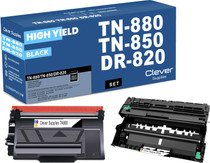

Brother
Compatible Brother DR820 Black Drum and Toner Set
/>


Brother
Compatible Brother DR820 Black Drum and 3 Toner Set
/>