





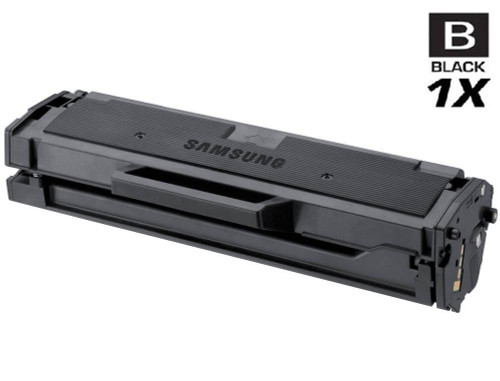
 See Compatible Printers
 Read more about our ink!
Samsung
Compatible Samsung ML-2160W Laser Toner Cartridge Black
- Page Yield:
- 1,500 Pages
- Availability:
- In Stock
- Shipping:
- Calculated at Checkout

Amazon Price:

- Page Yield:
- 1,500 Pages
- Availability:
- In Stock
- Shipping:
- Calculated at Checkout
- Compatible Printers
- Specifications
- SKU:
- ML-2160W
- Printer Brand:
- Samsung
- OEM Number:
- MLT-D101S
- Ink Color:
- Black
- Page Yield:
- 1,500 Pages
- Printer Type:
- Laser Cartridge
- Condition:
- New Compatible
- Description
- Yields up to 1500 pages
- Ink/Toner: Color Black
- Ink/Toner Pack Size: 1/Pack
- Supply Type: Toner
- Cartridge Yield Type: Standard
- Compatible with: Samsung ML 2160 ML 2165 SCX 3400 SCX 3406 SF 760 SF 761 etc. series laser printers
- Ink/Toner Cartridge Type: Compatible
- Warranty: 1 year for — all supplies
- Reviews

/> 

Compatible Samsung ML-2160W Laser Toner Cartridge Black is easy to install delivers great print quality and professional results for both text and images
Samsung Black toner cartridge is designed specifically to work with Samsung printers for exceptional reliability and performance. Cartridge offers vibrant print quality and features a 1500-pages standard yield for long-lasting use.
Features:
Frequently Asked Questions
How long should one cartridge last in an ML-2160W that prints a few times a week?
Light, intermittent use is exactly the pattern this cartridge suits. The MLT-D101S is rated at 1,500 pages, so an ML-2160W printing a few dozen pages a week can run for many months on a single unit — a year or more is not unusual. Toner does not dry out the way ink does, so the gaps between print jobs cost you nothing; the count only moves when pages actually come out.
The cartridge that came with my ML-2160W ran out surprisingly fast — will this one do better?
Almost certainly, yes. Printers like this are typically shipped with a small starter cartridge holding a fraction of a full fill, so the first cartridge's short life is normal and not a fault. This is a full-size MLT-D101S rated at the complete 1,500 pages, which is why replacements routinely outlast the cartridge the machine arrived with by a wide margin.
How can I tell how much toner is left before it runs out?
On a compact printer of this generation the print itself is the gauge. Watch for the early signs: text that looks gray rather than black, pages that fade towards one edge, or output that needs a second pass to read comfortably. Any of those means the cartridge is in its final stretch — the right moment to have the next one ready rather than a crisis to solve after the last page fails.
What does this cartridge cost per ream of paper?
One cartridge covers 1,500 pages, which is three standard 500-sheet reams. At $32.73 the toner cost of printing a full ream works out to about $10.90 — a useful way to budget if your ML-2160W mostly turns out documents by the stack rather than the page. Per page, that is the rated figure of roughly 2.18 cents at standard coverage.
Which other Samsung models take this same cartridge?
The MLT-D101S is shared across Samsung's compact range of the period. Besides the ML-2160W, the same cartridge serves the ML-2165W, SCX-3400F, SCX-3400FW, SCX-3405, SCX-3405FW and SCX-3405W. The check that matters is the number on the cartridge coming out of your printer: if it says MLT-D101S, this is its replacement.
What if the cartridge leaks or streaks straight out of the box?
Then it comes back to us. This cartridge is covered by a one-year warranty with returns free for a full year — a unit that leaks, streaks or fails early is returnable at no cost to you, and the terms are spelled out on the shipping and returns page. We dispatch from warehouses in IL, PA, GA and CA, and support answers Monday to Friday, 9 AM to 5 PM CST.
How should I judge a newly fitted cartridge in the ML-2160W?
Print a few ordinary pages and judge the third or fourth, not the first. A fresh MLT-D101S can need a sheet or two for its toner to settle evenly, so early lightness on page one is not a verdict. If the output is still patchy after several pages, lift the cartridge out, reseat it firmly and test again before deciding the unit itself is at fault.
Why hold on to the old cartridge briefly after the swap?
It is your ready-made comparison. If the replacement's prints look wrong in the same way the old cartridge's did, the printer — not the toner — is where the problem lives; if the fault vanishes, the old unit was responsible. A few days of clean printing from the new MLT-D101S settles the question, and only then does the old cartridge go for recycling.
What is the safest way to reorder this cartridge by phone or from memory?
Order by the cartridge code, letter for letter: MLT-D101S. The model name on the printer is a weaker reference, because this one cartridge serves several Samsung machines and similar-looking codes exist across the range. Reading the code off the cartridge you removed — or off its box, kept for the purpose — guarantees the replacement that arrives is the unit your ML-2160W actually takes.
How does the ream figure work if I often print on both sides?
The cartridge's 1,500 pages are printed sides. Run single-sided, that is three 500-sheet reams of paper; feed the sheets twice to print both faces and the same MLT-D101S life covers 750 sheets carrying 1,500 pages of content. Paper savings from duplexing are real, but budget the cartridge by sides: your page count, not your paper stack, is what empties it.
About This Cartridge for the Samsung ML-2160W
A full-size replacement for the Samsung ML-2160W: an MLT-D101S cartridge rated at 1,500 pages and priced at $32.73. It drops into the same slot as the starter cartridge the printer shipped with and is built to deliver the model's full rated yield, backed by a year of warranty cover and a year of free returns. Just one of the compatible Samsung cartridges in our range for this compact series.
Related Items

Samsung
Compatible Samsung ML-2160W Laser Toner Cartridge Black 5 Pack
/>

Samsung
Compatible Samsung ML-2155W Laser Toner Cartridge Black
/>
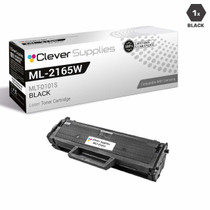
Samsung
Compatible Samsung ML-2165W Laser Toner Cartridge Black
/>

Samsung
Compatible Samsung ML-1750 Laser Toner Cartridge Black
/>