




C5510MFP
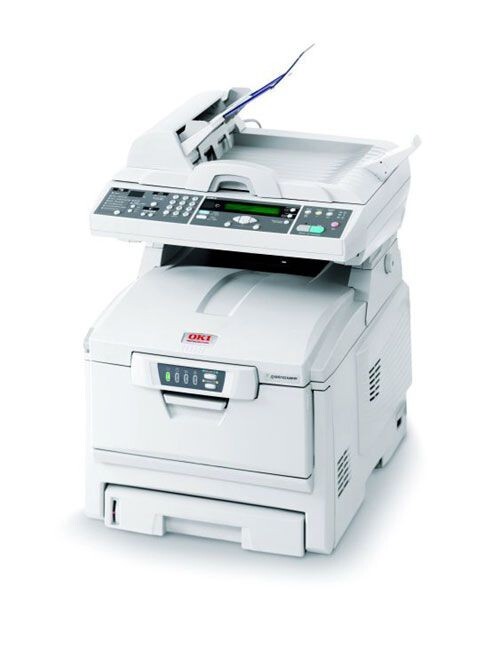
The OKI C5510MFP brings the C5510's color laser engine into a multifunction package, adding copying and scanning for offices that want one machine at the center of the desk. It feeds on Type C6 toner, and the cartridges stocked on this page are the high-yield colors: yellow 42127401, magenta 42127402 and cyan 42127403. The family's black cartridge is 42127404, which completes the four-slot set; this page stocks the three colors, so it is the color slots it exists to refill.
An MFP leads a double life. Half its work — scanning to email or a network folder — never touches toner at all, while the print and copy side draws on the same four cartridges as any color laser. That split makes the C5510MFP forgiving on consumables in a scan-heavy office, but a busy copy queue tells a different story: walk-up copying is hard to predict, and color copies drain one cartridge at a time, usually with no warning until the output starts to look thin.
Toner Cartridges for C5510MFP
| Cartridge | Color | Page Yield |
|---|---|---|
| 42127401 | Yellow (high yield) | See product page |
| 42127402 | Magenta (high yield) | See product page |
| 42127403 | Cyan (high yield) | See product page |
| C5100n 3 Color Set | Color set | See product page |
| C5100n 6 Color Set | Color set | See product page |
The same three cartridges are also listed on this page under the C5100n name: C5100n cyan cartridge, C5100n magenta cartridge, C5100n yellow cartridge.
Which cartridge should you buy?
Start with the slot that is actually empty. The three cartridges on this page are the high-yield colors for the C5510MFP, and each is replaced independently, so there is no reason to change a set when only cyan has run dry. Color consumption on an MFP is lopsided by nature — one popular report or a week of copying charts can empty a single color while the others sit nearly full. If it is the black slot that needs filling, the number to look for is 42127404, the black member of this same Type C6 family; it is not among the listings on this page. For the colors, keeping one spare of the shade your office copies most is the cheapest insurance against a stalled queue.
Chip, toner and everyday use
The cartridges report their levels through a chip, so the panel can warn before a color gives out mid-copy — worth watching on a shared machine nobody owns. After changing a color, run the printer's color calibration so the four toners realign; prints that looked balanced before a swap can drift slightly until you do. Yield figures assume roughly 5% coverage, and a full-color copied page uses far more than that, so copy-heavy weeks shorten cartridge life well beyond the page count alone. Store spares sealed and flat, away from heat and bright light.
Frequently Asked Questions
What toner set fits the OKI C5510MFP?
The C5510MFP uses the Type C6 family. This page stocks the high-yield colors — yellow 42127401, magenta 42127402 and cyan 42127403 — and the set is completed by black 42127404. Use these exact US part numbers; similar-looking OKI codes from other families are keyed differently and will not fit.
Does scanning on the C5510MFP consume any toner?
No. Scanning to email, a network folder or USB uses no toner at all. Only printing and copying draw from the cartridges, which is why a scan-heavy office sees such long cartridge life from this model.
Why do color prints from my C5510MFP carry a green tint?
A green cast usually means the magenta cartridge is running low while cyan and yellow are still printing — the balance tips toward green. Check the 42127402 level, replace it if it is depleted, then run the color calibration to rebalance the output before judging the next print.
Do other OKI models use these same color cartridges?
Yes. The 42127401–42127403 colors serve the whole C5100-to-C5510 generation of OKI color machines, which is why this page also carries them under C5100n listings. The related models are listed in full below.
More printers that use the same cartridges
The Type C6 color cartridges are shared across OKI's C5 generation, including: ES1624N MFP, C5100, C5100N, C5150, C5150N, C5200, C5200N, C5250, C5250DN, C5250N, C5300, C5300N, C5400, C5400DN, C5400DTN, C5400N, C5400TN, C5450, C5450dn, C5450N, C5510, C5510n MFP, C5510N.