




MagiColor 1690
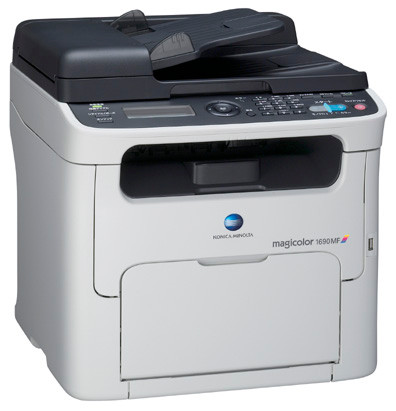
The MagiColor 1690 is the sprinter of the 16xx line — the fastest printer-only model in the family, built for desks and departments that measure waiting in complaints. Speed invites volume, and volume is where the high-capacity end of the A0V3 family earns its place: A0V301F black at about 2,500 pages, backed by A0V306F yellow, A0V30CF magenta and A0V30HF cyan. Standard-yield colors remain on the family tree (A0V305F, A0V30AF, A0V30GF) for machines whose pace turns out gentler than their engine.
There is a small irony in owning the fast model: the printer stops being the bottleneck, so the cartridges become it. A 1690 that clears jobs quickly also clears toner quickly, and its owners feel supply decisions more sharply than anyone else in the 16xx line. The owners who stay happy with this machine are the ones who treat toner as part of its speed — deep cartridges, a spare black always in the drawer, and no standard-yield experiments in the slots that work hardest.
Toner Cartridges for MagiColor 1690
| Cartridge | Color | Page Yield |
|---|---|---|
| A0V301F | Black | Rated ~2,500 pages |
| A0V306F | Yellow | See product page |
| A0V30CF | Magenta | See product page |
| A0V30HF | Cyan | See product page |
| A0V301F / A0V306F / A0V30CF / A0V30HF 4 Color Set | Black + 3 Colors | See product page |
| MagiColor 1690 High Yield 4 Color Set | Black + 3 Colors | See product page |
| MagiColor 1690 Premium Quality 4 Color Set | Black + 3 Colors | See product page |
Which cartridge should you buy?
For this engine, buy depth wherever volume is real. The high-capacity colors (A0V306F, A0V30CF, A0V30HF) repay anyone printing color weekly through a lower cost per page and far fewer mid-job stops; black offers no debate at all, since the A0V301F at roughly 2,500 pages is the only black the family sells and a busy 1690 will visit it often. If the machine's actual diet proves lighter — a fast printer bought for one impatient executive, say — standard colors are an honest economy in the color slots. The 4-color sets are the clean way to reset all four slots together after a heavy season.
Chip, toner and everyday use
A 1690 that sat idle for months and wakes up printing faded has usually not broken: toner settles and can clump during long rests. Lift each A0V cartridge out, rock it gently to loosen the contents, and refit it before condemning anything. Persistent fading in a single color after that exercise names its cartridge. One myth to retire: low toner does not cause paper jams — paper and rollers do — although a cracked, leaking cartridge can spill toner into the feed path and create them, so inspect any cartridge fitted around the time jams began. Chipped level reporting on every slot keeps surprises rare if you act on the first low warning.
Frequently Asked Questions
What is the most economical way to keep a 1690 fed?
High-capacity colors if you print color weekly — fewer changes and a lower cost per page — and a standing spare of the A0V301F black, which at around 2,500 pages is the cartridge this fast machine will ask for most often.
The 1690 sat unused for months and now everything prints faded. Is the toner ruined?
Not necessarily. Settled toner is the usual story: remove each cartridge, rock it gently side to side, reinstall, and test. Colors that stay faded after redistribution have likely degraded and should be replaced individually.
Can running low on toner make the 1690 jam?
Not by itself. Jams trace to paper, humidity or rollers. The exception is a leaking cartridge spilling toner into the paper path — if jams start suddenly, inspect the cartridges for cracks before blaming the machine.
More printers that use the same cartridges
The same A0V3 cartridges run throughout the 16xx family: MagiColor 1600, MagiColor 1600W, MagiColor 1630, MagiColor 1630N, MagiColor 1650, MagiColor 1650EN, MagiColor 1680, MagiColor 1680MF, MagiColor 1690MF.