





 See Compatible Printers
 Read more about our ink!
Konica-Minolta
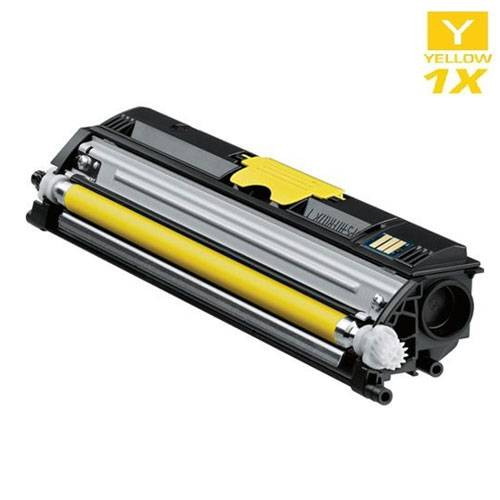
Compatible Konica Minolta A0V306F Laser Toner Cartridge High Yield Yellow

Amazon Price:

- Page Yield:
- 2,500 Pages
- Availability:
- In Stock
- Shipping:
- Free Shipping
- Compatible Printers
- Specifications
- SKU:
- A0V306F-Y
- Printer Brand:
- Konica-Minolta
- OEM Number:
- A0V306F
- Ink Color:
- High Yield Yellow
- Page Yield:
- 2,500 Pages
- Printer Type:
- Laser Cartridge
- Condition:
- New Compatible
- Description
- Yields up to 2500 pages
- Trust compatible Konica Minolta A0V306F Toner Cartridge to provide outstanding print quality for all your important photos and documents
- Unlike bargain replacement inks Konica Minolta Toner Cartridge are designed specifically to work with Konica Minolta printers for exceptional reliability and performance
- Compatible with: Konica Minolta MagiColor: 1600 1630N 1680 1690MF series printers
- Supply Type: Toner
- Cartridge Yield Type: High Yield
- Ink/Toner Cartridge Type: Compatible
- Ink/Toner Color: Yellow
- Ink/Toner Pack Size: 1/Pack
- Reviews

/> 

Compatible Konica Minolta A0V306F Laser Toner Cartridge High Yield in Yellow color with yielding capacity of up to 2500 pages renders consistent convenience and better value.
Konica Minolta Toner cartridge in yellow color with yielding capacity of up to 2500 pages offers an exceptional performance with Konica Minolta printers. Cartridge is designed to provide great print quality for photos and documents.
Features:
Frequently Asked Questions
What does the 6 in A0V306F stand for?
Yellow. On this Konica Minolta family the code endings do not spell out their colors, and 6 is the marker for the yellow cartridge — A0V306F is the one to order when the yellow station runs dry. If you want to confirm before ordering, read the label on the cartridge in the yellow slot; it carries the same code.
My greens have started looking blue. Is yellow the problem?
That is the textbook symptom on the MagiColor 1600W and its relatives. Green is mixed from cyan and yellow, so when the yellow fades the balance tips: greens slide towards blue, photographs lose their warmth, and yellows on the page come out thin. A test page with a pale yellow band confirms it.
How much printing does one yellow cartridge cover?
This is the high-yield build, rated at 2,500 pages on the standard test basis. Yellow use varies more than any other color — a text-heavy office may take a year to empty one, while photo and graphics work draws it down far faster — but the rating is the full capacity for this station, not a reduced starter size.
Do I have to change the other colors at the same time?
No. Each station works independently, and only the yellow needs to come out. Leave any color with life left in it exactly where it is, and keep spares sealed in their cartons until their own warning appears.
Will printing on with an empty yellow damage anything?
It will not harm the machine, but color output becomes unusable for anything presentable — the printer either stops on the warning or keeps producing pages with the color balance visibly wrong. Black-only text work can carry on while the replacement is on its way.
What cover does this cartridge come with?
A 1-year warranty and 1-year free returns, handled by a support team available Monday through Friday, 9 AM to 5 PM CST. A cartridge that arrives faulty or fails early is replaced or refunded without a return-shipping bill.
How can I check the yellow level before printing photographs?
Do not judge by ordinary pages — yellow barely shows in them. Before a photo run, print the machine's test page and read the yellow band specifically, or check the supply status if your model shows it. A pale or streaky band means the A0V306F should go in before the photographs, not after the first spoiled batch comes out.
I am reordering — how do I make sure I get yellow and not another color?
Quote the full code, A0V306F, and check it digit by digit against the label of the cartridge you removed. The codes in this family share the same A0V30 stem, and only the middle character separates the stations — 6 is yellow. Checking the carton code again when the order arrives takes ten seconds and prevents a wrong-color delivery from becoming a second wait.
Is a spare yellow worth keeping if ours takes a year to empty?
Yes — arguably it is the color where a spare earns its place most. Yellow consumption swings wildly with the work: a year of letters barely touches it, then one photo-heavy project can empty it in weeks, and it fails quietly, mid-job, in the colors around it. A sealed A0V306F on the shelf waits without any attention and turns that surprise into a two-minute swap.
How should the spare yellow be stored in a small office?
In its sealed carton, lying flat, somewhere cool and dry — a cupboard shelf away from radiators and sunny windows is all it needs. Toner does not dry out or go off the way liquid ink can, so the cartridge you fit months from now behaves like one fitted today. Keep the carton where the code can be read without moving the stack.
About This Konica Minolta A0V306F Yellow Cartridge
At $61.33, the A0V306F is the high-yield yellow cartridge for the MagiColor 1600W, MagiColor 1650EN and MagiColor 1680MF, rated at 2,500 pages. It runs the quietest station of the four — easy to forget until the greens on a chart drift blue. Orders ship from warehouses in IL, PA, GA and CA; delivery and returns terms are set out on our shipping & returns page, and the rest of the family is listed under Konica Minolta.
Related Items
Konica-Minolta
Compatible Konica Minolta A0DK232 Laser Toner Cartridge High Yield Yellow
/>


Konica-Minolta
Compatible Konica Minolta Laser Toner Cartridges High Yield 4 Color Set (A0V301F/ A0V30HF/ A0V30CF/ A0V306F)
/>

Konica-Minolta
Compatible Konica Minolta A0V30HF Laser Toner Cartridge High Yield Cyan
/>

Konica-Minolta
Compatible Konica Minolta A0V30CF Laser Toner Cartridge High Yield Magenta
/>