




MagiColor 1600W
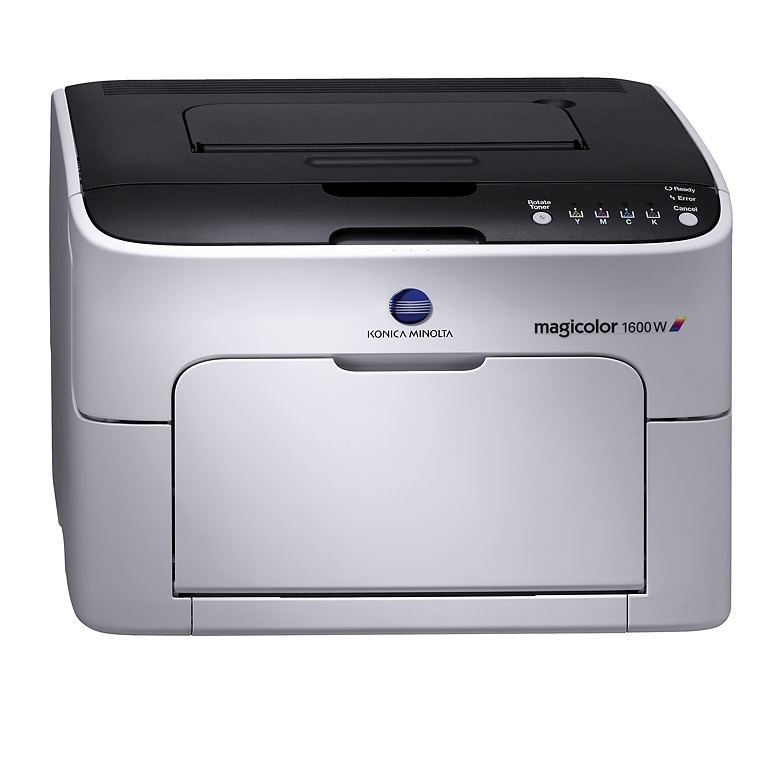
The W in MagiColor 1600W stands for wireless — Konica Minolta's cable-free entry into color laser printing, and a variant the company's own documentation names explicitly in the shared 16xx toner family. Wireless changed how this printer connects; it did not change what it consumes. The 1600W runs the same A0V3 set as the rest of the family: high-capacity A0V301F black, A0V306F yellow, A0V30CF magenta and A0V30HF cyan, plus standard-capacity color options (A0V305F, A0V30AF, A0V30GF) for lighter color use.
A wireless color laser lives differently from a tethered one. Freed from the cable, the 1600W ends up wherever the household or small office actually works — a hallway shelf, a spare bedroom, the corner of a shared studio — and it collects print jobs from every laptop, tablet and phone in range. That convenience quietly changes the toner pattern: more senders means more color, and phone photos in particular arrive as full-page color jobs. The economical way to print in color wirelessly is to match the cartridge sizes to that reality, which is what the choices on this page are for.
Toner Cartridges for MagiColor 1600W
| Cartridge | Color | Page Yield |
|---|---|---|
| Compatible Konica Minolta A0V301F Laser Toner Cartridge High Yield Black | Black | See product page |
| Compatible Konica Minolta A0V306F Laser Toner Cartridge High Yield Yellow | Yellow | See product page |
| Compatible Konica Minolta A0V30CF Laser Toner Cartridge High Yield Magenta | Magenta | See product page |
| Compatible Konica Minolta A0V30HF Laser Toner Cartridge High Yield Cyan | Cyan | See product page |
| Compatible Konica Minolta Laser Toner Cartridges High Yield 4 Color Set (A0V301F/ A0V30HF/ A0V30CF/ A0V306F) | 4 Color Set | See product page |
| Compatible Konica Minolta MagiColor 1600W Laser Toner Cartridges High Yield 4 Color Set | 4 Color Set | See product page |
| Compatible Konica Minolta MagiColor 1600W Premium Quality Laser Toner Cartridges High Yield 4 Color Set | 4 Color Set | See product page |
Which cartridge should you buy?
Start from the colors, because that is where this printer spends its money. If most of what arrives wirelessly is documents with a splash of color, the standard-capacity colors keep the upfront cost down and the high-capacity black A0V301F carries the text load. If phones and photos are a regular part of the mix, step straight to the high-capacity A0V306F, A0V30CF and A0V30HF — full-page color drains small cartridges quickly. The four-color sets on this page, family, model-named and Premium Quality alike, refresh every slot at once and suit a first full change or a household standardizing its shelf.
Chip, toner and everyday use
Two fitting habits prevent most cartridge trouble on this model. Pull the protective seal completely away before the cartridge goes in, and slide it home until it seats squarely — a cartridge resting slightly crooked is one whose chip may not meet its contacts. Keep the chip contacts clean and dry, and never touch them with bare fingers more than you must. Spares keep best sealed in their packaging, stored flat in a cool cupboard; a cartridge that has waited its turn in good conditions reads cleanly the day it is fitted.
Frequently Asked Questions
Does the wireless MagiColor 1600W use different toner than the regular 1600?
No. The 1600W takes the identical MagiColor 1600 toner shelf — the same A0V301F black and the same standard and high-capacity color cartridges. The W only adds wireless connectivity; the cartridge bay and the codes are unchanged.
I print from my phone to the 1600W. Will mobile printing use more toner?
The connection method itself does not change toner use — but phone photos tend to be full-page color, which drains the color cartridges fast. If mobile photo printing is your main use, choose the high-capacity A0V306F, A0V30CF and A0V30HF colors so the set lasts between changes.
The 1600W shows a cartridge error but the toner looks full. What is happening?
A cartridge the printer cannot read usually has a dirty or damaged chip, not an actual toner problem. Remove it, check the chip contacts for dust or damage, and reseat it. If the error persists, the cartridge needs replacing even though toner remains inside.
More printers that use the same cartridges
The wider 16xx family shares this black toner shelf across these models: MagiColor 1600, MagiColor 1630, MagiColor 1630N, MagiColor 1650, MagiColor 1650EN, MagiColor 1680, MagiColor 1680MF, MagiColor 1690, MagiColor 1690MF.