




Color LaserJet CP5525N
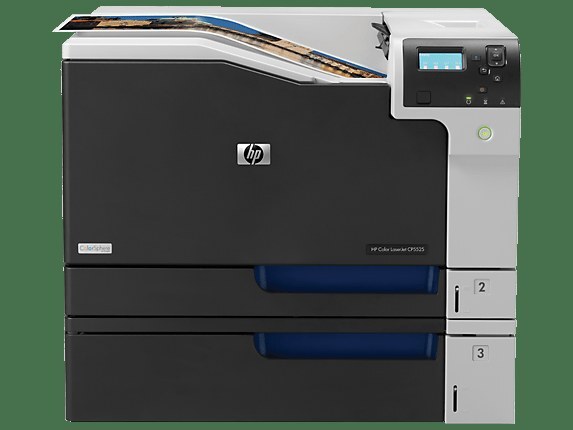
Networked wide-format color is the Color LaserJet CP5525N's whole brief: A3 output, placed on the office LAN for every workstation to share. It prints from the HP 650A cartridges — CE270A black, CE271A cyan, CE272A yellow and CE273A magenta.
The offices running a CP5525N moved past tying a big printer to a single desk. This one belongs to the department: the analyst prints the oversized spreadsheet, the designer proofs the A3 layout, and both jobs queue on the same machine. Shared machines reward boring, predictable supplies — and four standard codes that every facilities manager can source without a hunt are exactly that.
Toner Cartridges for Color LaserJet CP5525N
| Cartridge | Color | Page Yield |
|---|---|---|
| CE271A | Cyan | See product page |
| CE272A | Yellow | See product page |
| CE273A | Magenta | See product page |
| CP5525n toner Color Laserjet 4 Color Set | Set | See product page |
| CE270A | Black | See product page |
| 650A / CE270A / CE271A / CE273A / CE272A — set | Set | See product page |
| CE270A | Black | See product page |
Also stocked from the same family — CP5520-generation and M750 listings:
- CE270A / CE271A / CE272A / CE273A — set
- CE270A — single black
- CE271A / CE272A / CE273A — set
- CE273A — single magenta
- CE271A / CE272A / CE273A — set
- CE270A / CE271A / CE272A / CE273A — set
- CE270A — single black
- CE271A — single cyan
- CE273A — single magenta
- CE272A — single yellow
- CE270A — single black
- CE270A / CE271A / CE272A / CE273A — set
- CE270A / CE271A / CE272A / CE273A — set
- CE270A — single black
- CE271A — single cyan
- CE271A — single cyan
- CE271A / CE272A / CE273A — set
- CE270A / CE271A / CE272A / CE273A — set
- CE270A — single black
- CE271A — single cyan
- CE273A — single magenta
- CE272A — single yellow
- CE270A / CE271A / CE272A / CE273A — set
- CE272A — single yellow
- CE270A — single black
- CE273A — single magenta
- CE272A — single yellow
Which cartridge should you buy?
Shared printers fail socially before they fail mechanically: the job that matters always seems to arrive the day a cartridge dies. Guard against it by restocking on the low warning rather than the empty one, and keep the replacement habit simple — singles for the color that ran out, a set when several gauges are dropping together. Black gets its own rule on most office machines because text work dominates: a spare black within arm's reach of the printer is cheap insurance. The high-yield X members of this family suit the very busiest sites.
Chip, toner and everyday use
A cartridge swap on the CP5525N takes under a minute once the front door is open, and the only technique worth teaching the office is to push the new unit in squarely until it clicks — a tilted cartridge is the usual reason a fresh one is not recognized. Before blaming a cartridge for pale prints, print a supply status page: it separates a genuinely empty slot from a driver or paper problem. Toner cartridges travel and store happily at room temperature; avoid leaving spares on top of the printer itself, where heat shortens their temper.
Frequently Asked Questions
Which toner cartridges does the Color LaserJet CP5525N use?
Four from the HP 650A family: CE270A black, CE271A cyan, CE272A yellow, CE273A magenta.
Can the whole office print to one CP5525N?
That is what the N configuration is for. It joins the network directly and every workstation prints to it as a shared device, no host computer required.
A color ran out mid-job. Will the printer finish in black only?
Color jobs stop when a color cartridge is empty, because the printer cannot mix the missing color. Swap in the replacement for that slot and the queued work resumes.
Should I buy the set or singles for a shared CP5525N?
Singles for routine top-ups — you replace only what is empty. A set earns its place when several colors are low at once or when you are stocking a shelf for a newly installed machine.
More printers that use the same cartridges
The family below is the full list of models running on these four codes:
Color LaserJet CP5520, Color LaserJet CP5520DN, Color LaserJet CP5520N, Color LaserJet CP5520XH, Color LaserJet CP5525, Color LaserJet CP5525DN, Color LaserJet CP5525XH, Color LaserJet Enterprise CP5520, Color LaserJet Enterprise CP5520DN, Color LaserJet Enterprise CP5520N, Color LaserJet Enterprise CP5520XH, Color LaserJet Enterprise CP5525.
Color LaserJet Enterprise CP5525DN, Color LaserJet Enterprise CP5525N, Color LaserJet Enterprise CP5525XH, Color LaserJet Enterprise M750, Color LaserJet Enterprise M750DN, Color LaserJet Enterprise M750N, Color LaserJet Enterprise M750XH, Color LaserJet M750, Color LaserJet M750DN, Color LaserJet M750N, Color LaserJet M750XH, HP 650A.