




Color LaserJet 1500LXI
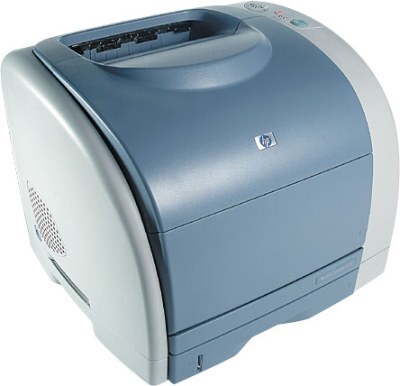
Sold through retail channels as a ready-to-go kit, the Color LaserJet 1500LXI packaged the 1500-series color printer with a bundle of extras for first-time color laser buyers. The bundle is history; the supplies are not. The LXI feeds on the standard HP 121A family — C9700A black, C9701A cyan, C9702A yellow, C9703A magenta — and every color prints through the one C9704A imaging drum.
Retail kits like the LXI tended to land in small businesses that print their own flyers, price lists and letterheads, so many of these machines worked harder than their home-office cousins. That makes the set options on this page the practical route for a refresh: when a secondhand LXI arrives with tired cartridges of unknown age, one full set gives you a known starting point for all four colors at once.
Toner Cartridges for Color LaserJet 1500LXI
| Cartridge | Color | Page Yield |
|---|---|---|
| C9700A | Black toner | See product page |
| C9701A | Cyan toner | See product page |
| C9702A | Yellow toner | See product page |
| C9703A | Magenta toner | See product page |
Sets and multipacks stocked on this page: C9700A black cartridge, 121A listing; 1500LXI 4-color set; 121A 4-color set (C9700A, C9701A, C9702A, C9703A); 1500LXI 6-color set (C9701A, C9702A, C9703A).
Toner and drum are separate items in the Color LaserJet 1500LXI. The toners are the C9700A black, C9701A cyan, C9702A yellow and C9703A magenta cartridges listed above; the drum is the C9704A, offered on its own as the C9704A imaging drum unit or the C9704A imaging drum, 121A listing.
Which cartridge should you buy?
Start with the 1500LXI 4-color set if the machine is new to you — it replaces every color in one pass and ends the guesswork about which cartridge is oldest. There is also a 1500LXI 6-color set for heavier users who want spares of the three colors on hand. After that first refresh, drop back to singles: the C9700A black will cycle fastest, and the colors can be replaced one at a time as each fades. The C9704A drum only joins the order when all four colors look weak together.
Chip, toner and everyday use
Fit each cartridge with a straight push until it clicks into its slot; on this series a cartridge that is a fraction short of fully home will trigger a supply warning even though it is the right part. If a warning appears, pull the cartridge, check the color label matches the slot, and refit it. Keep the printer somewhere dust stays low — the LXI often lives on a retail counter — and give the cartridge bay a quick look for loose toner whenever you swap a color.
Frequently Asked Questions
What made the 1500LXI different from the regular 1500?
The packaging, not the print engine. The LXI was a retail bundle of the same 1500-series hardware, so it orders the same C9700A through C9703A cartridges and the same C9704A drum as every other 1500 model.
Is the 6-color set a better deal than the 4-color set?
The 1500LXI 6-color set adds spare color cartridges to the basic four, which suits shops that print color daily and cannot wait on a delivery. For occasional color work the 1500LXI 4-color set plus a spare black is the leaner shelf.
Can I mix compatible and genuine cartridges in the LXI?
Yes. Each slot reads its own cartridge, so a compatible C9701A cyan can sit next to a genuine black. Color balance stays most predictable when the three colors are the same type and age, but mixing brands across slots works.
More printers that use the same cartridges
The LXI shares its complete cartridge set with these models: Color LaserJet 1500, Color LaserJet 1500L, Color LaserJet 2500, Color LaserJet 2500L. The rest of the family: Color LaserJet 2500LSE, Color LaserJet 2500N, Color LaserJet 2500TN, HP 121A.