




Color Laser Laser M5200
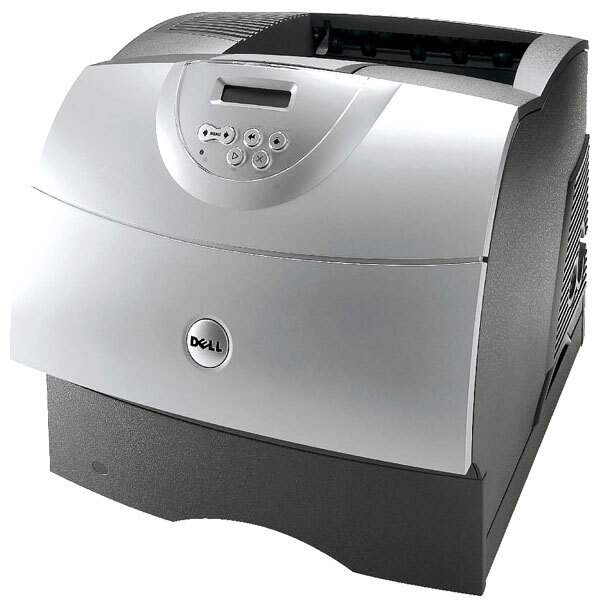
Some printers earn their keep for a decade, and the Dell M5200 is one of them: a workgroup monochrome laser valued for fast, dependable black-and-white output. Its toner is the 310-4133, Dell's high-yield black cartridge rated at roughly 21,000 pages between swaps, stocked below as a single cartridge and in packs of two, three, five and ten. At that capacity, a replacement is a planned event a few times a year rather than a recurring emergency.
What keeps the M5200 relevant is its expandable paper path. An optional duplex unit and additional drawers can be added as a team grows, so the same printer absorbs a small office's early volume and its later, heavier load. Long document runs — end-of-month invoice batches, policy documents, multi-hundred-page reports — are its home territory, and the high-yield cartridge is sized to match: the fewer times a busy workgroup has to stop for toner, the better the whole setup works.
Toner Cartridges for M5200
| Cartridge | Color | Page Yield |
|---|---|---|
| 310-4133 Black Toner Cartridge | Black | Approx. 21,000 pages |
| 310-4133 Black Toner Cartridges, 2 Pack | Black | Approx. 21,000 pages |
| 310-4133 Black Toner Cartridges, 3 Pack | Black | Approx. 21,000 pages |
| 310-4133 Black Toner Cartridges, 5 Pack | Black | Approx. 21,000 pages |
| 310-4133 Black Toner Cartridges, 10 Pack | Black | Approx. 21,000 pages |
Which cartridge should you buy?
Every listing on this page is the same 310-4133 high-yield cartridge, so the choice is purely about how many to hold. One printer in a modest office: a single cartridge plus one spare covers you comfortably, given the roughly 21,000-page interval. If the M5200 anchors a department, or if several machines from the same family share a supply shelf, the multi-packs cut the per-cartridge cost and end the cycle of one-off emergency orders. There is no smaller standard-fill decision to weigh here — capacity is already the high-yield option, and cost per page falls as pack size rises.
Chip, toner and everyday use
Long-life cartridges reward a little patience at the end of their run: when the last stretch of a 310-4133 starts to print lightly, remove it and rock it gently side to side to level the remaining toner — on a cartridge this large, that can recover a surprising number of clean pages. Store spares flat in their sealed packaging, away from heat, and write the purchase date on the box so the oldest stock is used first. After fitting a replacement, let the printer complete its recognition cycle before sending the next long run.
Frequently Asked Questions
Which toner cartridge fits the Dell M5200?
The 310-4133 high-yield black cartridge. It is the only cartridge stocked for this model here, sold as a single unit and in two, three, five and ten packs — pick the pack size that matches how many spares you like to keep.
How many pages does a cartridge last in the M5200?
Roughly 21,000 pages at the standard 5% coverage measure. Dense documents lower the real figure and light memos raise it, but either way the interval between swaps is measured in months for most offices.
Can I add paper capacity to the M5200 later?
Yes — the design allows for an optional duplex unit and extra paper drawers to be added as needs grow. Growing the paper path does not change the toner: the same 310-4133 serves the printer before and after any upgrade.
Are the multi-pack cartridges identical to the single?
Identical. Every pack contains the same 310-4133 cartridge; the packs simply bundle two, three, five or ten of them at a lower cost per unit for offices that stock ahead.
More printers that use the same cartridges
The same high-yield cartridge family also powers these Dell workgroup models: Color Laser Laser M5200N, Color Laser Laser W5300, Color Laser Laser W5300N, Color Laser Laser W5600N, Dell 310-4133, Laser 5200, Laser 5200N, Laser M5200, Laser M5200N, Laser W5300, Laser W5300N, Laser W5600, Laser W5600N.