





 See Compatible Printers
 Read more about our ink!
Epson
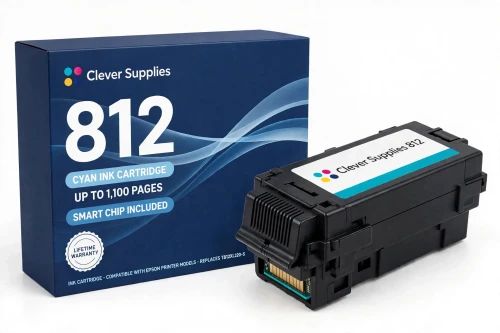
Compatible Epson 812 T812XL220 Cyan Ink Cartridge
- Page Yield:
- Up to 1,100 pages (ISO/IEC 24711)
- Shipping:
- Calculated at Checkout

Amazon Price:

- Page Yield:
- Up to 1,100 pages (ISO/IEC 24711)
- Shipping:
- Calculated at Checkout
- Compatible Printers
- Specifications
- SKU:
- CS-EP-812-CXL
- Condition:
- New Compatible
- OEM Part #:
- T812XL220-S
- Color:
- Cyan
- Ink Type:
- Pigment
- Page Yield:
- Up to 1,100 pages (ISO/IEC 24711)
- Chip:
- Yes — new compatible chip (level reporting); recognition after future firmware updates is not guaranteed
- Warranty:
- Lifetime Warranty
- Returns:
- 1-Year Free Returns
- Description
- Reviews
Cyan does the quiet structural work in this family: it is the base of every chart blue, sky and brand colour that comes off a 13" x 19" sheet. Our compatible T812XL220-S is the high-capacity cyan for the 812 line, filled with DURABrite Ultra pigment ink and rated up to 1,100 pages (ISO/IEC 24711) — the same rating as the black and the other two colours in the XL tier.



Because these printers print big, colour cartridges here are not the small-change items they are on a home machine: a full-bleed poster or a set of presentation boards drinks cyan steadily, and a faded, banding cyan is what makes a wide-format proof look tired before the black ever runs out. The XL tier exists for exactly that rhythm — all four colours at 1,100 pages, changed less often, in matched sets.
It fits all four verified US models — WF-7310, WF-7820, WF-7840, EC-C7000 — alongside its siblings T812XL120-S black, T812XL320-S magenta and T812XL420-S yellow, and it also works next to standard-tier 812 colours (T812220-S is the standard cyan code) if your other slots are still standard. It does not fit the 822 family's printers (WF-3820 class) or the EC-C110. The cartridge carries a new compatible chip — please read the firmware note below. Lifetime warranty, free returns for the first year.
Shop the Epson 812 family: T812XL120 Black Ink Cartridge · T812XL320 Magenta Ink Cartridge · T812XL420 Yellow Ink Cartridge · Set of 4 BCMY Ink Cartridge · Set of 9 3 Black 2 Cyan 2 Magenta 2 Yellow Ink Cartridge
Browse by series: WorkForce
Frequently Asked Questions
Which printers does this cyan fit?
All four officially verified US 812-family models: WF-7310, WF-7820, WF-7840, EC-C7000. Each takes the same 812 / 812XL code set, confirmed in Epson's own cartridge documentation — the T812320-S magenta product record, for example, names exactly these four printers.
How many pages does it print?
Up to 1,100 pages on the ISO/IEC 24711 pattern — Epson's published rating for the T812XL220. Wide-format pages use more ink per sheet than letter pages, so a poster-heavy workload will see fewer sheets than a document workload.
My prints have gone pale and greenish. Is cyan the culprit?
Often, yes. When cyan fades or bands, blues wash out and greens and skin tones shift, because cyan is a component of most mixed colours. Run a nozzle check from the printer's maintenance menu first; if the cyan pattern is broken after a cleaning cycle, the cartridge — not the printer — is the likely fix.
Is there an XXL version of this colour?
No. In the 812 family the extra-high XXL tier exists for black only (T812XXL120-S). Cyan, magenta and yellow top out at the XL tier — this cartridge.
Will this cartridge be recognised by my printer?
This cartridge carries a new compatible chip. If your printer's firmware has been updated, recognition issues can occasionally occur — Epson's own guide for these printers states that firmware updates may affect the functionality of third-party ink. Power the printer off, reseat the cartridge until it clicks, and restart before assuming the cartridge is faulty. We do not promise recognition under every future firmware version; if a recognition problem cannot be cleared, the cartridge is covered by our lifetime warranty.
Can I mix this XL cyan with standard cartridges in the other slots?
Yes. The slots do not care which tier sits in a neighbouring position: an XL cyan beside a standard black, or the reverse, is a normal configuration on all four models.
What kind of ink is inside?
DURABrite Ultra pigment ink — the ink family Epson specifies for the entire 812 line. Pigment particles sit on the paper surface rather than soaking in, which is why output from these printers resists smudging, water and fading.
I print mostly black text. Why does cyan still run down?
These printers draw a small amount of ink from every cartridge during printing and cleaning cycles to keep the permanent print head charged and clear — Epson states this in its own support answers. Colour levels therefore fall slowly even on black-only work, and the printer will ask for a spent colour to be replaced before it keeps printing.
How do I install it?
Remove the old cyan cartridge, take the new one out of its pack only when you are ready, remove only the protective tape, and do not touch the green chip. Press it into the cyan holder until it clicks, close the cover, and let the printer charge the ink before printing.
How should I store a spare?
Sealed in its pack, upright, at room temperature and out of direct sunlight, until install day. (A specific shelf-life figure is not published for this product; see Specifications.)
What warranty and returns cover this cartridge?
A lifetime warranty: a cartridge that fails to perform is replaced. Free returns run for the first year. (Returns note: the 1-year returns period is our standing compatible-product policy, applied to inkjet as an assumption pending Emrah's inkjet-specific confirmation.)
Is this a genuine Epson cartridge?
No — it is a Clever Supplies compatible cartridge built to the genuine cartridge's specification and code, labelled compatible on the box and on this page. It is not manufactured by Epson.
Related Items

Epson
Compatible Epson 812 T812XL320 Magenta Ink Cartridge
Magenta is the colour that decides whether a presentation board looks rich or washed out — reds, purples and skin tones all lean on it. Our compatible T812XL320-S is the high-capacity magenta for the...


Epson
Compatible Epson 812 T812XL420 Yellow Ink Cartridge
Yellow is the cartridge owners forget — until greens go blue and highlights go muddy. Our compatible T812XL420-S is the high-capacity yellow for the 812 line: DURABrite Ultra pigment ink, rated up to...
Epson
Compatible Epson 812 T812XL120 Black Ink Cartridge
This is the black cartridge the 812 family actually lives on — in its high-capacity form. Our compatible T812XL120-S carries DURABrite Ultra pigment ink rated up to 1,100 pages (ISO/IEC 24711). Epson...
Epson
Compatible Epson 924XL T924XL220 Cyan Ink Cartridge
In a compact workgroup printer, cyan is the colour that keeps charts honest and letterheads on-brand. Our compatible T924XL220 carries DURABrite Ultra pigment cyan ink rated up to 1,700 pages...