






 See Compatible Printers
 Read more about our ink!
Epson
Compatible Epson 812 Set of 9 3 Black 2 Cyan 2 Magenta 2 Yellow Ink Cartridge
- Page Yield:
- Black up to 1,100 each; Cyan up to 1,100 each; Magenta up to 1,100 each; Yellow up to 1,100 each (ISO/IEC 24711), per cartridge
- Shipping:
- Calculated at Checkout

Amazon Price:

- Page Yield:
- Black up to 1,100 each; Cyan up to 1,100 each; Magenta up to 1,100 each; Yellow up to 1,100 each (ISO/IEC 24711), per cartridge
- Shipping:
- Calculated at Checkout
- Compatible Printers
- Specifications
- SKU:
- CS-EP-812-SET9
- Condition:
- New Compatible
- OEM Part #:
- T812XL120-S / T812XL220-S / T812XL320-S / T812XL420-S
- Color:
- 3 Black + 2 Cyan + 2 Magenta + 2 Yellow (all XL)
- Ink Type:
- Pigment
- Page Yield:
- Black up to 1,100 each; Cyan up to 1,100 each; Magenta up to 1,100 each; Yellow up to 1,100 each (ISO/IEC 24711), per cartridge
- Chip:
- Yes — new compatible chip (level reporting); recognition after future firmware updates is not guaranteed
- Warranty:
- Lifetime Warranty
- Returns:
- 1-Year Free Returns
- Description
- Reviews
Built for the way these printers are actually used: three blacks, two of each color. This bulk set holds nine 812XL cartridges — 3 × T812XL120-S black, 2 × T812XL220-S cyan, 2 × T812XL320-S magenta and 2 × T812XL420-S yellow — all DURABrite Ultra pigment ink, all high-capacity.


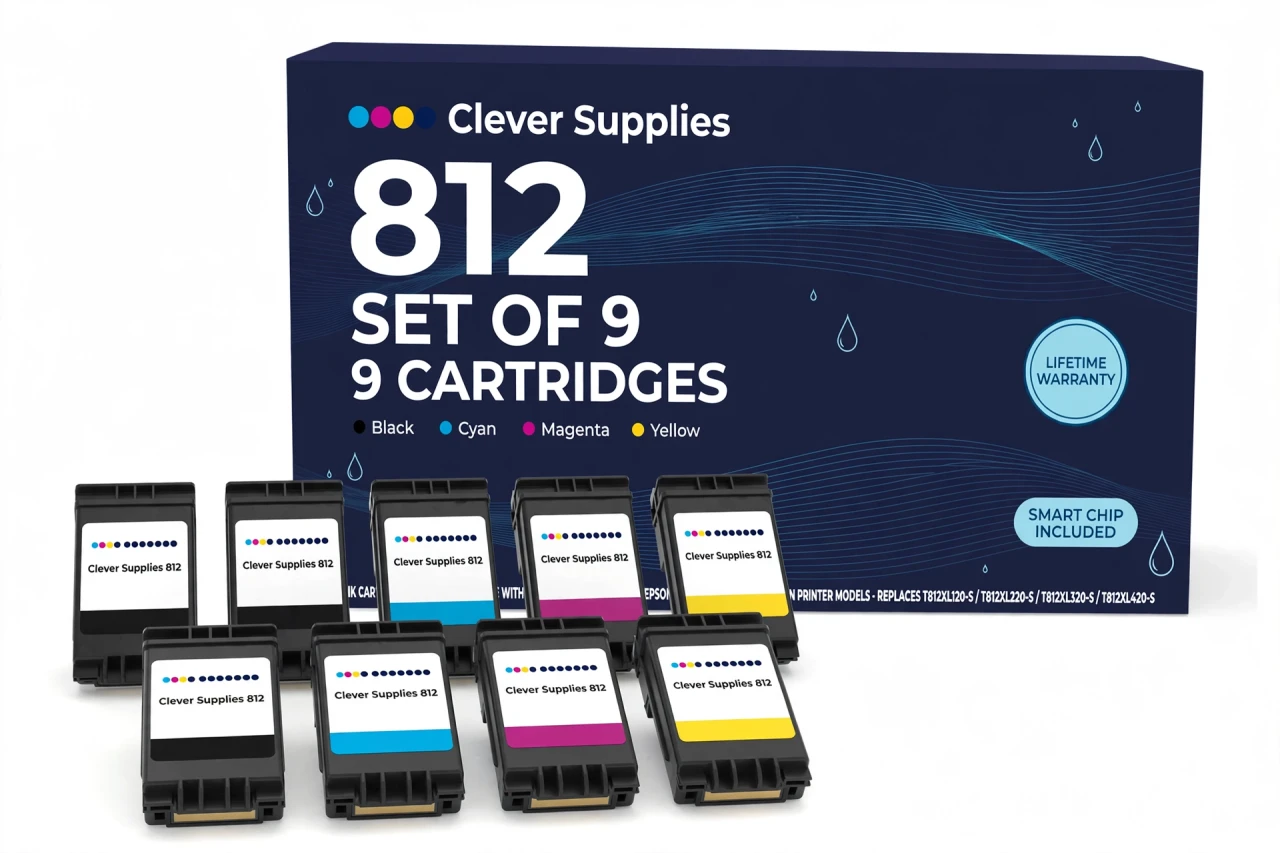
The mix is deliberate. Every cartridge is rated up to 1,100 pages (ISO/IEC 24711) — figures stated per cartridge and never totalled — but documents, drawings and proofs burn black far faster than color, so an office that restocks evenly ends up reordering black mid-cycle. Three blacks in the box matches the real consumption rhythm of the WF-7840 and EC-C7000 class machines this set is aimed at.
All four verified US models take these cartridges — WF-7310, WF-7820, WF-7840, EC-C7000 — and no others: not the 822 family's printers and not the EC-C110. Each cartridge carries a new compatible chip; see the firmware note below. Lifetime warranty, free returns for the first year.
Shop the Epson 812 family: T812XL120 Black Ink Cartridge · T812XL220 Cyan Ink Cartridge · T812XL320 Magenta Ink Cartridge · T812XL420 Yellow Ink Cartridge · Set of 4 BCMY Ink Cartridge
Browse by series: WorkForce
Frequently Asked Questions
Why does the box hold three blacks and only two of each color?
The split mirrors real consumption. Black does the work on nearly every page — text, line work, shadows — while each color covers a share of graphics and images. An even 2-2-2-2 restock strands you with black as the mid-cycle emergency order; weighting the box this way follows the rhythm these printers actually use ink.
What exactly am I buying?
Nine XL cartridges: three T812XL120-S Black, two T812XL220-S Cyan, two T812XL320-S Magenta and two T812XL420-S Yellow. The full contents table is printed on the box front.
Is the bulk set cheaper than buying singles?
Yes. Priced against the same nine cartridges bought individually, the set comes in lower; the Set of 4 sits between the two for a lighter restock. Each product page shows its own price.
How many pages does the set print in total?
We never quote a set total. Per cartridge the rating is up to 1,100 pages (ISO/IEC 24711) for every tank in the box, black and colors alike — and since cartridges empty at different rates, summing them would invent a figure nobody can plan around.
Which printers does it restock?
The four officially verified US 812-family models: WF-7310, WF-7820, WF-7840, EC-C7000. All take the same 812 / 812XL code set, as Epson's own cartridge documentation confirms.
How should I store the cartridges I am not installing yet?
Treat the box as shelf stock, not as a drawer of opened cartridges: each pack stays sealed, upright, at room temperature and out of direct sunlight, and is opened only on its own install day. (A specific shelf-life figure is not published for this product; see Specifications.)
Should a printer stocked from a bulk box have automatic firmware updates off?
For a machine fed from a shelf of spares, we recommend exactly that. The setting lives in the printer's setup / maintenance menus and in the Epson software on your computer. It defends both the working setup and the stock bought for it against a surprise change in how the printer treats compatible chips.
Will these cartridges be recognized by my printer?
Every cartridge in the box is chipped with a new compatible chip. Epson's own guide for these printers warns that firmware updates may affect the functionality of third-party ink, so an occasional recognition issue after an update is possible. When one appears, power off, reseat that cartridge until it clicks, and restart before assuming it is faulty. Recognition under every future firmware version cannot be promised; a cartridge whose problem will not clear is covered by our lifetime warranty.
What kind of ink is inside?
DURABrite Ultra pigment throughout — the same ink family Epson specifies for the whole 812 line in all four colors, and the reason these printers are known for smudge-, water- and fade-resistant document prints.
How do I install cartridges from the set?
Work position by position: remove the old cartridge for a color, take its replacement out of the pack, remove only the protective tape, avoid the green chip, and press the cartridge into its holder until it clicks. Close the cover and let the printer charge the ink before printing.
Is this a genuine Epson product?
No. It is a Clever Supplies compatible set, built to the genuine cartridges' specifications and codes, labeled compatible on the box and on this page, and not manufactured by Epson.
What warranty and returns cover this set?
A lifetime warranty applies to every cartridge in the box: a cartridge that fails to perform is replaced, and free returns run for the first year. (Returns note: the 1-year returns period is our standing compatible-product policy, applied to inkjet as an assumption pending Emrah's inkjet-specific confirmation.)
Related Items

Epson
Compatible Epson 822 Set of 9 3 Black 2 Cyan 2 Magenta 2 Yellow Ink Cartridge
Built for the way these printers are actually used: three blacks, two of each color. This bulk set holds nine 822XL cartridges — 3 × T822XL120-S black, 2 × T822XL220-S cyan, 2 × T822XL320-S magenta...

Epson
Compatible Epson 200XL Set of 9 3 Black 2 Cyan 2 Magenta 2 Yellow Ink Cartridge
Built for how these printers actually consume ink: three blacks for the document work, two of each color for everything else. The bulk set holds nine 200XL cartridges — 3 × T200XL120-S black, 2 ×...
Epson
Compatible Epson 202XL Set of 9 3 Black 2 Cyan 2 Magenta 2 Yellow Ink Cartridge
Built for printers that never seem to rest: nine XL cartridges weighted the way real usage runs — three T202XL120-S blacks and two each of T202XL220-S cyan, T202XL320-S magenta and T202XL420-S yellow...

Epson
Compatible Epson 252XL Set of 9 3 Black 2 Cyan 2 Magenta 2 Yellow Ink Cartridge
Built for the office shelf rather than the single swap: this bulk box holds nine 252XL cartridges — three T252XL120-S blacks and two each of T252XL220-S cyan, T252XL320-S magenta and T252XL420-S...