





 See Compatible Printers
 Read more about our ink!
Epson
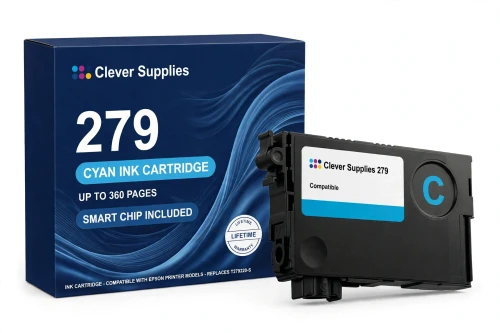
Compatible Epson 279 T279220 Cyan Ink Cartridge
- Page Yield:
- Up to 360 pages (ISO/IEC 24711)
- Shipping:
- Calculated at Checkout

Amazon Price:

- Page Yield:
- Up to 360 pages (ISO/IEC 24711)
- Shipping:
- Calculated at Checkout
- Compatible Printers
- Specifications
- SKU:
- CS-EP-279-C
- Condition:
- New Compatible
- OEM Part #:
- T279220-S
- Color:
- Cyan
- Ink Type:
- Dye
- Page Yield:
- Up to 360 pages (ISO/IEC 24711)
- Chip:
- New compatible chip (ink-level monitoring)
- Warranty:
- Lifetime Warranty
- Returns:
- 1-Year Free Returns
- Description
- Reviews
Cyan does the quiet heavy lifting in the XP-980's photo work — skies, water and the cool half of every landscape — and this standard-capacity compatible T279220-S carries Claria Photo HD dye cyan rated up to 360 pages (ISO/IEC 24711). It is the tier that suits a printer used in bursts: a holiday's worth of photos, a school project, then rest, rather than a cartridge bought for volume it will take a year to use.


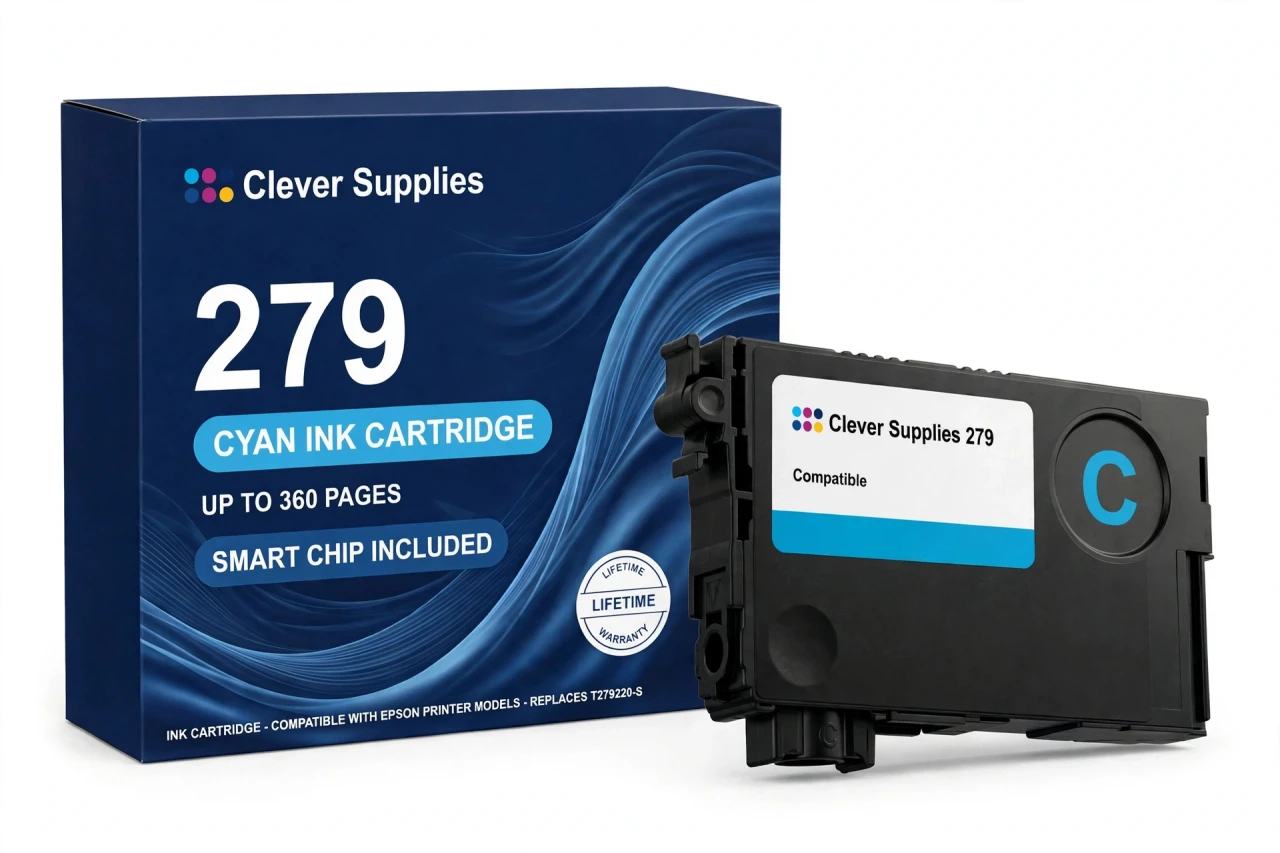
In the six-cartridge row it sits between the T279120-S black (up to 240 pages) and its standard partners T279320-S magenta, T279420-S yellow, T279520-S light cyan and T279620-S light magenta, each also rated up to 360 pages. Cyan and light cyan work as a pair in this family — the light cartridge lays down the pale tones, this full-strength cyan the saturated ones — and either slot can be stepped up to its XL version (the T279XL220-S cyan is rated up to 740 pages) without touching the other five. A new compatible chip reports ink levels; the firmware note in the questions below is worth a read before you install.
It fits one printer only — the Expression Photo XP-980 — and no other model: the look-alike XP-960 belongs to the 277 family. Covered by our lifetime warranty, with free returns for the first year.
Shop the Epson 279 family: T279120 Black Ink Cartridge · T279320 Magenta Ink Cartridge · T279420 Yellow Ink Cartridge · T279520 Light Cyan Ink Cartridge · T279620 Light Magenta Ink Cartridge · T279XL220 Cyan Ink Cartridge · Set of 6 Black Cyan Magenta Yellow Light Cyan Light Magenta Ink Cartridge · Set of 13 3 Black 2 Cyan 2 Magenta 2 Yellow 2 Light Cyan 2 Light Magenta Ink Cartridge
Browse by series:
Frequently Asked Questions
Why does this printer have both cyan and light cyan?
Smoothness. Full-strength cyan cannot lay down a very pale blue without visible grain, so the 279 family splits the work: this cartridge covers saturated blues, the light cyan covers skies and highlights. Together they are why the XP-980's photo gradients look the way they do.
How far does a standard cyan go?
Up to 360 pages on Epson's ISO/IEC 24711 rating for the genuine cartridge. Photo-heavy printing uses cyan faster than the rating suggests — a run of seascapes will drain this slot well before the black.
My printer says cyan is empty but prints still look fine. Swap now or later?
The printer stops when its counter says empty, so keep a spare ready rather than planning to squeeze pages past the warning. Colours can be replaced one at a time, the moment their own warning appears.
Can this cyan work next to XL cartridges in the other slots?
Yes. Standard and XL mix freely — each slot reads its own cartridge. Pairing this standard cyan with an XL black is a common arrangement in this family.
Does it show ink levels on the printer screen?
It does — a new compatible chip reports levels to the XP-980, so the gauge falls as the cartridge is used, just as with a genuine cartridge.
What should I know about the chip and firmware?
The honest version: this cartridge carries a new compatible chip. If your printer's firmware has been updated, recognition issues can occasionally occur on current Epson models. If a warning appears after an update, reseat the cartridge until it clicks and restart the printer before assuming a fault.
Is the 279 cyan a dye ink?
Yes — Claria Photo HD dye, like all six 279 colours. Dye is what this photo family is built on; there is no pigment version of this cartridge.
Which printer is it for?
The Expression Photo XP-980, only. It does not fit the XP-960 — a similar name on a different family — nor the XP-970, XP-950, XP-860 or XP-850.
The colour looks slightly off after a swap. Is the cartridge at fault?
Usually not immediately: run a nozzle check first, and a head cleaning only if the check shows gaps. A freshly seated cartridge can also need a page or two before its colour settles into the print head's mix.
How much ink is in it, in millilitres?
We leave that field blank: Epson's US documentation gives no millilitre figure for this family, and we will not substitute a reseller's number. The 360-page ISO yield is the comparable figure.
Is it made by Epson?
No. It is a Clever Supplies compatible built to the T279220-S specification, labelled compatible on the box and on this page.
What if it fails or leaks?
It is covered by our lifetime warranty — a cartridge that fails to perform, including leaking or printing poorly from new, is replaced. Free returns apply within the first year.
Related Items

Epson
Compatible Epson 279 T279520 Light Cyan Ink Cartridge
Light cyan is the reason XP-980 skies have no visible steps in them. This standard-capacity compatible T279520-S carries Claria Photo HD dye light cyan rated up to 360 pages (ISO/IEC 24711) — the...


Epson
Compatible Epson 279 T279420 Yellow Ink Cartridge
Yellow is the cartridge nobody watches until a print comes out wrong — greens go blue, golds go muddy — and this standard-capacity compatible T279420-S carries Claria Photo HD dye yellow rated up to...

Epson
Compatible Epson 279 T279320 Magenta Ink Cartridge
Magenta is the warmth in the XP-980's palette — skin tones, sunsets, reds and pinks all lean on it — and this standard-capacity compatible T279320-S carries Claria Photo HD dye magenta rated up to...
Epson
Compatible Epson 279 T279120 Black Ink Cartridge
This is the standard-capacity black the Expression Photo XP-980 was designed around: a compatible T279120-S with Claria Photo HD dye black rated up to 240 pages (ISO/IEC 24711). It is the tier for a...