




LaserClass 8500
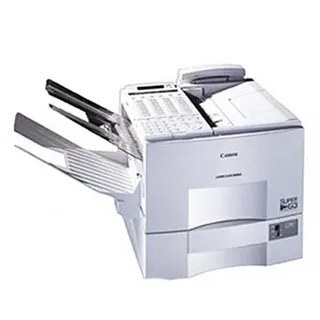
Built around receiving as much as sending, the Canon LaserClass 8500 pairs a 50-sheet automatic document feeder with InstaScan scanning at 25 pages per minute, and a paper capacity that stretches to 1,100 sheets — a fax that can sit at the center of a busy document flow without constant tending. Everything it prints comes from a single supply, the Canon FX-4 cartridge, rated for up to 4,000 pages, and an optional MultiSpot kit can add network printing when the machine's role grows.
Think of the workload this specification describes: stacks of outgoing pages fed through the document feeder in one pass, incoming orders and signed forms arriving all day, and a paper supply deep enough that nobody refills a tray mid-morning. In that rhythm, paper stops being the constraint quickly — the cartridge becomes the consumable that planning revolves around, and the 8500's generous rating per cartridge is part of why the machine suits a receive-heavy desk.
Toner Cartridges for LaserClass 8500
| Cartridge | Color | Page Yield |
|---|---|---|
| Canon FX-4 Toner Cartridge | Black | Up to 4,000 pages |
| Canon FX-4 Toner Cartridges 5 Pack | Black | Up to 4,000 pages per cartridge |
| Canon FX-4 Premium Quality Toner Cartridges 5 Pack | Black | Up to 4,000 pages per cartridge |
Which cartridge should you buy?
For a lightly used 8500, a single FX-4 already goes a long way — up to 4,000 pages is a deep runway. Receive-heavy offices are different: their page count climbs steadily whether anyone is watching or not, and the 5-pack is the natural stock level, keeping the cost per page down and removing the risk of an empty machine on a busy Monday. The Premium Quality 5-pack is the alternative line at the same count. Whichever you choose, keep at least one sealed cartridge in reserve; a machine with 1,100 sheets loaded should never be the one waiting on a toner delivery.
Chip, toner and everyday use
Day to day, the 8500 asks little: the FX-4 seats without tools and needs no chip registration on this generation of hardware. Remove the sealing tape completely, rock the cartridge gently to level the toner, and slide it home. A useful habit on high-capacity machines is changing the cartridge on condition rather than on streaks — once received pages start graying at the edges, swap in the spare and rock the old one as an emergency fallback. Keep reserve cartridges sealed and stored flat near the machine, not on top of it where heat rises.
Frequently Asked Questions
Does scanning with InstaScan use up toner?
No. Scanning is capture only — the document feeder and InstaScan move originals past the sensor without printing anything. Toner is spent when pages are printed: incoming faxes, copies and, if the MultiSpot kit is fitted, network print jobs.
With 1,100 sheets of paper loaded, which runs out first — paper or toner?
Paper, by a wide margin. One FX-4 is rated for up to 4,000 pages, so a single cartridge covers several full paper loads. Refill the trays on routine; plan the cartridge on a longer horizon.
Does fitting the MultiSpot network kit change the cartridge?
No. The kit adds a printing role, not a new supply — network jobs draw on the same FX-4 as fax output, which does mean total page volume, and cartridge consumption, will rise.
Is the FX-4 shared with other machines we might have?
Yes, it is the standard cartridge for the 9000 and 9500 series and the other models listed below, so one spare can cover several machines in the same office.
More printers that use the same cartridges
The FX-4 also powers L800, L900, LaserClass 9000, LaserClass 9000L, LaserClass 9000MFP, LaserClass 9000MS, LaserClass 9000S, LaserClass 9500, LaserClass 9500MFP, LaserClass 9500MS, LaserClass 9500S, LaserClass 9800, LaserClass L1000, LaserClass L900.