




L900
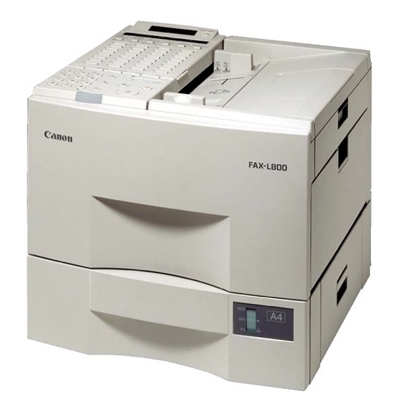
Canon's Fax L900 brought laser output to the desktop fax, replacing thermal paper rolls with crisp plain-paper pages that do not curl or fade in a file drawer. Its Super G3 modem handles high-speed transmission for busy fax workflows, so a multi-page contract moves in a fraction of the time older machines needed. One cartridge keeps it fed: the Canon FX-4, good for up to 4,000 pages.
A dedicated fax lives a different life from a printer. It can sit quiet for days, then a single morning brings a stack of orders, referrals or signed authorizations that all have to land on paper. The L900's 4,000-page cartridge suits that rhythm — long stretches between changes, and enough toner on hand when a burst arrives. It also shares its cartridge with the big LaserClass floor models listed below, so an office running both buys one cartridge type for the whole fax fleet.
Toner Cartridges for L900
| Cartridge | Color | Page Yield |
| Canon FX-4 Toner Cartridge | Black | 4,000 pages |
| Canon FX-4 Toner Cartridges, 5 Pack | Black | 4,000 pages per cartridge |
| Canon FX-4 Premium Quality Toner Cartridges, 5 Pack | Black | 4,000 pages per cartridge |
Which cartridge should you buy?
There is a single cartridge type here, so the decision is how many to keep. At up to 4,000 pages, one FX-4 already covers a long run of fax traffic for a small office, and a single plus a sealed spare is enough insurance for most L900s. The 5 packs make sense where several FX-4 machines share a supply shelf — the LaserClass models below use the identical cartridge — or where the fax line is genuinely busy and a stock-out would stall incoming paperwork. The premium 5 pack is the same fit in Canon's premium quality line.
Chip, toner and everyday use
The compatible FX-4 is built to be recognized by the L900 on installation, with no codes to enter and no settings to change. Before fitting, rock the cartridge gently end to end so the toner inside is evenly spread; a cartridge that has sat spare for a year needs this most. The 4,000-page figure assumes about 5% coverage, and typical fax pages — a letter or a form — sit close to that, so real-world life on a fax line tracks the rating well. Keep the spare sealed in a cool place, and when the old cartridge comes out, slip it into the new packaging so it can be recycled cleanly.
Frequently Asked Questions
What toner does the Canon L900 use?
The Canon FX-4, rated for up to 4,000 pages. It is the only cartridge this machine takes, and the same one used across the LaserClass family listed below.
How many pages does an FX-4 cartridge last on a fax machine?
Up to 4,000 pages at 5% coverage. Fax traffic is mostly text and forms, which is light coverage, so most L900 owners see life close to the rating; pages with heavy black graphics will use toner faster.
Will this cartridge fit our LaserClass 9000 as well?
Yes. The FX-4 serves the L900, the L800 and the LaserClass 8500 through 9800 series machines below. A shared spare is a practical way to cover a desktop fax and a floor model with one box.
Why does the L900 beat our old thermal fax on supplies?
Thermal machines consume special coated rolls whether the page is dense or blank, and the prints fade. The L900 prints on plain paper from a 4,000-page toner cartridge, so the cost sits in the pages you actually receive, and the output can be filed permanently.
More printers that use the same cartridges
Every machine below runs on the same FX-4 cartridge:
L800, LaserClass 8500, LaserClass 9000, LaserClass 9000L, LaserClass 9000MFP, LaserClass 9000MS, LaserClass 9000S, LaserClass 9500, LaserClass 9500MFP, LaserClass 9500MS, LaserClass 9500S, LaserClass 9800, LaserClass L1000, LaserClass L900