




DCP-L5510DN
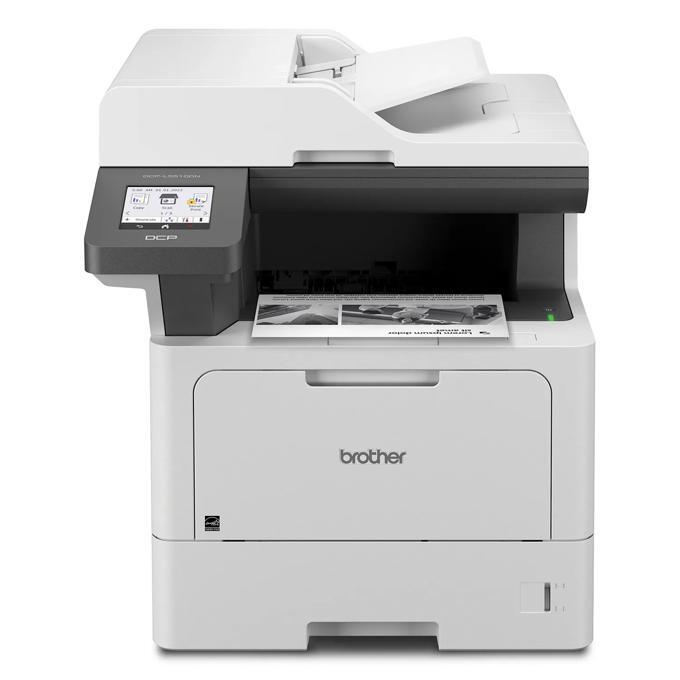
Because the Brother DCP-L5510DN prints, copies and scans from one supply shelf, it rewards a cartridge with stamina. Its toner range is a four-tier ladder: the standard-yield TN920 (TN-920) (about 3,000 pages), high-yield TN920XL (TN-920XL) (about 6,000 pages), super high-yield TN920XXL (TN-920XXL) (about 11,000 pages) and ultra high-yield TN920UXXL (TN-920UXXL) (about 18,000 pages). The separate DR920 (DR-920) drum unit underneath those cartridges is the second consumable to plan for, and it too is stocked on this page, singly and inside money-saving sets.
A multifunction machine burns toner differently from a plain printer. The DCP-L5510DN’s copy function turns other people’s documents into toner demand — a stack of contracts copied for a meeting can consume what a week of ordinary printing would not — and walk-up copying rarely appears in anyone’s volume forecast. That unpredictability is the practical argument for the upper tiers on this page: the bigger the cartridge, the longer the machine shrugs off surprise jobs without a supply errand in the middle of them.
Toner Cartridges for DCP-L5510DN
| Cartridge | Color | Yield |
|---|---|---|
| TN920 single | Black | Approx. 3,000 pages |
| TN920 2-pack | Black | Approx. 3,000 pages |
| TN920 4-pack | Black | Approx. 3,000 pages |
| TN920XXL single | Black | Approx. 11,000 pages |
| TN920XXL 2-pack | Black | Approx. 11,000 pages |
| TN920XXL 4-pack | Black | Approx. 11,000 pages |
| TN920UXXL single | Black | Approx. 18,000 pages |
| TN920UXXL 2-pack | Black | Approx. 18,000 pages |
| TN920UXXL 4-pack | Black | Approx. 18,000 pages |
| TN920XL single | Black | Approx. 6,000 pages |
| TN920XL 2-pack | Black | Approx. 6,000 pages |
| TN920XL 4-pack | Black | Approx. 6,000 pages |
The drum unit
- DR920 drum unit, single drum unit (compatible)
- DR920 drum unit, 2-pack (compatible)
- DR920 drum unit, 4-pack (compatible)
- DR920 drum unit, genuine Brother — rated for about 45,000 pages
Sets pairing toner and drum
Paired sets: TN920 set with 1 toner + 1 drum; TN920 set with 2 toners + 1 drum; TN920 set with 2 toners + 2 drums; TN920 set with 3 toners + 1 drum; TN920UXXL set with 1 toner + 1 drum; TN920UXXL set with 2 toners + 1 drum; TN920UXXL set with 2 toners + 2 drums; TN920UXXL set with 3 toners + 1 drum; TN920XL set with 1 toner + 1 drum; TN920XL set with 2 toners + 1 drum; TN920XL set with 2 toners + 2 drums; TN920XL set with 3 toners + 1 drum; TN920XXL set with 1 toner + 1 drum; TN920XXL set with 2 toners + 1 drum; TN920XXL set with 2 toners + 2 drums; TN920XXL set with 3 toners + 1 drum.
Genuine Brother cartridges and bundles
Genuine Brother toner on this page: genuine TN920 single, genuine TN920UXXL single, genuine TN920XXL single, genuine TN920XL single, genuine TN920XL 2-pack. Brother also bundles toner with the drum: genuine TN920XXL toner and drum bundle (1 toner + 1 drum), genuine TN920 toner and drum bundle (1 toner + 1 drum), genuine TN920 toner and drum bundle (2 toners + 1 drum), genuine TN920 toner and drum bundle (2 toners + 2 drums), genuine TN920 toner and drum bundle (3 toners + 1 drum), genuine TN920XL toner and drum bundle (1 toner + 1 drum), genuine TN920XL toner and drum bundle (2 toners + 1 drum), genuine TN920XL toner and drum bundle (2 toners + 2 drums), genuine TN920XL toner and drum bundle (3 toners + 1 drum).
Which cartridge should you buy?
Size the cartridge for the copying habit, not just the print queue. For the DCP-L5510DN, a light-duty desk can live on the TN920 (about 3,000 pages) or TN920XL (about 6,000), but a machine that copies daily belongs on the TN920XXL (about 11,000 pages), and copy-heavy desks are exactly what the TN920UXXL (about 18,000 pages) — the family’s lowest cost per page — was built for. Keep a 2-pack in reserve so a big copy job never waits on a delivery, and when the drum reaches the end of its long life, the sets below pair a DR920 with fresh toner in a single order. Compatible cartridges here are backed by a 1-year warranty and 1-year returns; genuine Brother cartridges are listed as well.
Chip, toner and everyday use
Each cartridge’s chip lets the DCP-L5510DN identify the tier fitted and estimate the toner left, which helps when copying makes consumption uneven. Seat a cartridge into the DR920 drum until it clicks; if the machine does not recognize it, remove the assembly and reseat the cartridge before reinstalling. Fading copies near the end of a cartridge often improve after a gentle side-to-side rock redistributes the toner. Page yields are rated at about 5% coverage, and copied pages can run far denser than that, so treat the numbers as a guide. Store spares sealed and flat, away from sunlight, and keep the drum’s green surface untouched.
Frequently Asked Questions
What toner does the Brother DCP-L5510DN use?
Four black tiers: TN920 (about 3,000 pages), TN920XL (about 6,000), TN920XXL (about 11,000) and TN920UXXL (about 18,000), all working through the separate DR920 drum unit that is also sold on this page.
Which cartridge suits a copy-heavy DCP-L5510DN?
The TN920UXXL (about 18,000 pages). Copying is spiky, unplanned toner demand, and the ultra tier absorbs those spikes with the fewest changes and the lowest cost per page in the range.
Does copying use the same cartridge as printing on the DCP-L5510DN?
Yes — print and copy draw on the same TN920 cartridge and the same DR920 drum, so one supply shelf covers every function of the machine. There is no separate copy toner to stock.
When should the DR920 drum be replaced in the DCP-L5510DN?
The genuine drum is rated for about 45,000 pages. Replace it when the printer calls for it or when streaks and spots persist across a fresh cartridge; it is available here alone or inside the toner-and-drum sets.
More printers that use the same cartridges
Every model listed here runs on the TN920 range and the DR920 drum: HL-EX415DW, HL-L5210DN, HL-L5210DW, HL-L5210DWT, HL-L5215DW, HL-L6210DW, HL-L6210DWT, HL-L6217DW, HL-L6310DW, HL-L6415DW, HL-L6415DWT, MFC-EX915DW, MFC-L5710DN, MFC-L5710DW, MFC-L5715DW, MFC-L5717DW, MFC-L5915DW, MFC-L6810DW, MFC-L6915DW.