




WorkCentre 3550M
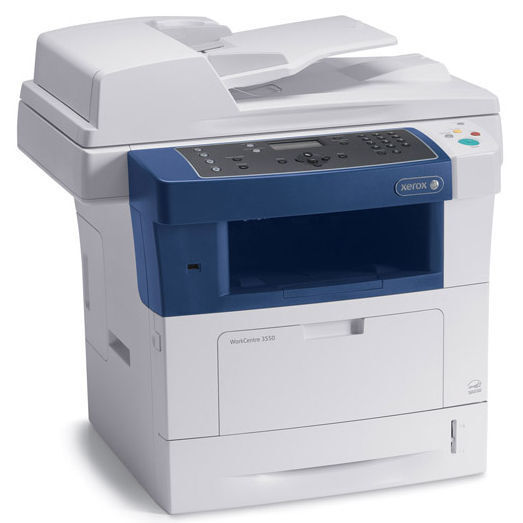
A department machine lives or dies by its supplies, and the WorkCentre 3550M keeps its list mercifully short. This monochrome multifunction prints, copies, scans and faxes for mid-size teams through the whole working day, and it all runs on one black cartridge family: the 106R01529 is the standard cartridge, and the high-yield 106R01530 steps in when the standard fill turns over too quickly. The listings below carry that high-yield code, together with a single and a 5 pack sold under the WorkCentre 3550M name.
The M configuration is the departmental workhorse of the 3550 line — the machine a whole team shares, which means its toner never runs out at a convenient moment. It runs out during the month-end close, with a queue behind it. Everything about buying for this model follows from that fact: the right cartridge is the one that lasts, and the right habit is a spare already in the building before the warning light appears.
Toner Cartridges for WorkCentre 3550M
| Cartridge | Color | Page Yield |
|---|---|---|
| 106R01530 — Single | Black | See product page |
| 106R01530 — 2 Pack | Black | See product page |
| 106R01530 — 5 Pack | Black | See product page |
| 106R01530 Premium Quality — 5 Pack | Black | See product page |
| 106R01530 MICR — Single (check printing) | Black | See product page |
| WorkCentre 3550M Laser Toner Cartridge — Single, model-named listing | Black | See product page |
| WorkCentre 3550M Laser Toner Cartridges — 5 Pack, model-named listing | Black | See product page |
Which cartridge should you buy?
For a shared departmental machine, swap frequency is the cost that hides in plain sight. Every cartridge change is a pause in a queue of other people's work, so the high-yield 106R01530 should be the standard order for the 3550M rather than the standard-fill 106R01529 — check the rated yields on the listings to size the difference. Buy it as a 5 pack and the supply cabinet holds months of cover at a lower cost per cartridge; a single is fine as an emergency top-up. The Premium Quality 5 pack suits departments that want the same count in a higher-grade build, and the MICR single exists only for the offices that also print their own checks.
Chip, toner and everyday use
When a department machine gets a new cartridge, seat it until it locks and give the 3550M a moment to calibrate before sending the queue through — the first pages after a swap are the machine settling, not a verdict on the cartridge. Its chip reports the toner level, so there is rarely an excuse for being caught empty: order when the level dips, not when it dies. Keep the incoming cartridge sealed until the day it goes in, stored flat in the same cabinet as the paper, away from windows and heaters.
Frequently Asked Questions
What toner does the WorkCentre 3550M use?
The standard cartridge is the 106R01529. For the volume a departmental machine sees, the high-yield 106R01530 is the practical choice, and it is sold here as singles, multipacks and under the WorkCentre 3550M name.
Our 3550M empties cartridges too fast. What should change?
The cartridge, not the machine. Moving from the standard 106R01529 to the high-yield 106R01530 stretches the interval between swaps, and ordering the 5 pack stops the order-wait-print cycle from repeating every few weeks.
Can the 3550M share cartridges with our 3550X?
Yes. Every 3550 configuration draws from the same cartridge system, so stock bought for the WorkCentre 3550X works in the 3550M and the other way around.
How do I install a cartridge in the WorkCentre 3550M?
Open the cartridge door with the machine on, pull the spent cartridge straight out, slide the replacement in until it seats firmly, and close the door. Let the machine calibrate, then release the waiting print queue.
More printers that use the same cartridges
One cartridge system covers the rest of the 3550 configurations as well: WorkCentre 3550, WorkCentre 3550T, WorkCentre 3550TM, WorkCentre 3550TS, WorkCentre 3550TSM, WorkCentre 3550X, WorkCentre 3550XM, WorkCentre 3550YX.