




Phaser 6505DN
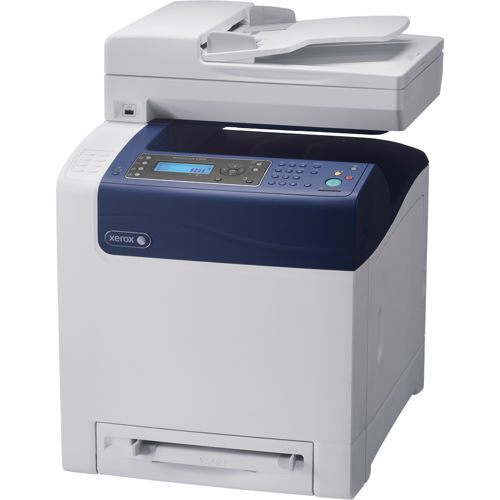
Under the cover of the Xerox Phaser 6505DN sit four high-yield cartridges — the black 106R01597 alongside cyan 106R01594, magenta 106R01595 and yellow 106R01596 — swapped one at a time as each color fades. The printer is a laser model designed to keep busy workgroups productive, with the kind of no-drama reliability offices expect.
Workgroup printing is uneven by nature: one week is all spreadsheets and black text, the next is a run of color charts for a client meeting. That is why the 6505DN's colors fade at different rates, and why its supply routine is built around changing a single cartridge at a time. Nobody services the whole machine; they just answer the one warning in front of them.
Toner Cartridges for Phaser 6505DN
| Cartridge | Color | Page Yield |
|---|---|---|
| 106R01596 Laser Toner Cartridge High Yield Yellow | Yellow | See product page |
| 106R01597 Laser Toner Cartridge High Yield Black | Black | See product page |
| 106R01594 Laser Toner Cartridge High Yield Cyan | Cyan | See product page |
| 106R01595 Laser Toner Cartridge High Yield Magenta | Magenta | See product page |
| Laser Toner Cartridges High Yield 4 Color Set | Set | See product page |
| Phaser 6505DN Laser Toner Cartridges High Yield 4 Color Set | Set | See product page |
| Phaser 6505DN Premium Quality Laser Toner Cartridges High Yield 4 Color Set | Set | See product page |
Which cartridge should you buy?
Follow the fade. Because each color lives its own life in a workgroup printer, the economical habit is to replace only the cartridge the printer names — most often 106R01597 black after a text-heavy spell. The four-color sets listed here earn their place at setup time, or when a heavy color project is coming and you want every slot fresh before it starts. There is no smaller standard-yield tier for this model on this page, so every option you see is the longer-running high-yield build.
Chip, toner and everyday use
The printer reads a chip on each cartridge to identify it and estimate the toner left, and a compatible cartridge that is pushed fully home registers the same way. If pages come out streaky near the end of a cartridge's life, take it out and rock it gently — redistributing the last of the toner often buys enough clean pages to finish the job while a replacement ships. Yield figures assume roughly five percent of the page is covered, so chart-heavy workgroups should expect shorter real-world runs. Store spares upright in a dry place, out of direct light.
Frequently Asked Questions
What are the cartridge numbers for the Phaser 6505DN?
Black is 106R01597, cyan is 106R01594, magenta is 106R01595 and yellow is 106R01596 — all high-yield cartridges, one per slot.
Can I change just one color at a time?
Yes, and that is the normal routine on this model. Each cartridge is independent, so a faded yellow never forces you to replace black, cyan or magenta along with it.
What comes in the four-color set?
One cartridge of each color — black, cyan, magenta and yellow — in the same high-yield codes sold individually on this page. It is a full refresh of every slot in a single box.
Will compatible toner work properly in my 6505DN?
These compatible cartridges are built for this printer family and are recognized through their chips like the originals. They are sold with a 1-year warranty and 1-year returns for peace of mind.
More printers that use the same cartridges
The workgroup shares its cartridges with the wider family below, which is handy when a sister machine down the hall runs dry first: Phaser 6500, Phaser 6500DN, Phaser 6500N, Phaser 6505, Phaser 6505N, WorkCentre 6505, WorkCentre 6505DN, WorkCentre 6505N.