




ML-4510
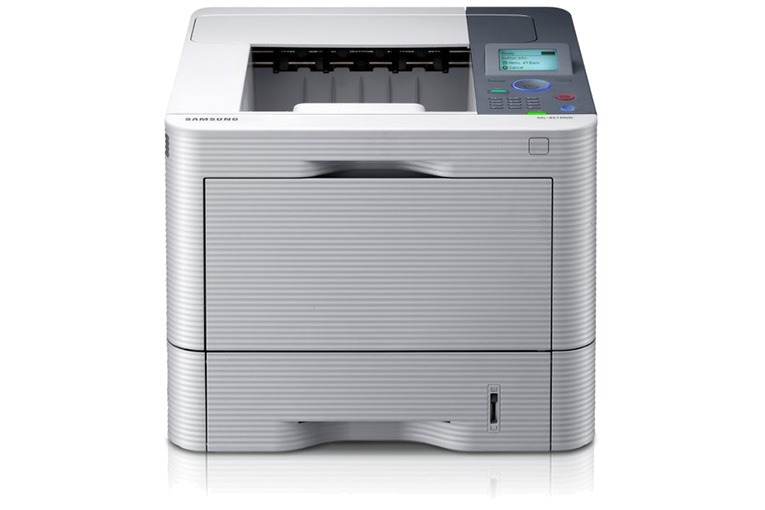
The Samsung ML-4510 is the entry model of the 45xx departmental line, a monochrome laser printer built a clear step above small-office machines for teams that keep a printer busy all day. It runs on the MLT-D307 cartridge family, which comes in four capacities: the standard MLT-D307S, the high-yield MLT-D307L, the extra-high-yield MLT-D307E, and the ultra-high-yield MLT-D307U. Toner and imaging are separate jobs on this platform — the cartridge holds the powder while the MLT-R307 imaging unit carries the drum — so each part is replaced on its own schedule. This page stocks the extra-high-yield cartridge, the size most ML-4510 owners land on once the printer settles into daily departmental work.
Printers at this level serve a whole corridor rather than one desk. Invoices, reports and shipping paperwork queue up from several computers, and a cartridge change interrupts everyone at once, not just the person who noticed the warning light. That is why capacity planning matters more here than on a personal printer: the ML-4510 was specified for departments stepping up from small-office hardware, and its running gear expects long, steady days rather than occasional pages.
Toner Cartridges for ML-4510
| Cartridge | Color | Page Yield |
|---|---|---|
| MLT-D307E | Black | See product page |
| MLT-D307E — 3 Pack | Black | See product page |
| MLT-D307E — 5 Pack | Black | See product page |
Which cartridge should you buy?
All four MLT-D307 sizes fit the same slot, so the choice is about how often you want to open the printer. The standard MLT-D307S suits a lightly used machine; each step up — MLT-D307L, then the extra-high MLT-D307E stocked here, then the ultra-high MLT-D307U — stretches the interval between changes and lowers the cost of the interruption rather than just the cost per page. On a shared departmental printer, the extra-high step is usually the sensible floor, because changes land less often in the middle of other people's work. If your ML-4510 runs through cartridges quickly, the 3-pack and 5-pack versions of the same cartridge keep spares on the shelf without a reorder every time. Remember that the MLT-R307 imaging unit is a separate purchase on its own, much longer cycle.
Chip, toner and everyday use
Each cartridge carries a chip the ML-4510 reads on installation, and a recognized cartridge reports its level so the department can see a change coming. When output first turns light, take the cartridge out and rock it gently side to side — the remaining powder redistributes and often prints evenly again for a while. Treat that as borrowed time, not a refill: order the replacement then, while the printer is still producing acceptable pages. Keep the spare sealed, upright and out of direct sunlight, and swap cartridges over a sheet of paper so any loose toner lands where it can be thrown away.
Frequently Asked Questions
Does the ML-4510 use a separate imaging unit?
Yes. The MLT-D307 cartridges hold toner only; the MLT-R307 imaging unit carries the drum that puts the image on the page. The two age differently — toner is consumed by printing, while the unit wears with use and time — so several toner cartridges will typically be used before the imaging unit needs attention.
Should I swap in a new cartridge the moment the low-toner warning shows?
Not necessarily. The warning threshold is set cautiously, and most ML-4510s keep printing well past it. Rock the cartridge gently to redistribute the toner, then replace it when pages genuinely fade or streak — but have the spare on hand first, because a shared printer cannot wait for a delivery.
Can envelopes and labels run through the duplex path?
Plain paper is what automatic duplexing is for, and making two-sided printing the driver default is one of the easiest running-cost controls on a shared machine. Envelopes and label sheets are better run single-sided, one job at a time, so the media follows the gentlest path through the printer; switch back to duplex for everyday documents.
More printers that use the same cartridges
The MLT-D307 family is shared across Samsung's 45xx and 50xx departmental printers. If your office runs one of these models instead, it uses the same cartridge line: ML-4510ND, ML-4512, ML-4512ND, ML-5010, ML-5010ND, ML-5012, ML-5012ND, ML-5015, ML-5015ND, ML-5017, ML-5017ND, Samsung-MLTD307.