




CLX-2161KN
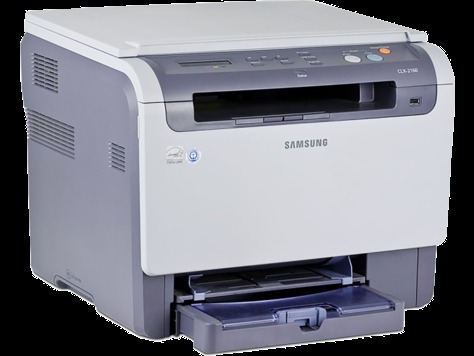
Samsung sold the CLX-2161KN as a configuration variant of the CLX-2161 line, built for specific channel needs within the mid-2000s CLP/CLX generation of color laser multifunction printers. Under the badges it is the same story as its siblings: a compact color MFP for home offices and very small businesses, feeding on the CLP-K300A cartridge set — CLP-C300A cyan, CLP-M300A magenta and CLP-Y300A yellow alongside the black. Four separate cartridges mean four separate replacement decisions, each made only when that color is spent.
Variant badges confuse owners more than they should. The KN designation changed how the machine was sold, not what it eats: the toner shelf, the imaging unit arrangement and the everyday running costs are the CLX-2161 family's. For a small office that prints mostly documents and reaches for color on presentations, letters with a logo and the occasional flyer, this was an affordable way to stop paying copy-shop prices for short color runs.
Toner Cartridges for CLX-2161KN
| Cartridge | Color | Page Yield |
|---|---|---|
| CLP-M300A | Magenta | See product page |
| CLP-K300A | Black | See product page |
| CLP-C300A | Cyan | See product page |
| CLP-Y300A | Yellow | See product page |
| CLX-2161KN Premium 4 Color Set | Black, Cyan, Magenta, Yellow | See product page |
| CLX-2161KN 4 Color Set | Black, Cyan, Magenta, Yellow | See product page |
| CLP-300A 4 Color Set | Black, Cyan, Magenta, Yellow | See product page |
Which cartridge should you buy?
Buy the color that is empty, in the code the machine asks for. Text-heavy offices will order the CLP-K300A several times between color purchases, and that rhythm is normal — black does the daily work while the colors wait for graphics. A full set like the CLX-2161KN 4 Color Set makes sense when the printer is new to you, when several colors report low in the same week, or before a known heavy run. Keep orders simple: one code, one color, replaced on its own schedule, with a 1-year warranty and 1-year returns behind every compatible cartridge on this page.
Chip, toner and everyday use
The printer reads a chip on each cartridge to confirm identity and estimate the level left. Firmware updates can tighten those checks, which is why a machine that accepted a cartridge happily may question one after an update — reseating the cartridge so the contacts meet squarely is the first fix, and the exact wording of any error message is the detail your supplier needs. For scanning and copying, toner is rarely the culprit: a clean scanner glass and the right choice between the flatbed and the document feeder solve most copy complaints before any cartridge is suspected.
Frequently Asked Questions
My CLX-2161KN says non-genuine cartridge — what does that mean?
It means the printer could not match the cartridge's chip to what it expects. That can follow a firmware update, a poorly seated cartridge, or a faulty chip. Take the CLP-K300A out, reinstall it firmly, and note the exact message if it returns — a quality compatible cartridge is chip-tested for this family before it ships, and your supplier can diagnose most chip questions from that message alone.
Can the CLX-2161KN take a high-yield version of its toner?
The printer accepts its cartridges by code, not by yield class: if a cartridge carries the CLP-K300A code, the CLX-2161KN will run it. Judge the listings on this page by that code and by the yield printed on each product page. Offices that let a machine sit idle for months often prefer not to park a large cartridge in it; steady users usually prefer fewer changes.
The CLX-2161KN will not scan — is that a toner problem?
Almost never. Scanning faults live in the scanner, the software or the original, not the toner cartridges. Wipe the glass, place originals squarely, and use the document feeder for multi-page jobs — choosing PDF there combines pages into one file. Toner only enters the picture when printed or copied output looks wrong.
How do I know whether it is toner or the imaging unit?
Read the warning literally: the printer names the part it wants. A toner message is answered with the matching cartridge; an imaging-unit message concerns the separate unit that transfers toner to paper. Keeping the two apart is what makes this family's running costs stay low over the years.
More printers that use the same cartridges
Variant badge or not, the toner is shared — these Samsung printers take the same four cartridges: CLP-300, CLP-300N, CLP-3160, CLX-2160, CLX-2160N, CLX-2160X, CLX-2161K, CLX-3160, CLX-3160FN, CLX-3160N, Samsung-CLP300.