




CLX-2161K
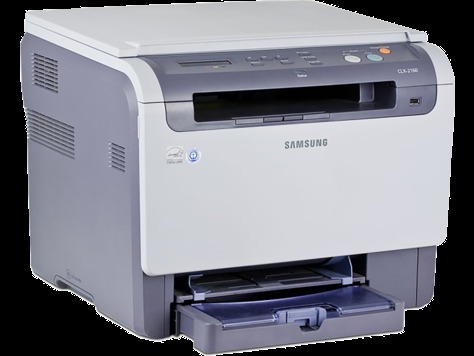
Inside Samsung's mid-2000s CLP/CLX generation, the CLX-2161K is the color laser multifunction that shares its engine and toner system with the rest of the CLX-2161 family. It earned its keep in home offices and very small businesses making their first move to color laser, printing, scanning and copying from one compact box. Four cartridges feed it: CLP-K300A lays down the black, while CLP-C300A, CLP-M300A and CLP-Y300A supply cyan, magenta and yellow one color at a time.
Sharing an engine across a family is a quiet advantage for owners. The CLX-2161K drinks from the same toner shelf as its CLX-2160 and CLX-3160 relatives, so a small business running more than one of these machines can stock a single set of spares instead of a drawer full of near-identical boxes. The printer itself was aimed at everyday color — proposals, handouts, the odd photo page — where the cost per page mattered more than raw speed.
Toner Cartridges for CLX-2161K
| Cartridge | Color | Page Yield |
|---|---|---|
| CLP-C300A | Cyan | See product page |
| CLP-K300A | Black | See product page |
| CLP-Y300A | Yellow | See product page |
| CLP-M300A | Magenta | See product page |
| CLP-300A 4 Color Set | Black, Cyan, Magenta, Yellow | See product page |
| CLX-2161K 4 Color Set | Black, Cyan, Magenta, Yellow | See product page |
| CLX-2161K Premium 4 Color Set | Black, Cyan, Magenta, Yellow | See product page |
Which cartridge should you buy?
Order against the cartridge the printer names, not against a hunch. A low black warning calls for the CLP-K300A alone; a low color calls for that color's single cartridge, and nothing else needs to change. Full sets earn their place in two situations: a machine whose history you do not know, where starting all four fresh makes levels predictable again, and a heavy color period — a run of brochures or presentation packs — where several colors will finish close together. The CLX-2161K 4 Color Set covers that case in one box. Every option here is a compatible cartridge backed by a 1-year warranty and 1-year returns.
Chip, toner and everyday use
Faded output on one side of the page is worth a two-minute diagnosis before you spend anything. Pull the cartridge for that color, rock it gently end to end to level the toner inside, and print a test page; if the fade survives a fresh cartridge, measure the spacing between any repeating marks — a constant interval points at the imaging unit or a roller, not the toner. Keep spare cartridges sealed, upright and out of strong light, and let the printer's chip do its job: install until the cartridge seats with a positive click so the contacts meet.
Frequently Asked Questions
The CLX-2161K says replace imaging unit — can I keep printing?
Usually for a while, yes. That message tracks wear on the imaging unit, a separate part from the CLP-K300A toner, and it is a planning warning rather than an instant stop. Two consumables on separate schedules is what keeps long-term costs down on this machine: toner runs out, the imaging unit wears out, and each is replaced only when its own turn comes. If the printer asks for a counter reset after the new unit goes in, follow the manual's steps so the warning clears.
Are there region-specific versions of CLP-K300A I should watch for?
Regional variants of Samsung toner exist, so treat the code on the box as the compatibility check: your CLX-2161K takes CLP-K300A for black and the matching 300A codes for the colors, in the version sold for your region. Matching the code exactly is the most reliable way to avoid a misfit — a cartridge that looks identical but carries a different code is a different cartridge.
My CLX-2161K prints faded on one side — what is wrong?
Start with the cartridge for the fading color: remove it, redistribute the toner with a gentle rocking motion, and retest. If a fresh cartridge does not cure the fade, suspicion moves to the imaging unit, which wears on its own schedule. Diagnose before you buy — two minutes with a test page beats ordering the wrong part.
Does this printer use a separate drum from the toner?
Yes. The imaging unit is its own replaceable part, distinct from all four toner cartridges, which is why a toner warning and an imaging-unit warning should never be answered with the same purchase. When only toner is low, only toner goes on the order.
More printers that use the same cartridges
One toner shelf serves the whole group — the printers below run on the same four cartridges as this one: CLP-300, CLP-300N, CLP-3160, CLX-2160, CLX-2160N, CLX-2160X, CLX-2161KN, CLX-3160, CLX-3160FN, CLX-3160N, Samsung-CLP300.