




MC360 MFP
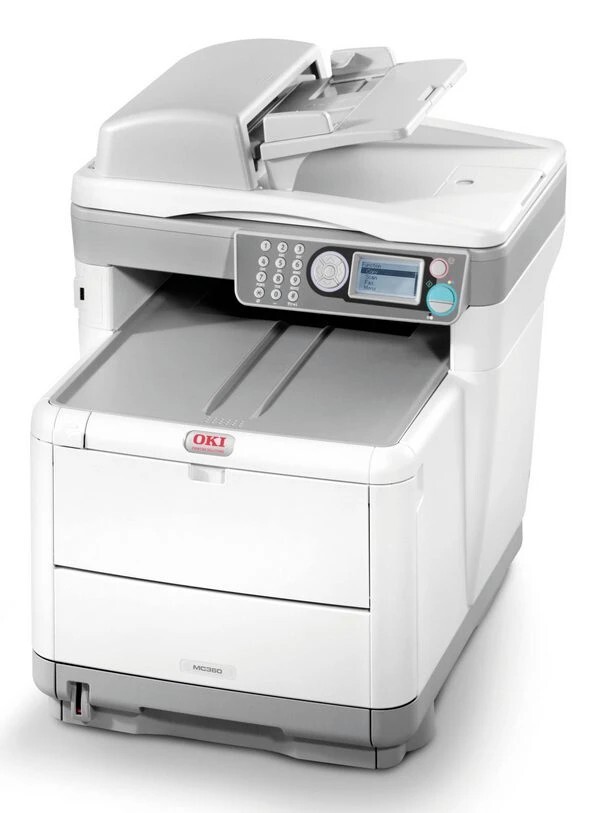
The OKI MC360 MFP is a color multifunction for small workgroups, combining printing, scanning, copying and fax in one desktop machine. Per OKI's official datasheet for the model, its toner set is black 43459324, cyan 43459371, magenta 43459370 and yellow 43459369 — numbers worth matching exactly, because the black sits in a different numeric range than the colors. The cartridge currently listed on this page is the yellow 43459301 from the C3300 family shelf shown below.
That single listing reflects how this page is stocked today: one cartridge, not the full set. Before ordering anything for an MC360 MFP, pull the cartridge you are replacing and read its number directly. If it matches the yellow listed here, this is your cartridge; if your machine carries the datasheet set above, order by those exact numbers instead of assuming the ranges run in sequence.
Toner Cartridges for MC360 MFP
| Cartridge | Color | Page Yield |
|---|---|---|
| 43459301 | Yellow | See product page |
For reference, the machine's datasheet toner set — black 43459324, cyan 43459371, magenta 43459370 and yellow 43459369 — is not listed on this page at this time.
Which cartridge should you buy?
Let the cartridge in your machine decide. The MC360 MFP's datasheet numbers and the number on the cartridge listed here are different part numbers, and toner is never interchangeable just because the colors match. Check the label on the cartridge you remove: if it reads 43459301, the yellow above is the replacement stocked on this page. If it reads one of the datasheet numbers, that exact number is the one to source. When in doubt, the ten seconds spent reading the old cartridge beats a return shipment every time.
Chip, toner and everyday use
Whichever cartridge your machine takes, install it with the power on and press it home until it locks, then run one test page to confirm the color lays down evenly. A compatible cartridge carries a chip so the machine can report its level; if a reading looks wrong after a swap, reseating usually fixes it. Keep spares sealed, stored flat and away from sunlight. And note that copying in black-and-white mode draws only on the black cartridge — set the default copy mode to monochrome if most of your copies are plain text.
Frequently Asked Questions
What toner does the OKI MC360 MFP use?
According to OKI's datasheet, black 43459324, cyan 43459371, magenta 43459370 and yellow 43459369. The black number comes from a different series than the three colors, so match each slot to its own listed number rather than expecting a sequence.
Which cartridge is actually listed on this page?
One: the yellow 43459301, sold under the C3300 name. It is the only cartridge stocked here for this category right now, so confirm the number on your current cartridge before ordering.
Why is the black cartridge numbered so differently from the colors?
The black 43459324 belongs to a different part-number series than the 43459369–43459371 color cartridges, likely reflecting a different capacity class. The machine expects exactly this combination, which is why matching numbers matters more than matching patterns.
Does the MC360 MFP use color toner when copying black-and-white documents?
Not when the copy mode is set to black-and-white — then only the black cartridge works. An auto color mode can engage the color cartridges on pages that look monochrome but carry faint color elements, so check the default setting.
More printers that use the same cartridges
The MC360 MFP sits in the same engine family as the C3300 and C3400 lines. The related models below share that family shelf:
MC630MFP, C3300, C3300N, C3400, C3400N, C3430N, C3520, C3530 MFP, C3530, C3530MFP, C3530N MFP, C3530N, C3600, C3600N
SELECT YOUR PRINTER FAMILY TO SHOP MC360 MFP PRODUCTS
There are no products listed under this category.