




LaserJet M5025MFP
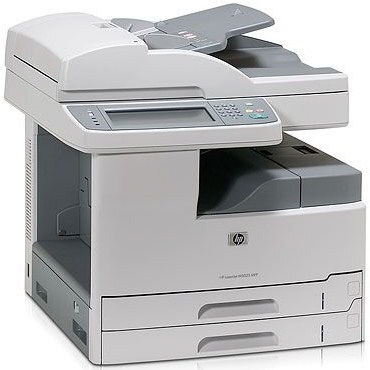
HP's LaserJet M5025MFP combines printing, scanning and copying in an A3-ready monochrome machine, built for offices that occasionally need larger-than-letter output from the same device that handles the daily stack. Every printed or copied page comes from one black cartridge, the Q7570A — HP's 70A. It is available as a single cartridge and in multi-packs for offices that plan ahead.
The MFP in the name is the point of this configuration: one machine at the end of the hall that a whole office prints to, copies on and scans from. Shared machines like this empty their cartridges on the office's schedule, not any one person's, and the M5025MFP shares its cartridge with the faster M5035 line — so a building running both models stocks a single cartridge type for all of them.
Toner Cartridges for LaserJet M5025MFP
Singles, a premium and MICR version, and two multi-packs are listed below.
| Cartridge | Version | Color | Page Yield |
|---|---|---|---|
| Q7570A | Standard black cartridge | Black | See product page |
| Q7570A | Premium-quality black cartridge | Black | See product page |
| Q7570A | MICR black cartridge for check printing | Black | See product page |
| Q7570A | Two cartridges (2 Black) | Black | See product page |
| Q7570A | Four cartridges (4 Black) | Black | See product page |
Which cartridge should you buy?
A single Q7570A suits an M5025MFP with a modest, predictable workload. Busier offices usually do better with the 2 Black pack: one cartridge goes into the machine and one waits sealed on the shelf, so the day the installed cartridge fades is a two-minute swap instead of an urgent order. The 4 Black pack extends that logic to the busiest shared machines or to buyers who reorder rarely. The premium-quality single is the higher build tier of the standard cartridge, and the MICR version is only for check printing. Every listing here is the same cartridge fitting; the choice is about how your office buys, not about compatibility.
Chip, toner and everyday use
Do not replace the cartridge at the first toner-low alert. The warning is an estimate from the cartridge's chip, and pages often stay clean for a good while after it appears; the honest signals are output that stays faded or streaked even after you remove the cartridge, rock it gently side to side to redistribute the toner, and refit it. Keep spares sealed in their packaging in a cool, dry place — a cartridge stored beside a sunny window ages before it is ever fitted. When you do swap, seat the new unit firmly so the printer reads its chip and reports the level correctly.
Frequently Asked Questions
What toner cartridge does the LaserJet M5025MFP use?
The HP Q7570A black cartridge. This page lists it as a single, in premium-quality and MICR versions, and in 2 Black and 4 Black multi-packs.
When is it time to replace the cartridge in the LaserJet M5025MFP?
When pages stay faded or streaked after you redistribute the toner, or when the toner-low alert will not clear with a fresh-looking output test. There is no need to swap early just because the first warning has appeared.
How can I check how much toner is left?
The printer's driver utilities report the supply level for the installed Q7570A, and the machine's own status information shows it as well. Check before ordering so a spare is bought on evidence, not on a guess.
Single cartridge or the 2 Black pack — which fits a shared office?
The 2 Black pack, in most shared settings. A spare already on the shelf removes the gap between a cartridge running out and a delivery arriving, which is when shared machines cause the most frustration.
More printers that use the same cartridges
The family list below runs in reverse, from the largest configurations back to the cartridge page: LaserJet M5035XSMFP, LaserJet M5035XS, LaserJet M5035XMFP, LaserJet M5035X, LaserJet M5035MFP, LaserJet M5035, LaserJet M5025, LaserJet M5025, HP Q7570A.