




LaserJet M5025
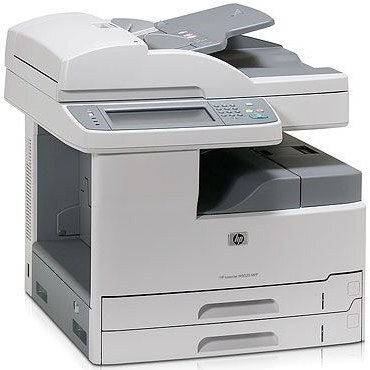
The HP LaserJet M5025 brought A3-capable monochrome multifunction printing to departments in the late 2000s, turning tabloid-size documents into a routine job alongside everyday letter and A4 work. It prints, scans and copies, and all of its printed output runs on a single black cartridge: the Q7570A, HP's 70A. One consumable for a machine of this size keeps departmental supply management unusually simple.
Most departments live on letter paper but regularly meet something bigger — a spreadsheet that only makes sense at tabloid size, a drawing, a proof. The M5025 exists for that mix: the big pages are occasional, yet they are exactly the pages that cannot wait for an outside print shop. Through all of it, the cartridge question never changes, because a single black cartridge is the machine's only consumable.
Toner Cartridges for LaserJet M5025
This page sells the cartridge in three versions; the fitting is the same in each row.
| Cartridge | Version | Color | Page Yield |
|---|---|---|---|
| Q7570A | Standard black cartridge | Black | See product page |
| Q7570A | Premium-quality black cartridge | Black | See product page |
| Q7570A | MICR black cartridge for check printing | Black | See product page |
Which cartridge should you buy?
For ordinary departmental printing, the standard Q7570A is the straightforward choice: it is the cartridge the machine was built around, and it covers print and copy work of every size the M5025 handles. The premium-quality version of the same cartridge is the option for buyers who prefer the higher build tier for a heavily used machine. The MICR version serves a single purpose — printing checks with magnetic characters that bank readers can process — and brings no benefit to drawings, spreadsheets or reports. Decide by the work your department actually sends to the machine, not by habit; all three listings fit the same bay.
Chip, toner and everyday use
The cartridge carries a chip the printer reads to confirm the cartridge and report its level, so push a new unit in until it seats fully. This is a large cartridge for a large machine: support it with both hands during a change and keep it level so toner does not shift to one end. If the first pages after a change look uneven, the toner may have settled in storage — a gentle side-to-side rock before fitting prevents that. Keep the spare sealed in a cool, dry place; A3 machines often sit in shared rooms where heat and sunlight are easy to overlook.
Frequently Asked Questions
What toner cartridge does the LaserJet M5025 use?
It takes the HP Q7570A black cartridge, sold on this page in standard, premium-quality and MICR versions. Match the code on the cartridge you remove before you order.
Is the LaserJet M5025 a monochrome or color printer?
Monochrome — it prints in black only, which is why a single black Q7570A covers everything it produces. If a job needs color, it belongs on a color LaserJet instead.
What is the MICR version of the cartridge for?
MICR toner prints the magnetic character line on checks so banking equipment can read them. Pick the Q7570A MICR cartridge only if this machine prints checks; it changes nothing for everyday documents.
Does scanning a document use up toner?
No. Scanning only captures the page; toner is consumed when the M5025 prints or copies. A department that scans heavily but prints lightly will find its Q7570A lasts far longer than the machine's workload suggests.
More printers that use the same cartridges
The same cartridge serves the whole M5025 and M5035 range: HP Q7570A, LaserJet M5025, LaserJet M5025MFP, LaserJet M5035, LaserJet M5035MFP, LaserJet M5035X, LaserJet M5035XMFP, LaserJet M5035XS, LaserJet M5035XSMFP.