




LaserJet Enterprise M528c
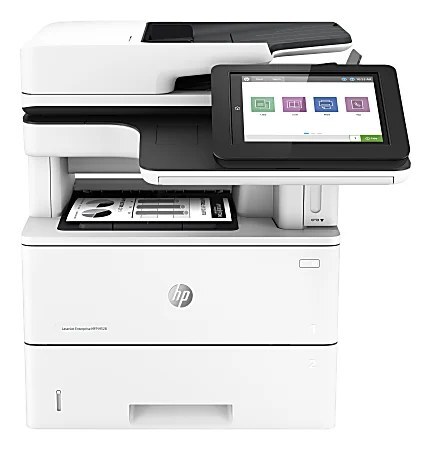
Offices that standardized on this chassis know the LaserJet Enterprise M528c as the multifunction configuration of the M528 line — monochrome print, scan and copy from one shared machine. It runs on two cartridges from the same HP family: the standard-yield 89A (CF289A) for routine volumes and the high-yield 89X (CF289X) when the machine rarely rests. HP also documents an extra-high-yield CF289Y for this chassis, but that cartridge is not stocked on this page — the listings below are the 89A and 89X options carried here.
An MFP on a shared floor has a particular toner problem: everybody prints, nobody owns the supply closet, and the cartridge always seems to run dry in the middle of someone else's deadline. The M528c earns its keep as the department's single black-and-white hub, so the practical question is less about the machine than about the rhythm of replacements — how much volume lands on it each month, and which yield tier keeps the swap interval sane. Offices that treat this unit as their main document station tend to standardize on one tier and keep a sealed spare within reach of the machine, rather than discovering an empty cartridge at the worst possible moment.
Toner Cartridges for LaserJet Enterprise M528c
Which cartridge should you buy?
Start with the volume this shared machine actually sees. The 89A (CF289A) standard cartridge suits an M528c that handles a moderate, spread-out workload — a satellite office or a small team's hub. When the same machine anchors a whole department, the 89X (CF289X) high-yield cartridge stretches the interval between swaps, which matters more than it sounds on a printer everyone depends on: fewer interruptions, fewer emergency orders. The 2-pack and 4-pack listings in the table are the same cartridges bought ahead — worth it when storage space exists, because a shared MFP is the last machine you want sitting idle over a missing cartridge. Whichever tier you choose, keep one sealed spare near the machine; on a multifunction unit, an empty cartridge also blocks the copying queue, not just printing.
Chip, toner and everyday use
The cartridge chip is what lets the M528c recognize the new unit and report its level, so seat the cartridge fully until it clicks and the panel should acknowledge it without complaint. Before installing, pull the sealing tape straight out and rock the cartridge gently from side to side — that loosens toner that settled in shipping and evens out the first pages. Treat every printed page-yield figure as an estimate based on roughly 5% page coverage; dense forms, contracts and graphics use toner faster than plain memos. If output fades near the end of a cartridge's life, removing it and rocking it once more often buys enough even pages to finish the day while the replacement ships.
Frequently Asked Questions
Which cartridge codes are compatible with the LaserJet Enterprise M528c?
This page stocks the CF289A standard cartridge and the CF289X high-yield cartridge for the M528c. HP also documents a CF289Y extra-high-yield option for this chassis, but it is not listed here — order by the CF289 code on your empty cartridge and you will match what this page sells.
The M528c printed before but suddenly stopped — where do I start?
Check for error lights on the panel first, then confirm the M528c is still set as the default printer on the computer sending the job. Clear any stuck jobs out of the print queue, and if the problem persists, reinstall the driver. A toner warning alone rarely stops this machine — a jammed queue is the more common culprit.
Should I try one compatible cartridge before switching the whole office?
That is a sensible way to do it. Run one compatible CF289A through the M528c on your typical documents — invoices, reports, the forms your office prints every day — and judge the output against what you get now. If it meets your standards on real work, the machine will happily run compatibles from then on.
Does scanning or copying use up toner on the M528c?
Scanning to a folder or email uses no toner at all. Copying is printing, so every copy draws on the same cartridge — worth remembering in offices where the M528c spends half its day as a copier, because copy volume shortens the cartridge's life just as surely as print jobs do.
More printers that use the same cartridges
The M528c shares its 89A cartridges with the rest of the M507 and M528 line — every model below takes the same CF289A and CF289X cartridges:
LaserJet Enterprise M507, LaserJet Enterprise M507dn, LaserJet Enterprise M507x, LaserJet Enterprise M528, LaserJet Enterprise M528f, LaserJet Enterprise M528z, LaserJet Enterprise MFP M528dn, Laserjet Enterprise M507n