




Laserjet Enterprise M507n
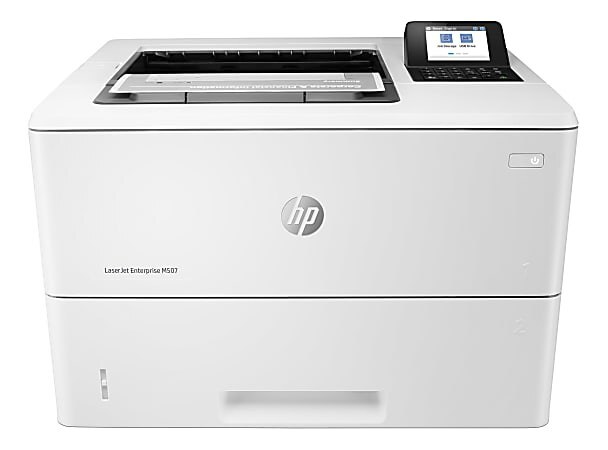
The LaserJet Enterprise M507n is a single-function monochrome Enterprise laser built for security-conscious departments, with a straightforward design that keeps toner changes quick and interruptions rare. It prints from the HP 89A cartridge family: the standard CF289A for ordinary months and the high-yield CF289X, the cartridge also sold as the 89X, for heavier ones. Every listing stocked on this page is one of those two cartridges in compatible form.
A departmental printer like this one serves a whole team's everyday output, so its toner story is about rhythm rather than emergencies: long runs of reports, forms and correspondence, with the cartridge swapped in minutes when the gauge runs down. Because the machine sits at the center of other people's work, the practical habit is to reorder when the low warning appears and to keep the replacement on a shelf nearby, not across the building.
Toner Cartridges for Laserjet Enterprise M507n
| Cartridge | Color | Page Yield |
|---|---|---|
| Compatible HP 89A (CF289A) Toner Cartridge Black | Black | See product page |
| Compatible HP 89A (CF289A) Toner Cartridge 2 Black | Black | See product page |
| Compatible HP 89A (CF289A) Toner Cartridge 4 Black | Black | See product page |
| Compatible HP 89X (CF289X) Toner Cartridge Black | Black | See product page |
| Compatible HP 89X (CF289X) Toner Cartridge 2 Black | Black | See product page |
| Compatible HP 89X (CF289X) Toner Cartridge 4 Black | Black | See product page |
| Compatible HP Enterprise M507n (CF289A) Toner Cartridge Black | Black | See product page |
| Compatible HP Enterprise M507n (CF289A) Toner Cartridge 2 Black | Black | See product page |
| Compatible HP Enterprise M507n (CF289A) Toner Cartridge 4 Black | Black | See product page |
| Compatible HP 89X (CF289X) Toner Cartridge Black | Black | See product page |
| Compatible HP 89X (CF289X) Toner Cartridge 2 Black | Black | See product page |
| Compatible HP 89X (CF289X) Toner Cartridge 4 Black | Black | See product page |
Also stocked: the same cartridges under sibling model names
The two cartridges above are also sold on this page under the names of the sibling machines they fit. The cartridges themselves are identical; only the listing names differ, so match the cartridge code rather than the model in the listing title.
Under the LaserJet Enterprise M507 name: CF289A single, CF289A 2-pack, CF289A 4-pack, CF289X single, CF289X 2-pack, CF289X 4-pack.
Under the LaserJet Enterprise M507dn name: CF289A single, CF289A 2-pack, CF289A 4-pack, CF289X single, CF289X 2-pack, CF289X 4-pack.
Under the LaserJet Enterprise M507x name: CF289A single, CF289A 2-pack, CF289A 4-pack, CF289X single, CF289X 2-pack, CF289X 4-pack.
Under the LaserJet Enterprise M528 name: CF289A single, CF289A 2-pack, CF289A 4-pack, CF289X single, CF289X 2-pack, CF289X 4-pack.
Under the LaserJet Enterprise M528f name: CF289A single, CF289A 2-pack, CF289A 4-pack, CF289X single, CF289X 2-pack, CF289X 4-pack.
Under the LaserJet Enterprise M528z name: CF289A single, CF289A 2-pack, CF289A 4-pack, CF289X single, CF289X 2-pack, CF289X 4-pack.
Under the LaserJet Enterprise MFP M528dn name: CF289A single, CF289A 2-pack, CF289A 4-pack, CF289X single, CF289X 2-pack, CF289X 4-pack.
Which cartridge should you buy?
Choose by monthly volume. The standard CF289A suits a department with moderate, steady output and keeps the per-cartridge outlay lowest. The CF289X is the high-yield version of the same cartridge, built to run longer between swaps, which is what a busy shared printer actually needs; on a machine other people depend on, fewer swaps also means fewer interruptions. Singles are fine for a first restock, while the 2-pack and 4-pack listings exist for offices that would rather hold stock than reorder often. Either way, confirm the code on the cartridge you remove before ordering.
Chip, toner and everyday use
The printer reads the cartridge's chip as it is installed and clears the supply alert once the new unit is detected. If an alert lingers after a swap, open and close the toner door or restart the printer to refresh the sensor before assuming the cartridge is at fault. Keep firmware current only through HP's official support site. Spares store best sealed and flat in a cool, dry cabinet, and yield ratings assume standard test coverage, so dense departmental documents will finish a cartridge sooner than the rating implies.
Frequently Asked Questions
Which toner cartridges work with the LaserJet Enterprise M507n?
The CF289A standard cartridge and the high-yield CF289X. Both are stocked on this page in single, 2-pack and 4-pack compatible listings; match the code on your old cartridge to be sure.
Why is my LaserJet Enterprise M507n still showing a toner alert after I installed a new cartridge?
The printer normally clears the alert on its own once the new cartridge is detected. If the message persists, open and close the toner door or restart the printer so the sensor refreshes.
Should I update the firmware on my LaserJet Enterprise M507n?
Keeping firmware current can resolve quirks, but download updates only from HP's official support site. Restart the printer after installing an update and reprint a test page.
Why does this page list so many listings for two cartridges?
The same two cartridges are listed generically and under the names of the sibling models they fit, including this printer's own name. The cartridge inside is the same; order by the CF289A or CF289X code, not by the model word in a listing title.
More printers that use the same cartridges
The same two cartridges serve the whole Enterprise bench around this printer: LaserJet Enterprise M507, LaserJet Enterprise M507dn, LaserJet Enterprise M507x, LaserJet Enterprise M528, LaserJet Enterprise M528c, LaserJet Enterprise M528f, LaserJet Enterprise M528z, LaserJet Enterprise MFP M528dn.