


null

0

Your cart is empty

LaserJet Enterprise M528
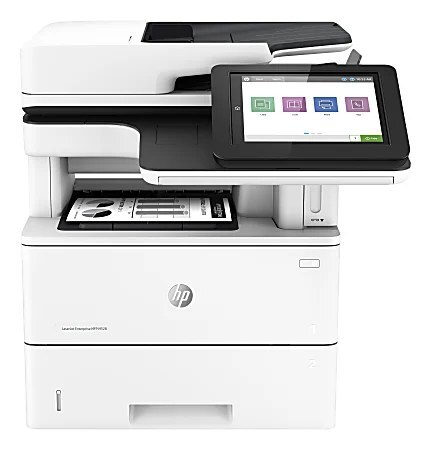
LaserJet Enterprise M528 printer

The LaserJet Enterprise M528 is the standard configuration of its multifunction line — print, scan and copy for everyday office work, without the alphabet soup of suffixes. It runs on two cartridges from the same HP family: the standard-yield 89A (CF289A) for routine volumes and the high-yield 89X (CF289X) when the machine rarely rests. HP also documents an extra-high-yield CF289Y for this chassis, but that cartridge is not stocked on this page — the listings below are the 89A and 89X options carried here.

As the baseline MFP of the family, the M528 is the machine most offices actually end up with: the shared unit by the door that prints the contracts, scans the signed copies and duplicates the handouts. Its toner life is therefore a blend of everything the office does in a day, which makes it harder to predict than a print-only machine's — and makes the choice between the standard and high-yield tiers a real one. The listings are split into two tables below, one per cartridge, so you can compare pack sizes within the tier you have already decided on.

Toner Cartridges for LaserJet Enterprise M528

The standard-yield cartridge for this machine:

CartridgeColorPage Yield
Compatible HP 89A (CF289A) Toner Cartridge 2 BlackBlackSee product page
Compatible HP 89A (CF289A) Toner Cartridge 4 BlackBlackSee product page
Compatible HP 89A (CF289A) Toner Cartridge BlackBlackSee product page
Compatible HP Enterprise M507n (CF289A) Toner Cartridge 2 BlackBlackSee product page
Compatible HP Enterprise M507n (CF289A) Toner Cartridge 4 BlackBlackSee product page
Compatible HP Enterprise M507n (CF289A) Toner Cartridge BlackBlackSee product page
Compatible HP M507 (CF289A) Toner Cartridge 2 BlackBlackSee product page
Compatible HP M507 (CF289A) Toner Cartridge 4 BlackBlackSee product page
Compatible HP M507 (CF289A) Toner Cartridge BlackBlackSee product page
Compatible HP M507dn (CF289A) Toner Cartridge 2 BlackBlackSee product page
Compatible HP M507dn (CF289A) Toner Cartridge 4 BlackBlackSee product page
Compatible HP M507dn (CF289A) Toner Cartridge BlackBlackSee product page
Compatible HP M507x (CF289A) Toner Cartridge 2 BlackBlackSee product page
Compatible HP M507x (CF289A) Toner Cartridge 4 BlackBlackSee product page
Compatible HP M507x (CF289A) Toner Cartridge BlackBlackSee product page
Compatible HP M528 (CF289A) Toner Cartridge 2 BlackBlackSee product page
Compatible HP M528 (CF289A) Toner Cartridge 4 BlackBlackSee product page
Compatible HP M528 (CF289A) Toner Cartridge BlackBlackSee product page
Compatible HP M528f (CF289A) Toner Cartridge 2 BlackBlackSee product page
Compatible HP M528f (CF289A) Toner Cartridge 4 BlackBlackSee product page
Compatible HP M528f (CF289A) Toner Cartridge BlackBlackSee product page
Compatible HP M528z (CF289A) Toner Cartridge 2 BlackBlackSee product page
Compatible HP M528z (CF289A) Toner Cartridge 4 BlackBlackSee product page
Compatible HP M528z (CF289A) Toner Cartridge BlackBlackSee product page
Compatible HP MFP M528dn (CF289A) Toner Cartridge 2 BlackBlackSee product page
Compatible HP MFP M528dn (CF289A) Toner Cartridge 4 BlackBlackSee product page
Compatible HP MFP M528dn (CF289A) Toner Cartridge BlackBlackSee product page

And its high-yield counterpart:

CartridgeColorPage Yield
Compatible HP 89X (CF289X) Toner Cartridge 2 BlackBlackSee product page
Compatible HP 89X (CF289X) Toner Cartridge 4 BlackBlackSee product page
Compatible HP 89X (CF289X) Toner Cartridge BlackBlackSee product page
Compatible HP 89X (CF289X) Toner Cartridge 2 BlackBlackSee product page
Compatible HP 89X (CF289X) Toner Cartridge 4 BlackBlackSee product page
Compatible HP 89X (CF289X) Toner Cartridge BlackBlackSee product page
Compatible HP 89X (CF289X) Toner Cartridge 2 BlackBlackSee product page
Compatible HP 89X (CF289X) Toner Cartridge 4 BlackBlackSee product page
Compatible HP 89X (CF289X) Toner Cartridge BlackBlackSee product page
Compatible HP 89X (CF289X) Toner Cartridge 2 BlackBlackSee product page
Compatible HP 89X (CF289X) Toner Cartridge 4 BlackBlackSee product page
Compatible HP 89X (CF289X) Toner Cartridge BlackBlackSee product page
Compatible HP 89X (CF289X) Toner Cartridge 2 BlackBlackSee product page
Compatible HP 89X (CF289X) Toner Cartridge 4 BlackBlackSee product page
Compatible HP 89X (CF289X) Toner Cartridge BlackBlackSee product page
Compatible HP 89X (CF289X) Toner Cartridge 2 BlackBlackSee product page
Compatible HP 89X (CF289X) Toner Cartridge 4 BlackBlackSee product page
Compatible HP 89X (CF289X) Toner Cartridge BlackBlackSee product page
Compatible HP 89X (CF289X) Toner Cartridge 2 BlackBlackSee product page
Compatible HP 89X (CF289X) Toner Cartridge 4 BlackBlackSee product page
Compatible HP 89X (CF289X) Toner Cartridge BlackBlackSee product page
Compatible HP 89X (CF289X) Toner Cartridge 2 BlackBlackSee product page
Compatible HP 89X (CF289X) Toner Cartridge 4 BlackBlackSee product page
Compatible HP 89X (CF289X) Toner Cartridge BlackBlackSee product page
Compatible HP 89X (CF289X) Toner Cartridge 2 BlackBlackSee product page
Compatible HP 89X (CF289X) Toner Cartridge 4 BlackBlackSee product page
Compatible HP 89X (CF289X) Toner Cartridge BlackBlackSee product page

Which cartridge should you buy?

For a first reorder, the 89A (CF289A) is the safe default — it is the cartridge this machine ships its reputation on, and one cycle of it teaches you your office's true monthly volume. Step up to the 89X (CF289X) once that volume proves heavy; on an MFP, remember that copying counts too, so offices that duplicate a lot reach the end of a standard cartridge sooner than their print counts suggest. Singles suit a single machine; the 2-pack and 4-pack listings suit a supply shelf shared by several family printers, where one order keeps every unit fed.

Chip, toner and everyday use

Streaks are the everyday complaint on a hard-working MFP, and most are cheap to fix: check the cartridge level first, then print a cleaning page from the tools menu. Streaks that survive a fresh cartridge and a cleaning cycle point to a dirty roller rather than the toner. When a cartridge does go in, pull its seal, rock it gently so the toner sits evenly, and push until it clicks — the chip then reports levels normally. Yield figures assume about 5% coverage, which is why two offices can get noticeably different life from the same cartridge.

Frequently Asked Questions

Will CF289A work in my LaserJet Enterprise M528?

Yes — the CF289A is this machine's standard cartridge, and the CF289X is its high-yield option. If a listing shows one of those codes, it is made for your printer; the CF289Y extra-high-yield variant is documented for the chassis but is not stocked on this page.

How do I fix streaks on pages from the M528?

Check the CF289A level first — a nearly empty cartridge streaks before it fades. Then run a cleaning page from the tools menu. If the marks survive both a fresh cartridge and a cleaning cycle, the cause is usually a dirty roller inside the machine, not the toner.

Will a compatible cartridge print as well as the OEM in the M528?

A good compatible CF289A produces output comparable to the OEM. The practical test: install one, print a test page plus a few of your everyday documents, and judge the quality yourself before committing the whole office. Compatibles here carry a 1-year warranty and 1-year returns.

One cartridge feeds printing and copying — but what about scanning?

Scanning sends an image to a computer or folder and uses no toner at all. Printing and copying both draw on the same cartridge, which is why a copy-heavy M528 empties its toner faster than page counts alone predict.

More printers that use the same cartridges

Everything below runs on the same 89A family as the M528, so spares bought for one model serve the others too:

LaserJet Enterprise M507, LaserJet Enterprise M507dn, LaserJet Enterprise M507x, LaserJet Enterprise M528c, LaserJet Enterprise M528f, LaserJet Enterprise M528z, LaserJet Enterprise MFP M528dn, Laserjet Enterprise M507n

SELECT YOUR PRINTER FAMILY TO SHOP LaserJet Enterprise M528 PRODUCTS