




LaserJet 9050DN
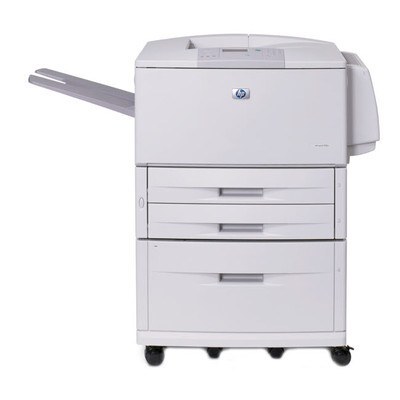
Duplexing and networking turned the flagship into the 9050DN: HP's 2004 A3 monochrome engine in its fullest departmental dress, printing on both sides of the sheet and shared by a whole enterprise at once. The cartridge story stays simple — the 43X (C8543X) high-yield black does all the work, with the 43XJ (C8543XJ) maximum-yield build available when the queue never seems to empty.
Double-sided output is where this configuration earns its keep: thick reports, manuals and meeting packs come off the machine using half the paper of a single-sided run, and the network connection means one 9050DN can absorb the A3 work of several departments. That concentration of volume is exactly why cartridge choice matters here — a busy DN is the last machine you want sitting idle with an empty toner light.
Toner Cartridges for LaserJet 9050DN
| Cartridge | Color | Page Yield |
|---|---|---|
| C8543XJ | Black — maximum yield | See product page |
| C8543XJ 3 Pack | Black — maximum yield | See product page |
| C8543X | Black — high yield | See product page |
| C8543X 3 Pack | Black — high yield | See product page |
| C8543X MICR | Black — MICR | See product page |
| C8543X Premium Quality 3 Pack | Black — high yield, premium build | See product page |
| LaserJet model cartridge | Black | See product page |
Which cartridge should you buy?
For a shared, duplexing machine, plan around uptime. The C8543XJ maximum-yield cartridge stretches the interval between changes the furthest, which suits a printer that serves many desks at once. The regular C8543X high-yield single remains the sensible default where volume is steady rather than relentless, and the 3-pack builds keep a reserve beside the machine. If the same unit ever handles check runs, the MICR version of the 43X is the correct pick for those jobs; the premium 3-pack covers buyers who prefer the upgraded compatible build.
Chip, toner and everyday use
Two-sided printing does not change how the cartridge behaves, but it doubles the pages each fill produces, so a cartridge can feel longer-lived here than in a single-sided sibling. If pages emerge with toner that rubs off, check that the paper type setting matches the stock loaded before blaming the cartridge. Rock a new cartridge gently side to side before fitting it, let the machine calibrate, and judge density on the third or fourth page. Spares belong sealed in a cool cabinet near the printer, not on top of it where heat collects.
Frequently Asked Questions
Does duplex printing change which cartridge the 9050DN needs?
No. Duplexing is a paper-path feature; the toner is the same C8543X 43X high-yield cartridge as the rest of the family. Buy for your volume, not for the configuration.
Which cartridge lasts longest in a shared 9050DN?
The C8543XJ maximum-yield build carries the deepest fill of the 43X line, so it goes the longest between swaps — the natural choice for a machine an entire floor depends on.
Can several departments share one 9050DN?
Yes — the networking in this configuration exists precisely for that. One centrally placed machine can take the whole building's A3 work, which is why most owners keep a 3-pack in reserve so toner never becomes the bottleneck.
What does the MICR 43X listing do differently?
The C8543X MICR cartridge uses magnetic toner formulated for check printing. Standard 43X cartridges handle everyday documents; check stock should go through the MICR build.
More printers that use the same cartridges
Every model below runs on the same 43X cartridge family as this 9050DN:
LaserJet M9059MFP, LaserJet M9050MFP, LaserJet M9050, LaserJet M9040MFP, LaserJet M9040, LaserJet 9050N, LaserJet 9050MFP, LaserJet 9050, LaserJet 9040N, LaserJet 9040MFP, LaserJet 9040DN, LaserJet 9040, LaserJet 9000N, LaserJet 9000MFR, LaserJet 9000MFP, LaserJet 9000LMFP, LaserJet 9000L, LaserJet 9000HNS, LaserJet 9000HNF, LaserJet 9000DN, LaserJet 9000, HP C8543X