




LaserJet 8100N
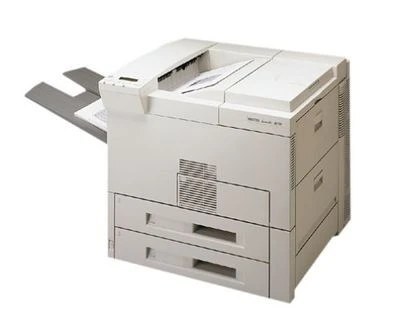
The N in LaserJet 8100N stands for the built-in networking that made this late-1990s monochrome printer an easy one to share around a small office. Its appetite is the HP 82X (C4182X) high-yield cartridge — the family fit for the whole 8100/8150 line — and busy shared units can step up to the C4182XJ (82XJ), the maximum-yield compatible alternative. Both are stocked here, singly and in packs.
A printer with its own network connection lives a different life from one tethered to a single desk: it is the default queue for whoever sits nearby, and its cartridge drains at the pace of the busiest neighbor. Owners of the 8100N tend to discover that its legendary mechanical stamina outlasts several rounds of the PCs driving it — the supply cupboard, not the machine, is what needs managing.
Toner Cartridges for LaserJet 8100N
| Cartridge | Color | Page Yield |
|---|---|---|
| C4182X | Black | See product page |
| C4182XJ | Black | See product page |
| C4182X 2 Pack | Black | See product page |
| C4182X 3 Pack | Black | See product page |
| C4182X Premium Quality 3 Pack | Black | See product page |
| C4182XJ 3 Pack | Black | See product page |
Which cartridge should you buy?
Think in terms of how many desks feed the machine. One or two light users are well served by the C4182X single. A corridor printer fielding jobs all day is the natural home of the C4182XJ, whose deeper fill means fewer interruptions. Because a shared unit cannot wait on a delivery, many offices keep the 2 Pack rhythm — one cartridge in the machine, one in the cupboard. Each compatible cartridge on this page is backed by a 1-year warranty with 1-year returns.
Chip, toner and everyday use
Fitting the replacement takes a minute: raise the toner-access door, draw the spent cartridge out by its handle, and slide the new one straight in until it clicks home. The printer recognizes it on its own — no menu codes to enter. Print a test page from one workstation to confirm clean output before the queue builds up again. If the first pages streak, reseat the cartridge firmly; a unit that is a few millimeters short of home is the usual cause on this model.
Frequently Asked Questions
Which toner cartridge does the LaserJet 8100N use?
The HP 82X, part C4182X. Check the code printed on the cartridge you take out if you are unsure — the networked trim uses exactly the same cartridge as the base 8100.
Can the LaserJet 8100N be shared on an office network?
Yes, that is what the N designates. Connect it by Ethernet, install the driver on each workstation, and every computer sends jobs straight to it without going through a host PC.
How do I replace the toner cartridge in the LaserJet 8100N?
Open the toner-access door, pull the old cartridge out by its handle, and slide the new one in until it clicks. The machine detects it automatically; a quick test page confirms the swap. Keep the empty cartridge's packaging for returning or recycling the spent unit.
What does the N add over the standard LaserJet 8100?
Built-in networking — the printer takes its own network connection instead of hanging off one computer. Print engine and cartridge are unchanged, so supplies stay common across the family.
More printers that use the same cartridges
Supplies are interchangeable right across the line: HP C4182X; LASERJET 8100MFP; LaserJet 8100; LaserJet 8100DN; LaserJet 8150; LaserJet 8150DN; LaserJet 8150HN; LaserJet 8150MFP; LaserJet 8150N.