




LaserJet 2100XI
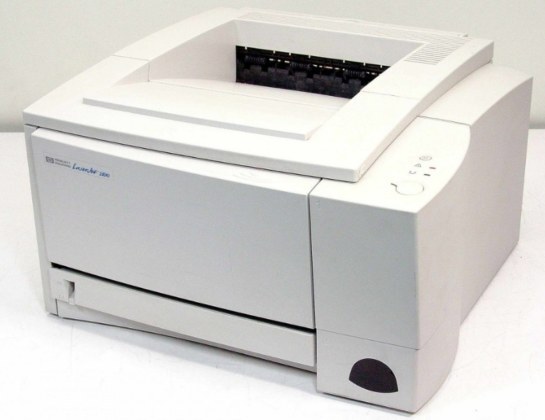
HP's turn-of-the-millennium monochrome range included the LaserJet 2100XI, a single-function printer aimed at everyday office documents rather than spec-sheet bragging rights. It belongs to the HP 96A (C4096A) family, which means this page's whole shelf is one black cartridge in several pack sizes, plus a premium variant and a MICR version.
The XI was never about flash. It was about showing up: a plain machine for letters, invoices and reports that did its work without demanding attention, upgrades or unusual supplies. Printers like that accumulate years quietly, and their owners' needs stay equally plain — the correct cartridge, at a fair rhythm, with a spare that is actually there when the light print starts.
Toner Cartridges for LaserJet 2100XI
| Cartridge | Color | Page Yield |
|---|---|---|
| C4096A | Black | See product page |
| C4096A | Black | See product page |
| C4096A | Black | See product page |
| C4096A | Black | See product page |
| C4096A | Black | See product page |
| C4096A | Black | See product page |
| C4096A MICR | Black | See product page |
| Model listing | Black | See product page |
Also stocked on this page: the same cartridge listed under two sibling model names — the 2200DT listing and the 2200DTN listing. The code is identical; only the listing name differs.
Which cartridge should you buy?
For a no-frills printer, keep the buying no-frills too. The C4096A single covers a lightly used XI with no waste. If the machine prints daily, step to the 3 pack or 5 pack: fewer orders, a spare always in the drawer, and a lower cost per cartridge across the box. The premium quality 5 pack is there for buyers who prefer that build; the 10 pack serves offices supplying several printers of this family at once. The MICR cartridge is the specialist of the shelf — magnetic toner for check printing — and should be bought only for that job. Everything else is the same cartridge in different quantities, so buy by usage, not by features.
Chip, toner and everyday use
Nothing about routine care changes on the XI. The cartridge seats in one motion and its chip lets the printer recognize it and track toner. Fading output near the end of a cartridge usually means the toner has settled unevenly: take the cartridge out, rock it gently side to side a few times, and you will typically get a further run of solid pages. Rated yields assume 5% coverage, so treat them as a planning guide rather than a promise. Keep spares sealed in their bags, flat and out of direct light, and fit the oldest stock first. A printer this undemanding rewards exactly one virtue — never letting it run completely dry in the middle of a working day.
Frequently Asked Questions
Does the 2100XI take a different cartridge from the 2100?
No. The XI uses the same HP C4096A as the base 2100 and the rest of the family, so one cartridge stock can cover every model on this page.
Which cartridge should I order for the LaserJet 2100XI?
The 96A — C4096A — in the pack size that matches how much you print. Standard, premium and MICR variants differ in build or toner type, never in fit.
Is a separate drum available for this printer?
There is none to buy: the drum is part of the toner cartridge on this model, so installing a fresh cartridge replaces the drum at the same time.
What should I do when prints start looking washed out?
Rock the cartridge gently side to side to level the toner, then print a test page. If output stays light after that, the cartridge is genuinely near its end and the spare should go in.
More printers that use the same cartridges
Same cartridge, same story — the models below all share the XI's single supply: LaserJet 2200DTN, LaserJet 2200DT, LaserJet 2200DSE, LaserJet 2200DN, LaserJet 2200D, LaserJet 2200, LaserJet 2100TN, LaserJet 2100SE, LaserJet 2100M, LaserJet 2100, HP C4096A.