




Color LaserJet M254dw
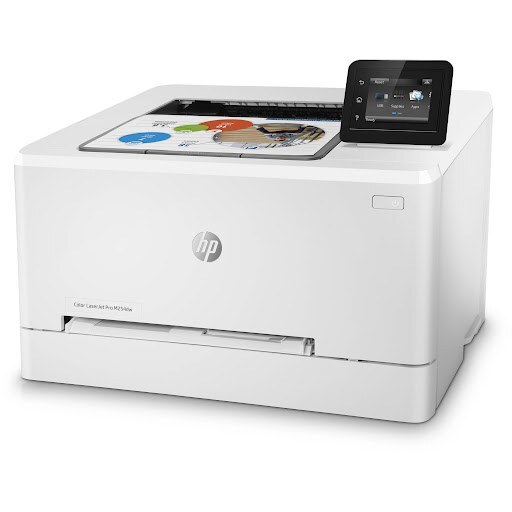
HP aimed the Color LaserJet M254dw squarely at small workgroups when it launched this 2018-era color printer: a team machine that delivers pages without ceremony. It runs two tiers of the same family — the standard 202A black CF500A with cyan CF501A, yellow CF502A and magenta CF503A, or the high-yield 202X black CF500X with cyan CF501X, yellow CF502X and magenta CF503X. Every slot takes either tier, so a cartridge decision is never a compatibility gamble.
Small workgroups buy toner differently from enterprises: there is no supply cabinet and no facilities order, just whoever notices the low warning first. The practical shelf for that reality is below — compatible cartridges in both tiers, singles for the one color that actually emptied, and sets for the day the whole machine gets refreshed at once.
Toner Cartridges for Color LaserJet M254dw
| Cartridge | Color | Page Yield |
|---|---|---|
| CF500A (202A) | Black | See product page |
| CF501A (202A) | Cyan | See product page |
| CF502A (202A) | Yellow | See product page |
| CF503A (202A) | Magenta | See product page |
| CF500X (202X) | Black (high yield) | See product page |
| CF501X (202X) | Cyan (high yield) | See product page |
| CF502X (202X) | Yellow (high yield) | See product page |
| CF503X (202X) | Magenta (high yield) | See product page |
| CF500A — 2 Black Set | Black | See product page |
| CF500A — 3 Black Set | Black | See product page |
| CF500A — 5 Black Set | Black | See product page |
| 202A 4 Color Set | Black + CMY | See product page |
| 202A 5 Color Set | Black + CMY | See product page |
| 202A 8 Color Set | Black + CMY | See product page |
| 202A 3 Color Set (CMY) | CMY | See product page |
| 202A 6 Color Set (CMY) | CMY | See product page |
| CF500X — 2 Black Set | Black | See product page |
| CF500X — 3 Black Set | Black | See product page |
| CF500X — 5 Black Set | Black | See product page |
| 202X 4 Color Set | Black + CMY | See product page |
| 202X 5 Color Set | Black + CMY | See product page |
| 202X 8 Color Set | Black + CMY | See product page |
| 202X 3 Color Set (CMY) | CMY | See product page |
| 202X 6 Color Set (CMY) | CMY | See product page |
The same cartridges are also stocked under listings carrying this model's name: M254dw Black (CF500A), M254dw Cyan (CF501A), M254dw Magenta (CF503A), M254dw Yellow (CF502A) and the M254dw 4 Color Set.
Which cartridge should you buy?
The two tiers are the same cartridges in two sizes. A team that prints a few pages a day will take months to empty even the standard tier, and standard singles keep cash out of the supply drawer. A team that prints proposals and reports daily should live in the X tier: the per-page cost drops and the swaps get rarer, which matters when the 'IT department' is whoever is nearest the printer. Colors can mix tiers freely — an X black beside standard colors is a perfectly sensible shelf. All compatibles here carry a 1-year warranty and 1-year returns.
Chip, toner and everyday use
Each cartridge's chip reports its level to the printer, so the low warning that starts the office group chat is a real reading. Fitting is tool-free: pull the drawer, lift the old unit out, drop the new one in. Remove the seal first — the forgotten seal is the number one cause of 'the new cartridge prints nothing' calls. Yield ratings assume about 5% page coverage, so a workgroup printing full-color one-pagers will cycle the color slots much faster than the number on the box implies. A gentle shake of a fading cartridge redistributes the last toner and buys a few more days while the replacement ships.
Frequently Asked Questions
Which toner cartridges work with the Color LaserJet M254dw?
The eight codes in the table — four standard-yield and their four high-yield twins. These are the codes listed for this printer, so any cartridge carrying one of them is the right type; checking the label on the old cartridge is the fastest confirmation.
How do I connect the M254dw to Wi-Fi?
Use the wireless setup wizard on the control panel to find your network and enter its password. If the wizard struggles, connect by USB or Ethernet temporarily and configure wireless through the printer software instead.
What paper should I use in this printer?
Plain laser-compatible office paper for everyday jobs, and heavier laser-rated stock for presentations. Inkjet-only paper should not go through a laser printer — its coating is not made for the fuser's heat.
Can I replace only the color that ran out?
Yes, always. The four slots are independent; swapping a full set because one color faded throws away the other three cartridges' remaining life.
More printers that use the same cartridges
Its closest sibling shares the whole 202 family, and the family's own index page is here too: Color LaserJet M281dw, HP 202X.