





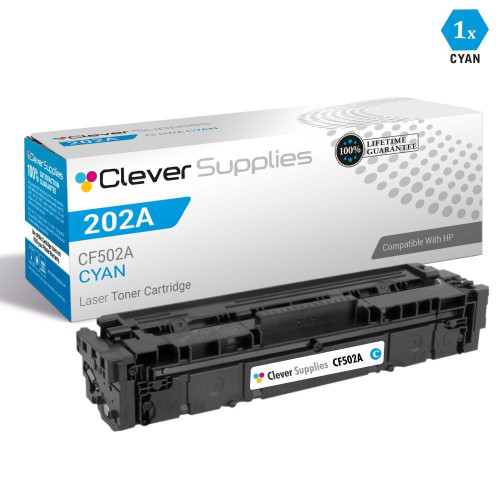

 See Compatible Printers
 Read more about our ink!
Hewlett Packard
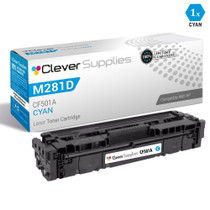
CS Compatible Replacement for HP 202A Toner Cartridges Cyan (CF501A)

Amazon Price:

- Page Yield:
- Color: 1300
- Availability:
- In Stock
- Shipping:
- Calculated at Checkout
- Compatible Printers
- Color LaserJet M254dw
- Color LaserJet M281cdw
- Color LaserJet M281dw
- Color LaserJet M281fdwi>
- HP 202X
- Specifications
- SKU:
- CS-HP--202A-C
- Printer Brand:
- Hewlett Packard
- OEM Number:
- CF501A
- Ink Color:
- Cyan
- Page Yield:
- Color: 1300
- Printer Type:
- Laser Cartridge
- Condition:
- New Compatible
- Description
- Reviews

/> 

Clever Supplies brand products are made in the USA! Why pay more for cheaper product with a high defective rate? You will end up having to send it back to the manufacturer. Get a quality product that you KNOW will work. Purchase the Clever Supplies Products Compatible for HP 202A (CF501A) Cyan and experience the difference! All Clever Supplies brand products are backed by '100% Quality Satisfaction' 1 year warranty against defects in materials and workmanship for all toner products. Free tech support for a Clever Supplies problems for all Clever Supplies brand products. The use of Clever Supplies brand replacement laser toner cartridges and supplies does not void printer warranty. Premium Quality Replacement Toner Cartridge is made by ISO9001 Certified Factory to Meet or Exceed OEM Standards. These units are manufactured 100% brand new with all new parts including OPC drums, wiper blades, a smart chip and other internal parts, they are an economical alternative to expensive OEM CF501A Compatible Toner Cartridges. This is a Compatible for HP toner cartridges Cyan guaranteed to perform with HP Laser Printers. It replaces the original HP 202A toner cartridge Cyan. The compatible replacement for CF501A. We offer a 100% Quality Satisfaction Guarantee on our Compatible for CF501Alaser toner cartridges and supplies. For use in the following printers:Color LaserJet M254dw, Color LaserJet M281dw Every configuration this family is sold in — both tiers for the Color LaserJet Pro M254 and MFP M280/M281 printers: the standard-yield 202A and high-yield 202X four-color sets, tri-color sets, five-, six- and eight-cartridge sets, all eight singles and the six black multi-packs — is compared side by side in our Best HP 202A & 202X (CF500–CF503) Toner Cartridges guide.
Frequently Asked Questions
The cartridge I removed is stamped CF501A. Is this the same unit?
It is. CF501A is the part number for the cyan cartridge in the HP 202A family, and this listing is that cyan unit on its own. It belongs to the compact color LaserJet Pro generation headed by the Color LaserJet Pro M254dw. Match the code on the empty cartridge to the code on this box and the color is guaranteed to be the right one — cyan, yellow and magenta each have their own number.
What does cyan actually print in an ordinary office?
More than most people expect. Cyan builds every sky and water tone, the blues in company logos, the cool half of charts and graphs, and it mixes with the other colors to make greens. A document set can look almost entirely black-and-blue and still be drawing steadily on this cartridge, which is why cyan often runs down ahead of its neighbours in offices that print reports and presentations.
Our greens have started looking yellow. Is cyan the cause?
That is the classic signature. Green is printed from cyan laid over yellow, so when cyan fades the balance tips and greens slide yellow while blues lose their depth and turn thin. Print a color test page: if the cyan block prints pale or streaky while the others look full, this cartridge is the one to change — the others can stay where they are.
How many pages does the 1,300 rating cover?
The 1,300-page figure assumes light standard coverage. A small office printing a few color reports a week can stretch one cartridge across many months; a desk producing color charts and photo-heavy handouts daily will work through it noticeably faster, because coverage per page — not page count — is what consumes toner. Use 1,300 as the budgeting number and the test page as the truth-teller.
How do I change just the cyan cartridge?
Open the front door and pull the cartridge drawer out. Take the cyan unit by its handle, lift it clear, and set the new one into the cyan slot — each slot is keyed and labeled, so it only sits correctly in its own place. Peel the sealing strip first, give the cartridge a gentle rock, push the drawer home and close the door.
What cover and delivery come with it?
The cartridge is $31.13 and carries a 1-year warranty, plus 1-year free returns under our shipping and returns policy if it arrives damaged or underperforms early. Stock ships from Illinois, Pennsylvania, Georgia and California, so most addresses see it quickly, and support runs Monday through Friday, 9 AM to 5 PM CST.
Should I keep a spare CF501A if color work only comes in bursts?
It is a sensible habit. Cyan rated at 1,300 pages under light coverage can sit nearly untouched for weeks of black-and-white work, then drain quickly through one photo-heavy report run — bursts are precisely when an empty cyan is discovered. A sealed spare in the drawer ends that story in one swap. If you would rather not stock ahead, the compromise is to order when the test page first shows the cyan block paling, while the cartridge still has working pages left.
How should the next cyan cartridge be stored until its turn?
Sealed in its carton, lying flat, somewhere cool and dry and out of direct sunlight — a supply drawer near the printer is ideal, a sunny windowsill is not. Stored that way, a toner cartridge waits patiently without losing quality, so there is no penalty for buying the CF501A ahead of need. Keep it in its own carton rather than loose: the code on the box is what the next person matches against the spent unit, and cyan, yellow and magenta cartons are easy to confuse at a glance.
What do I do with the spent cyan cartridge?
Put it into the carton the new cartridge came from as soon as it is out of the printer. The box holds any residue, keeps it off desks and shelves, and marks the unit plainly as spent — color cartridges all look alike once they are loose, and an unboxed empty cyan can easily be shelved as if it were stock. From the carton it goes with the office's other empties to the cartridge recycling collection. The job takes a moment and closes the changeover properly.
The first color pages after the swap look slightly off. Should I worry?
Give it a few pages first. A new cartridge settles as it starts work, and early sheets can look marginally uneven before the toner is fully distributed. Run a short batch of ordinary color pages, then print a fresh test page and read the cyan block: full and even means the cartridge has settled and the earlier sheets were just the warm-up. If the cyan block stays pale or streaky after that short run, contact support — the cartridge is covered by a 1-year warranty and 1-year free returns if it underperforms early.
About This CF501A Cyan Cartridge
Cyan is the quiet workhorse of the 202A set: the color behind the blues in your letterhead, the cool side of every chart, and half of every green on the page. This compatible CF501A is rated at 1,300 pages and priced at $31.13, sold on its own so you replace the one color that has actually run down instead of disturbing the rest. When greens start leaning yellow or the blues in a logo go thin, this is the cartridge the evidence points to — and the wider HP range in our store covers the rest of the set when their turn comes.
Related Items
Hewlett Packard
CS Compatible Replacement for HP M254dw Toner Cartridges Cyan (CF501A)
/>

Hewlett Packard
CS Compatible Replacement for HP M281dw Toner Cartridges Cyan (CF501A)
/>

Hewlett Packard
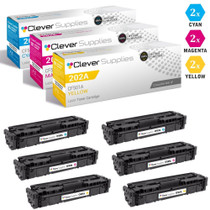
CS Compatible Replacement for HP 202A Toner Cartridges 6 Color Set (CF501A, CF503A, CF502A)
/>


Hewlett Packard
CS Compatible Replacement for HP 202A Toner Cartridges 3 Color Set (CF501A, CF503A, CF502A)
/>